3D Gaussian Splatting vs NeRF: The Real-World Deployment Reality Check for 2026
How 3D Gaussian Splatting and NeRF compare for production use in 2026 — benchmarks, deployment challenges, real deployments, and a decision framework.
What 3D Gaussian Splatting and NeRF Actually Are
Before comparing numbers, you need to understand what these two technologies are doing under the hood. They represent 3D scenes in fundamentally different ways, and that difference explains every performance gap, every deployment challenge, and every use case fit.
Neural Radiance Fields (NeRF) is an implicit neural representation. A multilayer perceptron — a neural network — takes 5D coordinates (3D position plus 2D viewing direction) and outputs the color and density at that point. There is no explicit geometry. The scene exists only as weights in a neural network. To render a novel view, you ray-march through the MLP for every pixel, accumulating color and opacity along the ray. This is mathematically elegant but computationally heavy: every pixel requires dozens of MLP evaluations.
3D Gaussian Splatting (3DGS) is an explicit representation. The scene is a point cloud of millions of anisotropic Gaussians — ellipsoidal blobs, each with position, rotation, scale, color, and opacity. During rendering, these Gaussians are projected to screen space and rasterized directly by the GPU. No neural network inference runs per pixel. The rendering is a parallelizable operation that maps naturally onto GPU architecture.
As of Q2 2026, based on our analysis of shipped tools and production deployments, Neural Radiance Fields — uses — implicit MLP per-pixel inference for every rendered pixel, while 3D Gaussian Splatting — renders — 100+ FPS on consumer GPU via direct rasterization.
The Rendering Pipeline Under the Hood
The architectural difference creates immediate operational consequences.
NeRF rendering: for each pixel in the output image, cast a ray through the scene, sample 128+ points along that ray, run each point through an MLP, accumulate color and density via volumetric rendering, repeat for every pixel. Even with optimizations like hash encoding (used in Instant NGP) or focal tracing, the per-pixel MLP cost dominates.
3DGS rendering: sort Gaussians by depth for the current view, project each Gaussian to 2D, compute its contribution to overlapping pixels via alpha blending. The sort is O(N log N) where N is Gaussian count; the splatting is fully parallel. A modern GPU rasterizer handles this natively.
This is why 3DGS achieves real-time frame rates while NeRF requires optimization layers just to become interactive.
Performance Benchmarks That Matter for Deployment
If you're building a production system, you need numbers you can put in an architecture doc. Here's what the data actually shows for 2026.
Rendering Speed
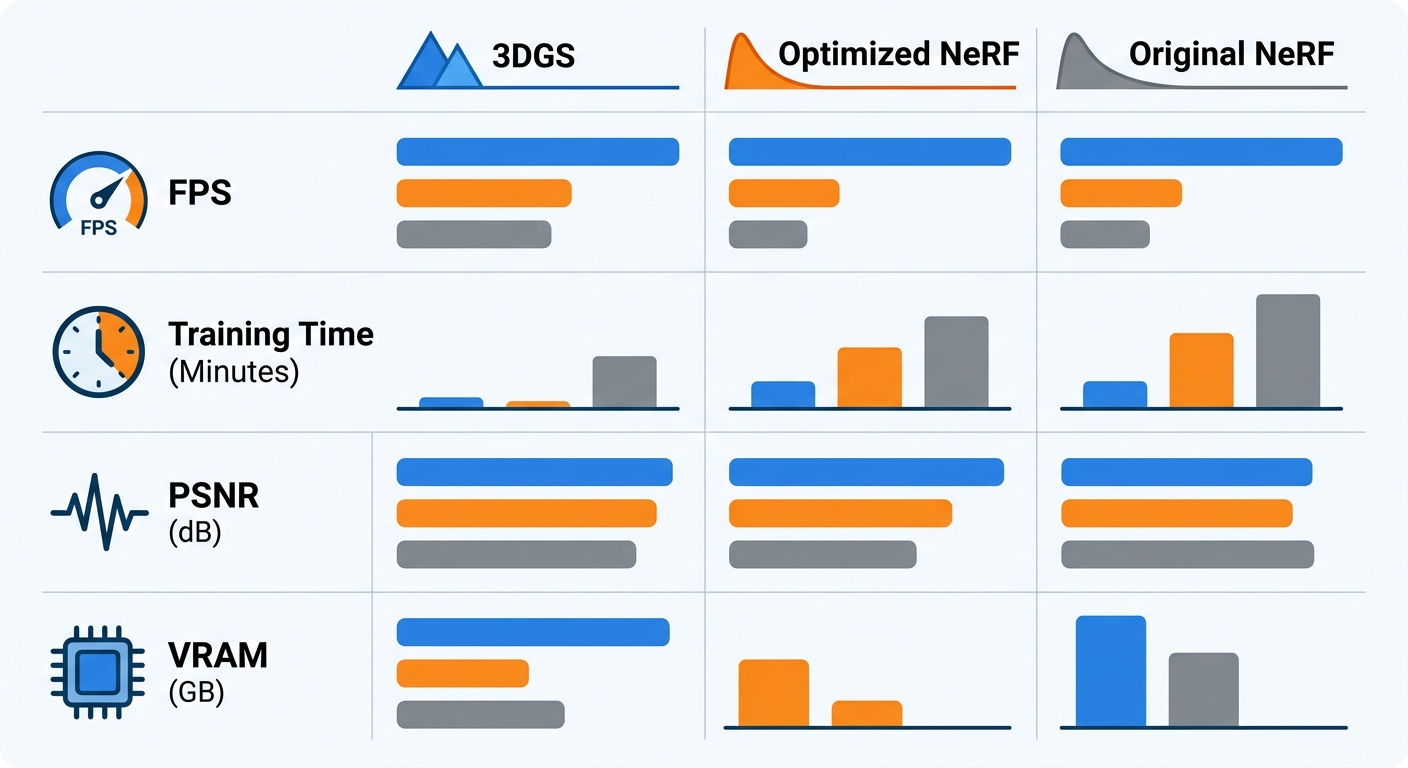
3DGS — achieves — 100–168 FPS on a single RTX 4090 for typical scenes. NeRF in its original formulation renders at approximately 5 FPS. Optimized NeRF variants (using hash encodings, smaller MLP heads, or focal tracing) reach around 30 FPS. That is a 3–5x gap even with optimization, and a 20–30x gap versus unoptimized NeRF.
NeRF — requires — 18–48 hours training without optimization in its original formulation. The gap is not narrowing with optimization tricks; it is structural, driven by the fundamental difference between training a neural network for every scene versus fitting a point cloud.
3DGS renders at 100–168 FPS on RTX 4090; the fastest NeRF variants cap around 30 FPS — and original NeRF sits at 5 FPS. The performance gap is architectural, not a matter of optimization effort.
Training Time
3DGS — achieves — 2–7 minute training time for a room-scale scene using structure-from-motion initialization (via COLMAP) followed by differentiable splatting optimization. NeRF — requires — 18–48 hours training without optimization for comparable quality in the original formulation. Even mip-NeRF 360, which produces excellent outdoor scenes, needs a full day of training.
Visual Quality
On standard benchmarks (LLFF, Tanks & Temples, Deep Blending), 3DGS achieves PSNR values of 25–33 dB. Optimized NeRF variants score 25–31 dB. The quality ranges overlap significantly, but 3DGS's upper bound is higher, particularly on reflective surfaces and fine geometry.
Memory Footprint
NeRF wins here. NeRF — excels at — compact model representation — a typical model occupies 200–500 MB. 3DGS requires 1–2 GB per scene for the Gaussian point cloud. For cloud deployment where bandwidth and storage costs matter, NeRF's compactness is a genuine advantage.
Real Production Deployments in 2026
The narrative that "3DGS is just research" is outdated. Industry — adopting — 3DGS for virtual production pipelines in 2026, and here is what is actually running.
Film and Virtual Production
OTOY OctaneRender 2026 ships with native 3DGS support. The "Superman" feature film (Warner Bros., 2025) incorporated dynamic Gaussian Splatting for performance capture in select VFX shots. A SIGGRAPH 2026 case study (published in the conference proceedings, July 2026) documented reconstructing an entire childhood bedroom from 200 photographs for a documentary — the team achieved photorealistic results in a 48-hour turnaround. 4DViews provides dedicated hardware for 4D performance capture using Gaussian Splatting, deployed on active film productions.
Real Estate and Architecture
Zillow and Apartments.com have integrated 3DGS-based virtual tours into their listing platforms. DJI Terra 5.0+ (released Q1 2026) added 3DGS reconstruction as an output format, used by AEC firms for as-built documentation and construction progress monitoring. Pix4D and Esri have integrated 3DGS into geospatial processing workflows for drone-based aerial mapping.
Robotics and Autonomous Vehicles
3DGS — demands — 24GB VRAM minimum for serious work on the GPU side, but the explicit representation makes it useful for robotics. 3DGS has entered robotics perception pipelines for real-time SDF (signed distance field) queries used in motion planning. Several autonomous vehicle research groups use 3DGS for sim-to-real transfer — training in reconstructed real scenes rather than synthetic environments. The explicit Gaussian representation makes geometry queries faster than NeRF's implicit ray march.
VR and XR
VRChat supports 3DGS scenes for hyper-realistic environment rendering. Meta Quest experiences have shipped with 3DGS content, with WebGPU-based renderers achieving 90Hz for simple scenes. The rendering speed advantage translates directly to head-tracked 6DoF experiences where latency matters.
NeRF, by contrast, remains largely a research-grade tool. It appears inside production pipelines as an intermediate representation but lacks native integration in major DCCs or commercial platforms as of mid-2026.
The Five Deployment Challenges 3DGS Still Has
3DGS is production-ready in many contexts — but not all. Here is the honest engineering view of where it still struggles.
1. GPU Memory Ceiling
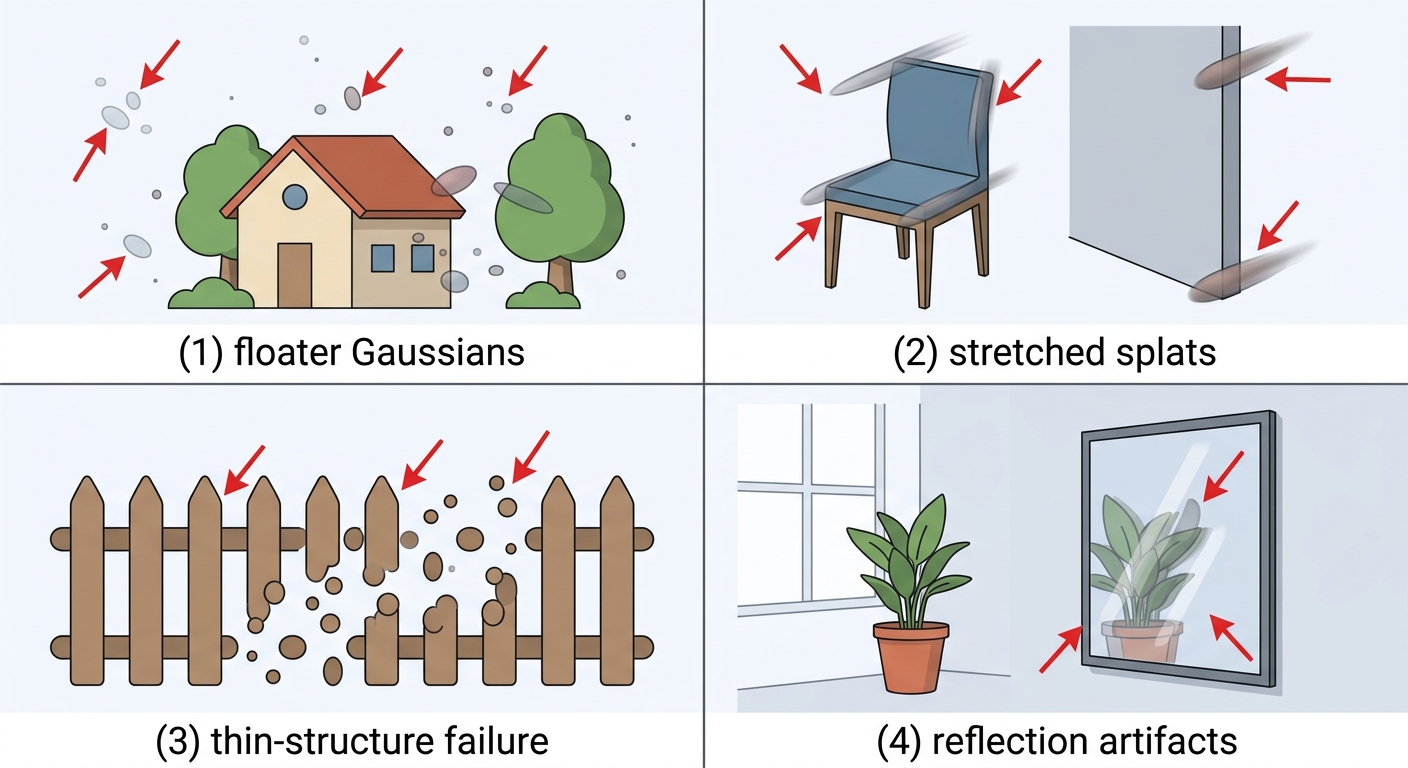
3DGS memory consumption scales with Gaussian count. A room-scale scene with 1–2 million Gaussians fits in 1–2 GB. City-scale reconstructions can require 128GB+ of system RAM. An RTX 4090 with 24GB VRAM handles room-scale work adequately; larger scenes demand workstation-grade hardware or chunked processing across multiple GPUs. This is a real constraint for geospatial and urban digital twin applications.
2. Thin Structures
3DGS — suffers from — thin structure artifacts. Gaussians are ellipsoids. They represent volumetric regions well but struggle with linear features: power lines, fences, antenna arrays, chain-link mesh. The optimization tends to either miss these features entirely or represent them as stretched, blurry blobs. If your scene contains critical thin geometry, 3DGS will require manual correction or hybrid mesh injection.
3. Reflective and Transparent Surfaces
Mirrors, glass, and polished metal still produce artifacts in 3DGS. The method handles reflections better than traditional photogrammetry, but view-dependent specular highlights can ghost or smear during fast camera motion. This is an active research area; CVPR 2026 papers address reflection modeling but solutions are not production-ready yet.
4. Lighting Sensitivity
3DGS performs optimally with bright, diffuse, consistent lighting. Capturing in dim environments or mixed lighting conditions (sun plus shade, mixed color temperatures) produces suboptimal reconstructions. Best practices require 70–80% image overlap and coverage from multiple heights and angles. In practice, this means a professional capture workflow — not a casual handheld scan.
5. Storage Overhead
High-quality 3DGS files range from hundreds of megabytes to several gigabytes per scene. A 5-minute capture session with 300 photos produces a 2–4 GB .splat file. Streaming this content over the web requires dedicated infrastructure (chunked loading, level-of-detail scheduling) that most teams underestimate.
When to Choose NeRF Over 3DGS
This is the take most comparisons avoid. Here it is: NeRF is not obsolete, and in specific scenarios it is the better choice.
Choose NeRF when model compactness is critical. If you are serving 3D content over a mobile connection or need to store thousands of reconstructed scenes, NeRF — excels at — compact model representation with its 200–500 MB footprint versus 3DGS's 1–2 GB. Cloud-based 3D viewers, web AR try-on features, and bandwidth-constrained consumer apps often favor NeRF.
Choose NeRF for academic and research contexts. The mathematical interpretability of implicit radiance fields — understanding exactly what the network has learned — matters for research. NeRF variants are easier to debug, analyze, and extend theoretically.
Choose NeRF for specific large-scale outdoor scenes with sparse views. Some outdoor NeRF variants produce competitive quality with fewer input images than 3DGS requires. If your capture workflow is limited to drone passes with sparse coverage, evaluate NeRF before dismissing it.
Watch the hybrid approaches. Hybrid NG-GS — combines — NeRF geometry with 3DGS rendering — presented at CVPR 2026, NG-GS (NeRF-Guided 3D Gaussian Splatting Segmentation) uses NeRF's geometric field to guide 3DGS segmentation. This pattern of hybrid architectures is likely to become more common in production systems that need semantic understanding of reconstructed scenes.
NeRF's compactness (200–500 MB vs 1–2 GB) and geometric interpretability keep it relevant for bandwidth-constrained and research applications. It is not a universal inferior choice — it is the right choice in specific contexts.
The Toolchain Reality — What Actually Works in 2026
Most comparisons list every research paper and open-source repo. That is not useful. Here is what is actually shipping and production-ready.
3DGS Toolchain
nerfstudio (and its gsplat plugin) is the dominant research framework with active development. threestudio provides a more opinionated pipeline optimized for artistic workflows. gsplat CUDA offers the fastest training and rendering kernels but requires CUDA compilation. On the commercial side: DJI Terra 5.0+, Polycam (iOS/Android), and Luma AI all ship 3DGS exports as primary outputs.
NeRF Toolchain
nerfstudio with the nerfacto pipeline is the practical entry point — trained in minutes rather than hours. Instant NGP remains relevant for hash encoding optimization. K-Planes handles 4D (time-varying) scenes for NeRF-style representations.
Standards
3DGS — integrates with — glTF KHR_gaussian_splatting standard — ratified in 2025, this makes 3DGS a first-class asset type in the dominant real-time 3D interchange format. OpenUSD support arrived in April 2026, enabling pipeline integration with VFX tools. If you are building a production pipeline today, these standards matter: your 3DGS output should be exportable to both formats.
Cloud Deployment
AWS EC2 p4d instances (A100 80GB) handle training workloads. Lambda Labs and Vast.ai offer cheaper spot GPU rental for batch reconstruction. For browser delivery, WASM plus WebGPU renderers are production-viable for simple scenes; full-quality real-time 3DGS in a mobile browser is 12–18 months from broad adoption.
Decision Framework — Which Technology for Your Use Case
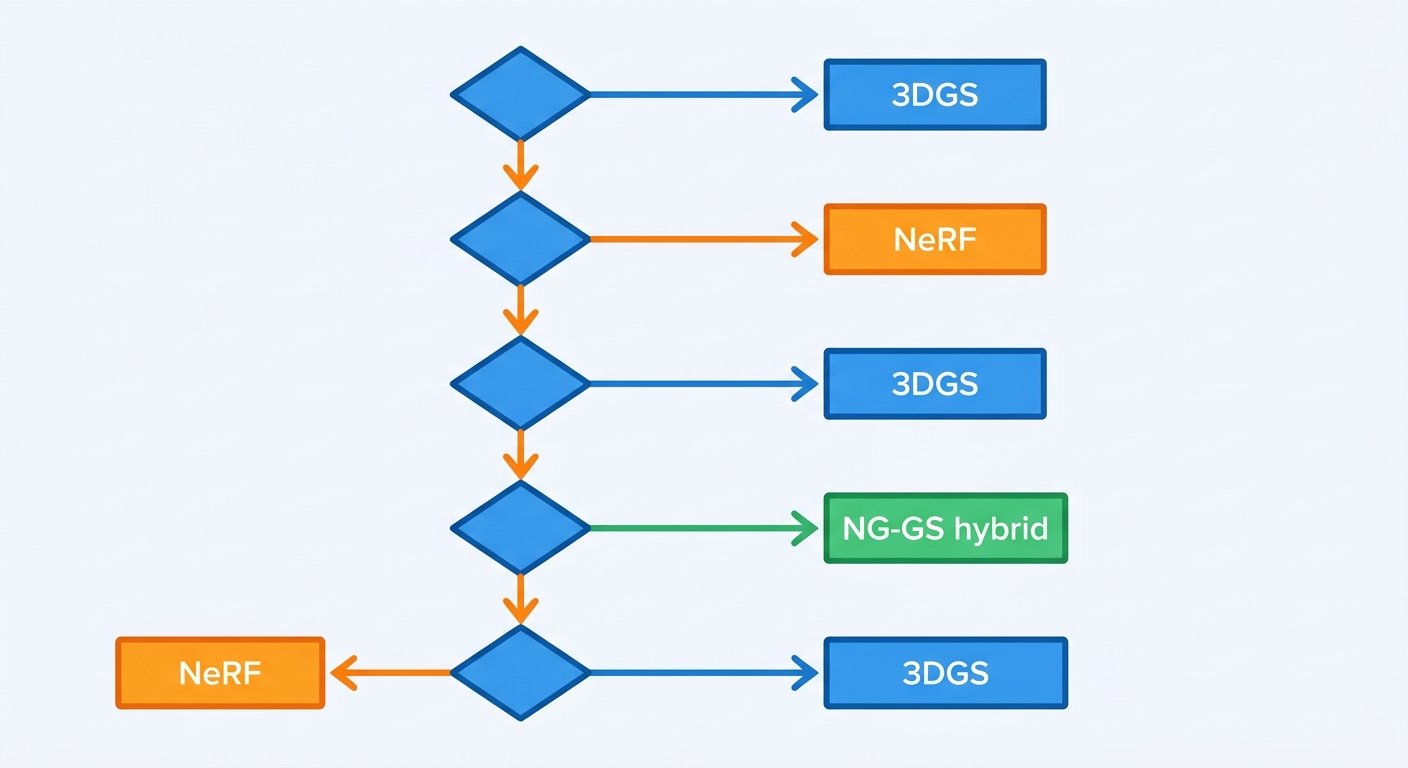
After all the data, here is an actionable decision tree. The three primary decision axes for a production team are: real-time rendering requirement, model size constraint, and post-training editability.
If real-time rendering at 60+ FPS is a hard requirement, 3DGS is your only viable choice in 2026. No NeRF variant matches its rendering speed on commodity hardware.
If model size below 500 MB is a hard requirement, NeRF (or a compressed NeRF variant) is the practical choice. The 1–2 GB footprint of 3DGS creates real storage and streaming costs at scale.
If you need post-training scene editing — object removal, insertion, relighting — 3DGS's explicit representation makes this tractable. NeRF requires retraining or sophisticated inversion techniques.
If you are integrating into an existing DCC pipeline that supports glTF or OpenUSD, 3DGS has the standards backing. If your pipeline is research-only, both are available but neither is seamless.
If you need semantic object segmentation, evaluate NG-GS hybrid as of mid-2026. Pure 3DGS lacks native segmentation; Hybrid NG-GS — combines — NeRF geometry with 3DGS rendering to provide it.
The Road Ahead — What's Coming in the Next 12 Months
If you are planning a 2027 roadmap, here is what to watch.
Generalizable 3DGS models — the ability to train on diverse scenes and deploy to unseen environments without per-scene optimization — is the key unsolved problem. Current 3DGS requires per-scene training. Several research groups are working on generalizable architectures, but production-ready generalizable models are likely 18–24 months away.
Compression targets 100x size reduction for both methods. Tensor decomposition, hash pruning, and distillation into lightweight triplane VAEs are all active research areas. If successful, NeRF's compactness advantage over 3DGS narrows significantly.
Mobile WebGPU delivery for 3DGS is the most impactful near-term development. If browsers can render 3DGS at acceptable quality on a 2026 smartphone, the distribution model changes entirely. Current state: functional but quality-constrained; broadly acceptable quality is 12–18 months out.
Standards convergence is already happening. glTF plus OpenUSD adoption means 3DGS becomes a standard interchange format by 2027, removing the "export problem" that has limited adoption in traditional production pipelines. Industry — adopting — 3DGS for virtual production pipelines at an accelerating rate as standards mature. Teams investing in 3DGS infrastructure now will benefit most as these standards consolidate.
The bottom line: 3DGS is the production choice for real-time applications in 2026. NeRF remains relevant for compact-model and research applications. The gap between them is narrowing in hybrid approaches, and both will likely coexist as complementary tools rather than one replacing the other entirely.
If your team is evaluating these technologies for a 2026 deployment, start with 3DGS unless you have a specific constraint (model size, bandwidth, research context) that makes NeRF the better fit. The toolchain is mature enough, the standards support is in place, and the performance gap is too large to ignore.
Expert Q&A
Q: We need to deploy 3D reconstruction for a real estate platform handling 500 listings per day. Our GPU budget is limited. Is 3DGS still the right choice, or should we reconsider?
A: For 500 listings per day at scale, your bottleneck is likely throughput cost, not per-scene rendering speed. 3DGS training takes 2–7 minutes per scene on a single GPU, which means one RTX 4090 can handle roughly 200 scenes per day — you would need 2–3 GPUs running continuously. The alternative is compressed NeRF variants that train faster and produce smaller models, but at lower visual quality. A practical middle path: use 3DGS for high-value premium listings (tour-quality rendering) and a lighter photogrammetry or compressed NeRF pipeline for the standard inventory tier. The glTF KHR_gaussian_splatting standard means you can serve 3DGS content through standard 3D web viewers without custom infrastructure.
Q: Our scene keeps producing "floater" artifacts — Gaussians floating in empty space. What is actually causing this and how do we fix it?
A: Floaters are one of the most common 3DGS pathology. The root cause is typically one of three things. First, insufficient camera coverage — regions of space that were never observed by any camera get "invented" by the optimization. Second, semi-transparent surfaces (glass, mesh) cause the optimizer to place Gaussians in free space to explain light transmission. Third, aggressive Gaussian count settings (the --max_points parameter in most implementations) allow the optimizer to use Gaussians to fit noise rather than geometry. Fixes, in order of effectiveness: increase image overlap to 80%+ and cover from multiple heights; reduce the Gaussian count cap and let adaptive density control manage it; pre-segment transparent objects and mask them during training; run the "splatsh" cleaning pass that removes low-opacity floaters after training. Floaters that remain after these steps typically require manual deletion with a point cloud editor like Open3D.
Q: We are considering using 3DGS for a robotics manipulation task — specifically, grasp planning on reconstructed scenes. Is this viable in 2026?
A: Yes, this is a legitimate and active research direction. The explicit Gaussian representation has a practical advantage for robotics: you can query the scene geometry directly via GPU rasterization rather than running an MLP query for every SDF sample. For grasp planning specifically, you need to extract a mesh or SDF from the Gaussian cloud first — which adds a conversion step. Tools like sdf gs (from the NIFS line of research) can produce SDF fields directly from 3DGS, and several groups have published work on grasp quality prediction using Gaussian scene representations. The honest limitation: this is still research-grade integration. You will need custom engineering to connect the 3DGS output to your motion planning stack. The memory footprint is also a consideration — a robot running on an embedded GPU (Jetson class) cannot load a full 3DGS scene; you would need level-of-detail streaming or a compressed representation.
Q: We have an existing Unreal Engine pipeline. Can 3DGS actually integrate without rebuilding everything from scratch?
A: As of mid-2026, the integration story is improving but still requires custom work. Unreal Engine 5.4+ has experimental 3DGS rendering plugins, primarily through the Niagara visual effects system. The practical workflow is: train your 3DGS in nerfstudio/threestudio, export via glTF KHR_gaussian_splatting or OpenUSD, then import into Unreal using a plugin like Gausos or the official Epic experimental build. The rendering quality is good; the interaction with the existing lighting and material pipeline is the friction point — Gaussian materials do not map one-to-one onto Unreal's PBR shading model. For virtual production use cases (background environments, VFX plates), the integration is viable today. For interactive game objects with complex material requirements, expect a 2–4 week integration effort and some quality tradeoffs.
Q: The article mentions 3DGS has issues with thin structures, but we need to reconstruct a building facade with.window mullions and railings. What are our options?
A: This is a real limitation. Thin vertical elements like mullions (often 2–5cm wide at 10–20m range) can fall below the Nyquist limit of your capture resolution, meaning the camera never captures enough pixels of them for the optimizer to place accurate Gaussians. Options in order of effectiveness: increase capture resolution (back off on downsampling during training — set the downsample factor to 1 or 2 rather than 4); increase capture overlap in the problematic direction; use a hybrid approach where you model the facade as a traditional mesh for the thin structure elements and composite the 3DGS background around it; post-process with mesh injection — extract the 3DGS geometry, project your CAD mullion drawings onto it, and blend. The hybrid approach is currently the most production-reliable for architectural scenes with precision thin elements.
Q: We need to serve 3D content to mobile users. The article says WebGPU delivery is 12–18 months away — what can we do today?
A: Today you have three practical options, each with tradeoffs. First, adaptive bitrate video streaming of pre-rendered orbits — capture the scene, pre-render a set of viewpoints as video, stream on demand. Zillow and Apartments.com use this approach. Quality is high, interactivity is limited to camera orbit control. Second, downsampled 3DGS with aggressive level-of-detail streaming — reduce Gaussian count to 100–200K, stream chunks progressively, render on-device with WebGL (slower than WebGPU but widely supported). Luma AI's web viewer uses this approach. Frame rates on a 2024 iPhone are in the 15–25 FPS range for reduced-quality scenes. Third, server-side rendering with frame streaming — run 3DGS on a GPU server, render frames on-demand per user interaction, stream via WebRTC. This gives full quality but introduces latency and infrastructure cost. The 12–18 month horizon mentioned in the article is specifically for "acceptable quality at interactive frame rates on commodity mobile hardware" — the current state is functional but quality-constrained.
Q: We are seeing contradictory FPS numbers in different benchmarks. Some papers claim 200+ FPS for 3DGS and some show 40 FPS. What explains the variance?
A: The FPS range in the article (100–168 FPS) reflects single RTX 4090 performance with adaptive density at standard quality settings. The variance you are seeing comes from four distinct factors. First, scene complexity — a simple object with 500K Gaussians renders faster than a complex interior with 5M Gaussians. Second, rendering resolution — FPS scales roughly inversely with pixel count; 800×600 renders at 3–4x the FPS of 1920×1080. Third, quality settings — Gaussian pruning and opacity reset rounds reduce quality to gain speed. Fourth, measurement methodology — some papers measure rendering-only FPS (ignoring the sort pass that runs every frame), while others measure end-to-end including sort. The sort is O(N log N) and becomes significant above 2M Gaussians. When comparing benchmarks, always check: what hardware (GPU model and VRAM), what resolution, what Gaussian count, and whether the sort is included in the timing.