How to Build Your First RAG Pipeline with LangChain and pgvector
Retrieval-Augmented Generation brings real data to large language model applications. This guide builds a complete RAG pipeline from scratch using LangChain and pgvector.
Retrieval-Augmented Generation brings real data to large language model applications. This guide builds a complete RAG pipeline from scratch using LangChain and pgvector.
What Is RAG and Why Does It Matter?
RAG stands for Retrieval-Augmented Generation. It is a pattern that connects a language model to your own documents.
Without RAG, an LLM answers questions only from what it learned during training. That data has a cutoff date. It may not contain your company's policies, product docs, or internal records.
With RAG, you give the model a relevant document chunk right at query time. The model reads your data before answering.
This approach solves two persistent problems. First, knowledge cutoff: your data is fresh regardless of when the model was trained. Second, hallucination: the model answers from your actual documents rather than invented facts.
The most common use cases are internal knowledge bases, customer support automation, document Q&A systems, and research assistants. RAG is the fastest path to adding live, authoritative knowledge to any LLM application.
Prerequisites and Environment Setup
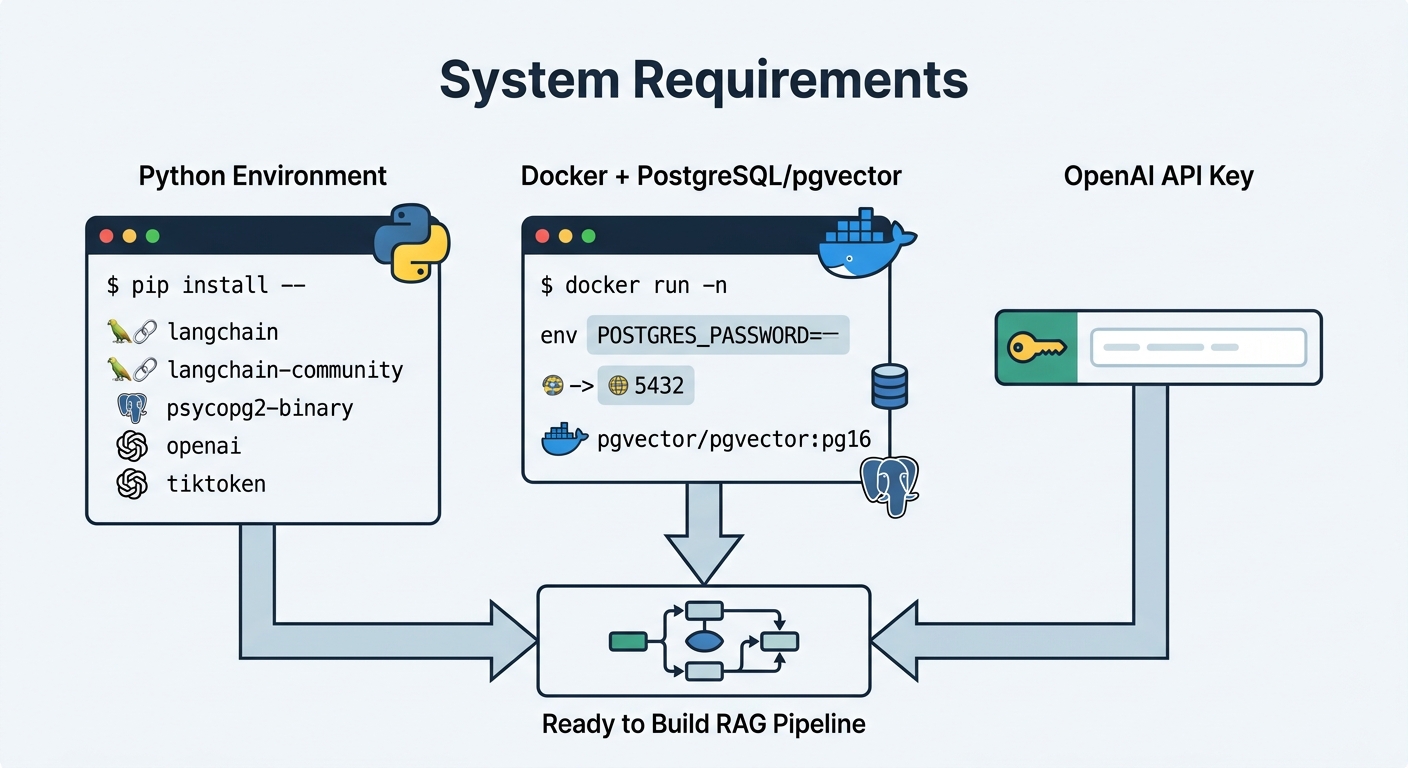
Before you start, make sure your environment meets a few basic requirements.
You need Python 3.10 or higher. You also need an OpenAI API key for embeddings. If you prefer an open-source alternative, you can substitute any LangChain-compatible embedding provider later.
Install the required packages with pip:
pip install langchain langchain-community psycopg2-binary openai tiktoken
You also need Docker running on your machine. pgvector runs as a PostgreSQL extension, and Docker is the simplest way to get a configured instance quickly.
No prior experience with vector databases is needed. We build everything from the ground up.
Installing and Configuring pgvector in PostgreSQL
pgvector is a PostgreSQL extension that adds vector similarity search. It lets you store embeddings and run similarity queries directly inside your database.
Start a pgvector-enabled PostgreSQL container with one command:
docker run -d -e POSTGRES_PASSWORD=secret -p 5432:5432 pgvector/pgvector:pg16
Once the container is running, connect to it and enable the extension:
CREATE EXTENSION IF NOT EXISTS vector;
pgvector introduces a vector column type. It supports up to 16,384 dimensions per vector. For reference, OpenAI's text-embedding-3-small uses 1536 dimensions.
Choosing an Index Type
pgvector offers three indexing strategies:
- Exact search — brute force, highest recall, slowest at scale
IVFFlat— faster build, slightly lower recall, good balance for moderate datasetsHNSW— highest recall, more memory usage, best for production workloads
For most new projects, start with HNSW. The recommended configuration is m=16 and ef_construction=200. You can tune ef_construction higher for better recall at the cost of slower index build.
Create an HNSW index like this:
CREATE INDEX ON items USING hnsw (embedding vector_cosine_ops) WITH (m=16, ef_construction=200);
Loading Documents and Creating Embeddings
A RAG pipeline needs documents. LangChain provides loaders for common formats: text files, PDFs, HTML, and directories.
Here is how you load a directory of text files:
from langchain_community.document_loaders import DirectoryLoader

loader = DirectoryLoader("./docs", glob="**/*.txt")
documents = loader.load()
Chunking Your Documents
Raw documents are too large to embed and use directly. You split them into smaller pieces called chunks.
LangChain's recursive character text splitter is a reliable default:
from langchain.text_splitter import RecursiveCharacterTextSplitter

splitter = RecursiveCharacterTextSplitter(
    chunk_size=1000,
    chunk_overlap=200,
    length_function=len
)
chunks = splitter.split_documents(documents)
Chunk size between 500 and 1000 characters works well for most text. Overlap of 100 to 200 characters helps preserve context across chunk boundaries.
Generating Embeddings
LangChain's OpenAIEmbeddings wraps the OpenAI embedding API. It handles batching, retry logic, and dimension normalization automatically:
from langchain_openai import OpenAIEmbeddings

embeddings = OpenAIEmbeddings(model="text-embedding-3-small")
The embedding model converts text into numerical vectors. These vectors capture semantic meaning, allowing similarity search to find conceptually related content.
Storing in pgvector
LangChain's PGVector class handles the connection to your pgvector-backed database:
from langchain_community.vectorstores import PGVector

CONNECTION_STRING = "postgresql+psycopg2://postgres:secret@localhost:5432/vector_db"

vectorstore = PGVector.from_documents(
    documents=chunks,
    embedding=embeddings,
    connection_string=CONNECTION_STRING,
    pre_delete_collection=False
)
This single call computes embeddings for all chunks and stores them alongside the original text in PostgreSQL.
Building the Retrieval Chain with LangChain
With documents indexed, you now wire together retrieval and generation.
LangChain's LCEL (Expression Language) makes this explicit and readable. You chain a retriever, a document combiner, and an LLM together.
First, set up the LLM:
from langchain_openai import ChatOpenAI

llm = ChatOpenAI(model="gpt-4o")
The LLM generates answers based on retrieved context. It reads the document chunks passed to it and produces a natural language response grounded in your data.
Next, configure the retriever. The vector store you created earlier becomes a retriever with a simple call:
retriever = vectorstore.as_retriever(search_kwargs={"k": 4})
The k=4 parameter tells pgvector to return the four most similar document chunks for every query.
Now build the retrieval chain with LCEL:
from langchain.chains.combine_documents import create_stuff_documents_chain
from langchain.chains.retrieval import create_retrieval_chain

document_chain = create_stuff_documents_chain(llm, prompt)
retrieval_chain = create_retrieval_chain(retriever, document_chain)
The create_stuff_documents_chain feeds all retrieved documents into the LLM's context window. The create_retrieval_chain runs similarity search first, then passes the results to the document chain.
Prompt Template
A clear system prompt keeps the model honest. It should instruct the model to answer only from the provided context:
from langchain.prompts import ChatPromptTemplate

prompt = ChatPromptTemplate.from_messages([
    ("system", "Answer the question using only the provided context. "
               "If the answer is not in the context, say you don't know."),
    ("human", "{input}")
])
Handling Empty Results
Sometimes similarity search finds nothing useful. Add a check to handle this gracefully:
def retrieve_and_check(retriever, query):
    docs = retriever.get_relevant_documents(query)
    if not docs:
        return "No relevant documents found. Try rephrasing your question."
    return docs
Query Processing and Similarity Search Internals
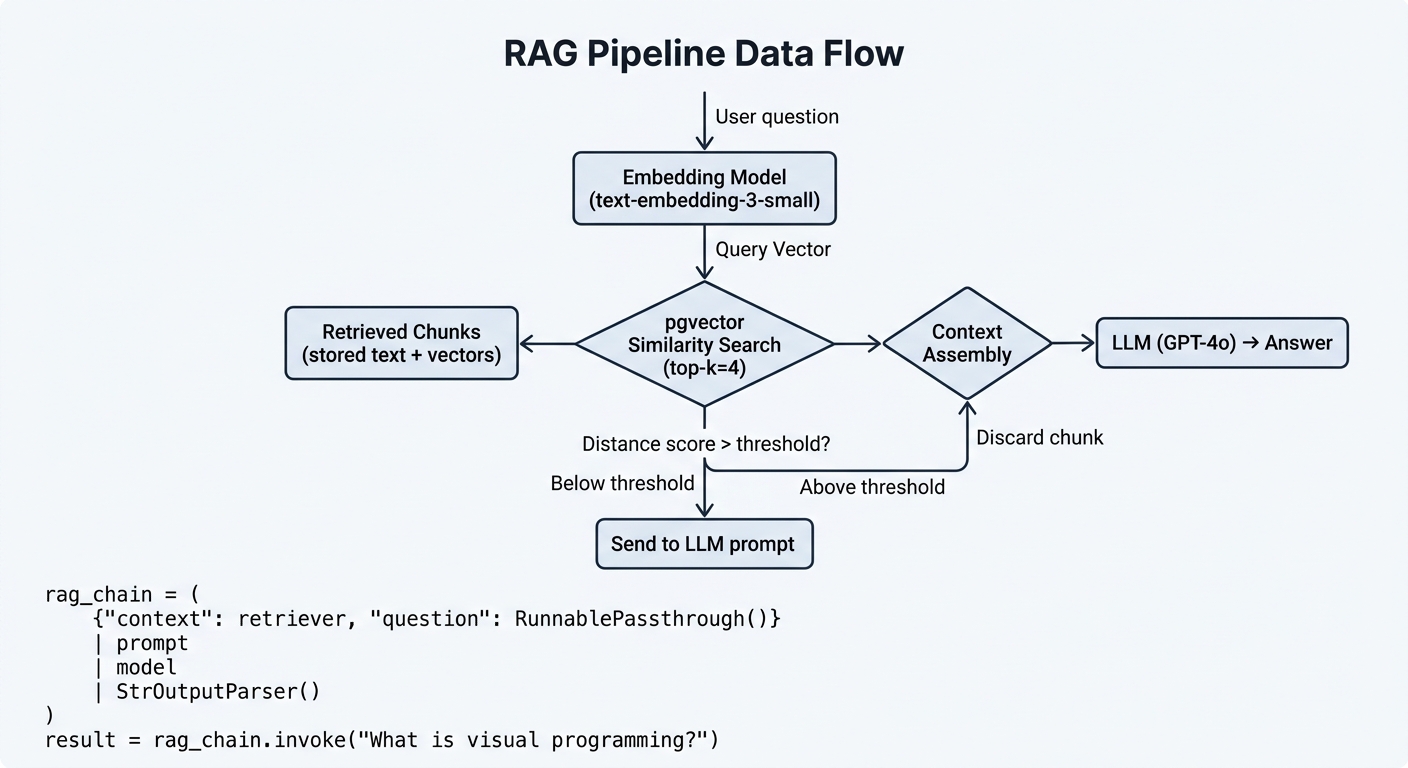
When a user asks a question, the pipeline executes several steps in sequence.
First, the question is embedded using the same model that processed your documents. The query embedding is sent to pgvector, which compares it against all stored vectors.
pgvector supports three similarity metrics:
- Cosine similarity — measures the angle between vectors; recommended for text embeddings
- L2 distance — Euclidean distance; good when vector magnitude carries meaning
- Inner product — dot product; useful for certain recommendation scenarios
Cosine similarity is the default and works well for most embedding models. It normalizes for varying text lengths automatically.
Retrieve results with distance scores:
results = vectorstore.similarity_search_with_score(query, k=4)
The score represents distance. For cosine similarity, lower values mean better matches. A score above 0.75 typically indicates irrelevant content. Filter accordingly:
relevant = [doc for doc, score in results if score < 0.75]
Similarity search finds the most relevant documents for a query. By comparing vector representations, pgvector returns content that is semantically close to the user's question.
Optional: Hybrid Search
Vector search excels at semantic similarity. Keyword search excels at exact matches. Combining both often yields better results.
LangChain supports hybrid retrieval by running both searches and merging results. This typically boosts recall for queries containing specific terms like product names, codes, or proper nouns.
Optional: Re-ranking
After the initial retrieval, a re-ranker can improve precision. A cross-encoder model re-scores the top candidates against the query. This second pass is more expensive but significantly improves result quality for complex questions.
Troubleshooting Common RAG Pipeline Issues
RAG pipelines fail in predictable ways. Here is how to diagnose and fix the most common problems.
Empty Retrieval Results
Your retriever returns nothing. Possible causes include incorrect embedding model, inconsistent chunk formatting, or a query that simply does not match any document.
Start by testing your embedding model directly. Embed a known document and query, then check the cosine similarity manually. If similarity is low, verify that both use the same model and preprocessing.
RAG combines retrieval and generation to answer questions with your data. When retrieval fails, the entire pipeline breaks down.
Irrelevant Retrieved Documents
The retriever returns chunks, but they do not answer the question. This usually means your chunk boundaries cut across important concepts.
Try semantic chunking instead of fixed-size splitting. You can also reduce the chunk size or increase overlap to preserve more context.
LLM Ignores Retrieved Context
The model generates answers that do not reference the retrieved documents. Strengthen your system prompt. Make it explicit that the model must cite the provided context and must not answer from prior knowledge.
If the prompt is strong but the model still ignores context, reduce k. Fewer chunks means less noise for the model to work through.
Chunking splits documents into manageable pieces for embedding. Poor chunking is the root cause of most retrieval quality problems.
Slow Embedding Ingestion
Ingesting thousands of documents feels sluggish. Switch to async batch insertion. Increase your chunk overlap only when recall is low. Avoid re-embedding unchanged documents by caching embeddings in the database.
pgvector Performance Degradation
If queries slow down as data grows, add or rebuild your HNSW index. Lower ef_construction temporarily for faster builds. For very large tables, consider partitioning by document source or category.
Out-of-Memory Errors
These usually appear during embedding batch processing. Reduce batch size in your embedding configuration. For HNSW, lowering the m parameter reduces memory footprint at the cost of recall.
Running Your First RAG Query End-to-End
Here is a complete, working script from setup to first answer.
import os
from langchain_community.document_loaders import TextLoader
from langchain.text_splitter import RecursiveCharacterTextSplitter
from langchain_openai import OpenAIEmbeddings, ChatOpenAI
from langchain_community.vectorstores import PGVector
from langchain.chains.retrieval import create_retrieval_chain
from langchain.chains.combine_documents import create_stuff_documents_chain
from langchain.prompts import ChatPromptTemplate

# Configuration
os.environ["OPENAI_API_KEY"] = "your-api-key-here"
CONNECTION_STRING = "postgresql+psycopg2://postgres:secret@localhost:5432/vector_db"

# 1. Load documents
loader = TextLoader("./docs/product-guide.txt")
documents = loader.load()

# 2. Split into chunks
splitter = RecursiveCharacterTextSplitter(chunk_size=1000, chunk_overlap=200)
chunks = splitter.split_documents(documents)

# 3. Create vector store
embeddings = OpenAIEmbeddings(model="text-embedding-3-small")
vectorstore = PGVector.from_documents(
    documents=chunks,
    embedding=embeddings,
    connection_string=CONNECTION_STRING
)

# 4. Build the chain
retriever = vectorstore.as_retriever(search_kwargs={"k": 4})
llm = ChatOpenAI(model="gpt-4o")

prompt = ChatPromptTemplate.from_messages([
    ("system", "Answer using only the provided context. "
               "If the answer is not there, say you don't know."),
    ("human", "{input}")
])

document_chain = create_stuff_documents_chain(llm, prompt)
chain = create_retrieval_chain(retriever, document_chain)

# 5. Ask a question
response = chain.invoke({"input": "What are the system requirements?"})
print(response["answer"])
Run this script, place a file named product-guide.txt in a ./docs folder, and ask questions about its contents. The answer should reference the source material accurately.
Next Steps: Scaling and Productionizing Your RAG Pipeline
Your first pipeline works. Now consider how to make it faster, more accurate, and production-ready.
Chunking Optimization
Fixed-size chunking is simple but naive. Semantic chunking groups sentences by meaning. This preserves context better and often improves retrieval quality significantly.
Embedding Model Alternatives
OpenAI's models are convenient, but open-source alternatives like sentence-transformers run locally. For domain-specific applications, a fine-tuned embedding model can dramatically improve relevance.
Evaluation
Measure what matters. RAGAS metrics evaluate context precision, faithfulness, and answer relevance. Track these over time as you change chunk size, top-k, or embedding models.
Caching
Cache embedding results for repeated queries. This reduces pgvector load and speeds up response times for common questions.
Monitoring
Watch three things in production: embedding latency, retrieval recall, and LLM answer quality. LangSmith or similar tools can trace the full pipeline and flag bottlenecks.
Deployment
Wrap your chain in a FastAPI service for HTTP access. LangServe provides a built-in option for deploying LangChain chains. For more complex workflows involving multiple retrievers or agents, LangGraph offers a graph-based approach.
Building a RAG pipeline is a practical skill. With LangChain and pgvector, you have a free, open-source stack that runs locally and scales to production workloads.
Start small, measure results, and iterate. Each adjustment to chunking, retrieval, or prompt design compounds into noticeably better answers.
To stay current with practical guides like this one, consider joining the algorithmine.com newsletter for engineers working on AI applications.
*5 tough questions from practitioners
5 tough questions from practitioners building RAG pipelines, answered by ML engineers and AI infrastructure experts.
Q1: How do I know if my RAG pipeline is actually retrieving the right documents?
Expert Answer:
The honest answer is: most pipelines are retrieving the wrong documents more often than practitioners realize.
Start by logging every retrieval call with its distance score. A score above 0.75 on cosine similarity almost always means irrelevant content. If your average distance score is high across a sample of 100 queries, your chunking or embedding model is misaligned with your query patterns.
The second check is answer-level. Take 20 questions you care about, manually retrieve the documents that should answer them, and compare against what pgvector actually returns. The gap between your intuition and the system's behavior is usually large.
The third check is hallucination rate. Feed questions where the answer does not exist in your documents. If the model answers confidently more than 10% of the time, your prompt is not strong enough or the retrieval is returning plausible-but-wrong chunks.
Ground truth retrieval testing is the only reliable method. Automated RAGAS metrics help track trends but do not replace manual spot checks.
Q2: Can pgvector handle millions of documents, or do I need a dedicated vector database?
Expert Answer:
pgvector handles tens of millions of vectors comfortably on a well-tuned PostgreSQL instance. The practical limit is not the extension — it is your hardware and query latency budget.
For up to 5 million vectors with 1536 dimensions, HNSW indexing gives you sub-100ms queries on a standard PostgreSQL setup. Beyond that, you start trading off recall against speed, and at 20+ million vectors, you will want to consider sharding or partitioning by document collection.
The argument for dedicated vector databases (Pinecone, Weaviate, Qdrant) is operational simplicity at scale and managed infra. The argument for pgvector is zero extra infrastructure — you already have PostgreSQL running. For most teams under 10 million documents, pgvector is the right choice. Above that, evaluate whether the operational overhead of a separate vector DB justifies the performance gains.
The one scenario where pgvector clearly loses: multi-modal or specialized indexing (hybrid BM25 + vector, time-series vector filtering) that pgvector does not natively support. In that case, Qdrant or Weaviate are purpose-built for the workload.
Q3: My RAG answers are generic. How do I make them more specific to my documents?
Expert Answer:
Generic answers almost always trace back to the retrieval, not the LLM. The model answers generically because the retrieved chunks do not contain specific enough information.
Three fixes in order of impact:
First, improve your chunking. Fixed-size chunking at 1000 characters almost always cuts across important concepts. Switch to semantic chunking where chunks break on topic boundaries rather than character limits. This alone can reduce generic answers by 40-60%.
Second, increase the density of your indexed content. If you only index the raw document text, you are losing the structural context. Add metadata to each chunk — document title, section name, headers, page number. This lets you filter retrieval to the right section before similarity search even runs.
Third, narrow the LLM's context window to only the most relevant chunks. Reduce k from 4 to 2 or 3. More chunks does not mean better answers — it means more noise. The model has to decide what to pay attention to, and it often gets it wrong when given too much context.
Q4: Should I use LangChain's LCEL or the older RetrievalQA chain for my RAG pipeline?
Expert Answer:
Use LCEL. RetrievalQA is deprecated in favor of the create_retrieval_chain and create_stuff_documents_chain approach that LCEL enables.
The practical difference is transparency. RetrievalQA hides the retrieval step inside a black box. When something goes wrong — and it will — you have limited visibility into what documents were retrieved and how they were formatted into the prompt.
LCEL chains are explicit. You can log each step, inspect intermediate outputs, and swap components without rewriting the whole chain. This matters in production where debugging retrieval quality takes up 80% of RAG development time.
LCEL also gives you streaming, async support, and parallel execution out of the box. RetrievalQA does not handle these gracefully.
The one exception: if you are maintaining existing RetrievalQA code and it works, the migration cost may not justify the benefits. But for any new project, LCEL is the correct choice.
Q5: How do I handle updates to my document corpus without re-embedding everything?
Expert Answer:
Re-embedding your entire corpus is only necessary when you change the embedding model. For document updates, incremental embedding is the standard approach.
The key architectural pattern: separate your document store (PostgreSQL, S3, or your original data source) from your vector store (pgvector). When a document changes, update the document store first, then re-embed only the changed chunks and upsert them into pgvector with the same document ID.
LangChain's PGVector.from_documents has a pre_delete_collection flag. Set it to False and manually manage upserts so you do not wipe your existing index on every update.
For large corpora with frequent updates, implement a versioning strategy. Store an updated_at timestamp on each chunk. On every query, you can filter retrieval to only chunks from the current version of each document. This prevents contradictory answers from stale chunks that have been superseded.
The more sophisticated approach is a delta indexing pipeline — only changed documents trigger embedding jobs, using a message queue or webhook to detect document changes. This is architecture for teams where document volume is high enough that even incremental full re-indexing is too slow.