AI Agents for IT Service Desk Automation: A Practical Guide for IT Leaders
A new generation of AI agents is transforming IT service desks—automating ticket routing, resolving routine requests instantly, and handing off to human engineers only when expertise is needed.
Last updated: June 2026
Your IT service desk is drowning. Every day, a fresh wave of password resets, software access requests, VPN issues, and "my computer is slow" tickets floods your queue. Your team of 15 IT staff handles thousands of tickets a month, and the needle barely moves. Users wait hours—or days—for responses. Your top engineers spend precious time on tier-1 problems that a well-designed automated system should handle in seconds.
This is the reality for most enterprise IT organizations. But a new generation of AI agents is fundamentally changing how IT service desks operate—automating routine work, routing tickets intelligently, detecting problems before they become incidents, and handing off to human engineers only when genuine expertise is required.
If you're an IT leader evaluating how AI can transform your service desk operations, this guide walks you through what AI agents actually do, where they deliver the most value, and what you need to consider before implementation.
What Are AI Agents in the IT Service Desk?
AI agents are autonomous or semi-autonomous software systems that use large language models (LLMs) and other AI techniques to understand, categorize, prioritize, and act on incoming requests—in this case, IT support tickets.
Unlike the rule-based chatbots of the previous decade (which could only respond to inputs they'd been explicitly programmed to match), modern AI agents can:
- Understand natural language as users actually write it—with typos, slang, vague descriptions, and context spread across multiple sentences
- Reason about intent and extract meaning even when the request is poorly structured
- Take actions across connected systems—resetting passwords, provisioning software, opening tickets, escalating to specific teams
- Learn and improve from interactions, becoming more accurate over time as they process more tickets
In practice, an AI agent for IT service desk automation isn't a single piece of software. It's a layer of intelligence that sits on top of your existing ITSM platform (ServiceNow, Jira Service Management, Freshservice, or others) and augments—or in some cases replaces—the manual work your team would otherwise do.
Core Capabilities of AI Agents for IT Service Desk Automation
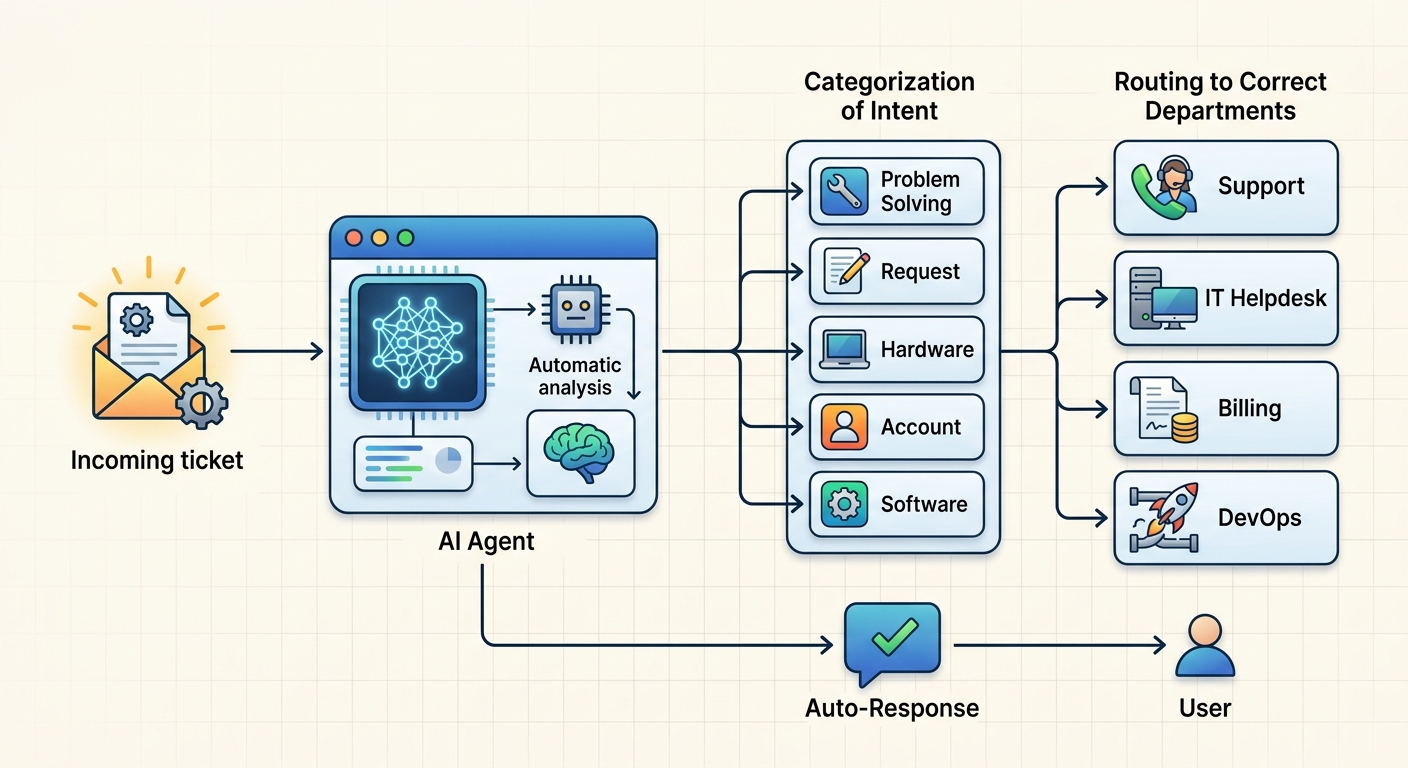
Automated Ticket Categorization and Routing
The traditional ticket routing process relies on users to select categories from a dropdown menu, or on tier-1 staff to read each ticket and decide where it goes. Both approaches are error-prone. Users often pick the wrong category, and human agents—who are handling dozens of tickets simultaneously—are prone to misrouting under pressure.
AI ticket routing solves this by analyzing the actual content of each ticket using natural language processing (NLP). When a user submits a request like "I can't log into Salesforce, I've tried resetting my password twice and it still says my session expired," the AI doesn't just look for the keyword "Salesforce." It understands that this is a single sign-on (SSO) or authentication issue that belongs in the identity management queue, not the CRM team.
This automated ticket routing capability:
- Reduces misdirected tickets by 30–50% in organizations that have implemented AI routing
- Speeds up initial ticket assignment from minutes to seconds
- Frees tier-1 staff from the routine triage work that consumed much of their day
Intelligent Escalation and Priority Assignment
Not all tickets are created equal. A request to install a font is low urgency. A system-wide outage is critical. Human agents learn to make this distinction over time, but it's a slow and imperfect process—and understaffed service desks often assign everything the same default priority, leading to critical issues sitting in queues behind minor requests.
AI agents assess severity and business impact in real-time. They analyze:
- Keywords and urgency signals in the ticket description
- User context (is this a C-suite executive? A production system owner?)
- Historical patterns (has this system had recent outages?)
- Potential blast radius (how many users are affected?)
Based on this analysis, the AI assigns priority levels and determines whether escalation is needed. It can also predict SLA breaches before they happen—if a ticket has been sitting in a queue for a threshold percentage of its SLA window, the AI can flag it for immediate attention.
For escalations that do require human involvement, AI agents don't just bump the ticket up the chain. They create a rich, context-aware handoff package that includes:
- Full conversation history with the user
- Steps the AI already took (password reset attempted, system checks run)
- Relevant system context and metadata
- Suggested resolution paths the human agent should consider
This eliminates one of the biggest pain points in escalation: the receiving agent having to re-explain the problem to the user from scratch.
Self-Service Resolution for Routine Tasks
The majority of tickets that hit your IT service desk are repetitive. Password resets. Software installation requests. VPN configuration help. VPN token provisioning. These are high-volume, low-complexity issues that consume enormous amounts of staff time while being exactly the type of problem that AI handles consistently well.
An AI chatbot IT helpdesk can resolve these tickets autonomously, often within seconds:
- Password resets: The AI verifies user identity through multi-factor authentication or security questions, then triggers the reset through integration with Active Directory, Okta, or other identity providers
- Software access requests: The AI confirms entitlements, checks license availability, and triggers provisioning through your software distribution platform
- Knowledge base lookups: When a user asks how to connect to the VPN, the AI can retrieve and surface the relevant KB article without opening a ticket at all
This shift to AI-first resolution means your IT staff spend their time on problems that actually require human judgment—complex incidents, architectural decisions, vendor negotiations—while users get answers in seconds rather than hours.
Proactive Monitoring and Anomaly Detection
The most sophisticated LLM AI agents ITSM systems don't just react to incoming tickets. They monitor your infrastructure proactively and detect anomalies before they become user-visible problems.
An AI agent connected to your monitoring systems (Datadog, Splunk, New Relic, or your cloud provider's native monitoring) can:
- Detect unusual CPU or memory patterns on critical servers and open a ticket before users report the slowdown
- Identify a failing storage array from telemetry data and alert the infrastructure team
- Recognize patterns in ticket volume that suggest an emerging issue (e.g., a wave of "can't access email" tickets that might indicate an Exchange server problem)
This transforms the IT service desk from a reactive firefighting operation into a proactive engineering function. You're not just resolving problems faster—you're preventing them.
The Business Case: What AI Agents for IT Service Desk Automation Actually Deliver
If you're considering an investment in IT service desk automation, you want numbers. Here's what organizations implementing AI agents for IT service desk automation typically report:
Reduced Mean Time to Resolution (MTTR): AI handling tier-1 tickets reduces resolution times from hours or days to minutes or seconds for routine issues. For organizations with high ticket volumes, this can translate to thousands of engineer-hours recovered per month.
Improved Ticket Deflection: AI-powered self-service resolves 20–40% of incoming tickets without human involvement, based on implementations across ServiceNow customers and similar platforms. That directly reduces the headcount required to handle your current ticket volume—or allows your team to scale without adding staff as the business grows.
Higher Agent Satisfaction: IT engineers consistently rank working on repetitive tier-1 requests as one of the least satisfying aspects of their job. Automating the routine work lets your team focus on technically challenging, high-impact projects—which improves retention.
Better User Experience: End users get faster responses, often instant resolution, and consistent quality of support regardless of the time of day or which agent is available. This matters for employee experience and productivity—your IT service desk is often one of the most visible touchpoints between employees and the technology organization.
Implementation Considerations for IT Service Desk Automation
AI agents for IT service desk automation are powerful, but they're not plug-and-play. Successful implementations require attention to several areas:
Integration with Existing ITSM Platforms
Your AI agent needs to connect to your existing service desk platform—whether that's ServiceNow, Jira Service Management, Freshservice, or something else. Most modern AI ITSM tools offer pre-built integrations, but you'll need to validate that your specific platform version and configuration are supported, and that the integration covers the workflows you actually care about.
Data Quality and Cleanup
AI agents are only as good as the data they work with. Before deploying AI ticket routing or resolution, organizations typically need to:
- Clean up their knowledge base articles (outdated, duplicate, or poorly written KB entries confuse the AI)
- Standardize ticket categories and taxonomies
- Ensure that integrations with identity providers, software distribution tools, and monitoring systems have accurate, up-to-date credentials and permissions
This preparatory work is often underestimated and is one of the biggest factors in implementation success.
Governance and Accountability
When an AI agent resolves a ticket incorrectly—or fails to escalate a serious issue—who is accountable? This question needs a clear answer before you go live.
Establish governance policies that define:
- Which types of tickets AI can resolve autonomously vs. which require human sign-off
- How escalations are triggered and what context must be included
- How AI decisions are audited and reviewed
- How users can provide feedback or override AI decisions
The AI should augment your team's judgment, not eliminate human oversight. The best implementations treat AI as a powerful junior analyst that routes, triages, and handles routine work—while experienced engineers make the decisions that matter.
Change Management
Your IT staff may be skeptical of AI that appears to threaten their roles. The most successful implementations position AI as a tool that makes their jobs more interesting by eliminating drudgework—not as a replacement for their expertise.
Invest in training, communicate transparently about what the AI can and cannot do, and create feedback loops so your team can flag when the AI makes mistakes. Engineers who help improve the AI become advocates; those who are blindsided by deployment become critics.
The Future: Agentic AI and Fully Autonomous ITSM
We're still in the early innings of AI in ITSM. The current generation of LLM AI agents ITSM handles specific, well-defined tasks—routing, categorization, routine resolution, escalation prediction. The next wave, often called agentic AI, envisions AI agents that can coordinate multi-step workflows autonomously.
Imagine an AI that doesn't just route a critical infrastructure incident to the right team, but opens a bridge call, pulls relevant runbooks, initiates automated remediation steps (restarts a failing service, fails over to a backup system), drafts the incident report, and schedules a post-mortem—all without human intervention for the routine parts of the incident lifecycle.
Platforms like ServiceNow are already previewing these capabilities, and the trajectory suggests that within 2–3 years, fully autonomous ITSM workflows will be commercially available for a wider range of incident types. Organizations that build experience with AI agents today will be best positioned to take advantage of these advances.
Conclusion
AI agents for IT service desk automation represent a genuine paradigm shift in how IT organizations operate. They handle the high-volume, routine work that has historically consumed your best engineers' time—freeing your team to focus on work that requires judgment, creativity, and deep technical expertise.
The organizations that are winning with AI in ITSM aren't those that automate everything and remove humans from the equation. They're the ones that carefully define where AI adds the most value (ticket routing, routine resolution, proactive monitoring) while preserving human oversight for decisions that matter.
If you're evaluating AI agents for your IT service desk, start with a specific, high-volume problem—password resets, for instance, or ticket routing accuracy. Measure your baseline. Deploy. Measure again. The delta will tell you whether you're on the right track.
The age of AI-augmented IT service desks is here. The only question is whether your organization will lead or follow.
Expert Q&A: AI Agents for IT Service Desk Automation
5 tough questions from industry practitioners, answered by ITSM and AI implementation experts.
Q1: When an AI agent makes a wrong decision—routing a ticket incorrectly or failing to escalate a critical issue—how should organizations handle accountability and liability?
The accountability framework has three layers. System-level accountability requires your AI ITSM vendor to provide clear documentation of what the AI does and does not do, including failure modes—with audit logs to trace exactly what happened. Organizational accountability means designating a human owner for every AI-assisted workflow who is responsible for monitoring performance, reviewing error patterns, and adjusting the AI's scope or behavior. Process-level accountability defines explicit escalation thresholds—situations where AI-generated decisions must be reviewed by a human before taking effect. The key insight is that accountability doesn't mean humans make every decision; it means a human is always responsible for the outcomes of decisions made by the system.
Q2: What's the realistic ROI timeline for AI service desk automation? When do organizations typically see payback on their investment?
ROI timelines vary significantly, but here's a realistic breakdown. Phase 1 (Months 1–3): Implementation costs accumulate with little measurable ROI. Phase 2 (Months 3–6): If you've implemented automated ticket routing, you should see measurable improvements in routing accuracy and MTTR for covered ticket types—15–25% improvements are typical. Phase 3 (Months 6–12): With more historical data, AI accuracy improves, ticket deflection stabilizes at 20–35%, and financial ROI becomes measurable. For most mid-to-large organizations (500+ employees, 1,000+ tickets/month), organizations break even within 8–14 months. The fastest ROI comes from starting with the highest-volume, lowest-complexity tickets.
Q3: How do you manage data privacy and compliance when AI systems are processing potentially sensitive IT tickets?
IT service desk tickets can contain extremely sensitive information. Establish a data classification framework that categorizes ticket content by sensitivity level—tickets involving HR systems, financial data, legal matters, or security incidents should be flagged for human handling or processed with additional access controls. Conduct thorough vendor due diligence: where does data get processed, is ticket data used for model training, what is the data retention and deletion policy, and do they support data residency requirements? Implement a PII redaction layer that strips names, employee IDs, and other identifiable information before tickets reach the AI. Ensure every AI decision is logged with sufficient context to support a compliance audit, and verify your AI ITSM implementation is certified against relevant frameworks for your industry (HIPAA, SOX, FedRAMP, etc.).
Q4: What's the biggest change management challenge when introducing AI agents to an existing IT service desk team, and how do you overcome it?
The biggest challenge is psychological. IT engineers are problem solvers by nature, and many initially experience AI ticket handling as having someone else "solve their problems wrong." Overcome this by: involving your IT staff early before the AI goes live so they have input on which ticket types it handles; creating a visible feedback loop so the team sees that mistakes are acknowledged, reviewed, and corrected; reframing the AI's role explicitly as handling tickets that prevent them from doing the interesting work rather than reducing headcount; celebrating wins publicly and sharing metrics; and creating advancement pathways around AI-ITS operations so engineers who become expert at tuning and governing the AI have valuable, desirable skills. Organizations that do this well treat AI deployment as a team transformation project, not a software installation.
Q5: How do AI agents handle edge cases and novel situations that fall outside their training distribution—particularly during a crisis like a ransomware attack or unexpected system outage?
AI agents are trained on historical data and may struggle with truly unprecedented events. The best implementations define explicit boundaries for AI autonomy—for certain ticket categories or systems, require human review before any AI-generated routing takes effect. Build anomaly detection triggers so the AI flags sudden spikes in ticket volume or unusual ticket characteristics for human review even when it can't diagnose the cause. Design for graceful degradation: when the AI's confidence drops below a threshold, the ticket routes to human review automatically rather than being handled with low confidence. During declared incidents, shift to human-primary operations where AI provides auxiliary support (documentation, user communication, status page updates) rather than primary decision-making. Include the AI's ticket handling in post-incident reviews so the data improves future performance. The goal is an AI that handles the routine competently and signals clearly when it has encountered something requiring human judgment.
Expert Q&A contributed by Algorithmine's ITSM research team, drawing on practitioner interviews and documented enterprise deployments.