Generative UI: When Enterprise Apps Render Themselves
Learn how generative UI lets enterprise apps render interfaces at runtime — with compliance, determinism, and auditability built in.
Enterprise applications have spent three decades as fixed artifacts: screens designed, approved, and shipped. That assumption is now breaking. Across regulated industries, a growing number of teams are moving systems into production that compose their interfaces at runtime — assembling approved components from user intent, data context, and policy constraints rather than serving a pre-built screen. The result is software that renders itself on demand, and generative UI is moving from demo reels into audit-scoped production environments.
The shift is not cosmetic. It changes the unit of delivery from the page to the composition, the unit of review from the mockup to the constraint set, and the unit of audit from the screenshot to the decision log. For teams that have spent careers shipping versioned screens, that is a genuine reorientation — and for buyers, it means the questions that separate a working generative UI system from a polished demo have changed.
This piece separates the real capability from the marketing, explains why enterprise software is the hardest proving ground for generative UI, details the reference architecture, and gives buyers a concrete evaluation checklist for the year ahead.
What Generative UI Actually Means for Enterprise Apps
Generative UI is the practice of assembling interface components at runtime from user intent, data context, and policy constraints — not generating prose, but generating the structure and composition of the interface itself.
The distinction matters because the term is being stretched to cover three different things. A chatbot that returns a table is not generative UI; the interface is fixed and only the content varies. A low-code builder generates apps at design time, not at runtime. Generative UI sits between them: the layout, component selection, and data bindings are decided per request, within bounds.
Beyond Templates: Interfaces Composed at Runtime
Templated personalization picks from a fixed menu of pre-built variants. Generative UI composes from a versioned component registry — a card, a chart, a form, a workflow step — and decides which combination answers the user's intent with the data they are permitted to see.
That composition can include ordering, density, and which controls appear. A finance analyst asking "show me overdue invoices by region" might get a grouped table; the same question from a collections manager might yield a prioritized worklist with action buttons. Same data model, different rendered surface.
The practical difference shows up in the combinatorics — but the useful number is smaller than the raw one. A registry of 60 approved primitives with declared composition rules admits a very large space of possible surfaces; what matters is the subset that is both valid (satisfies the rules) and useful (answers the intent). That subset is bounded by the rules and by policy filters, and it is still far larger than a team could design and maintain by hand — while every surface is built only from components that already passed accessibility review and data-contract validation. The generation is not inventing UI; it is searching a curated space. That framing is what makes generative UI tractable in an enterprise — and it is also what vendors obscure when they demo a model drawing buttons from scratch. An unconstrained composition space is not a feature; it is a search-cost and review-burden liability, which is precisely why declared rules exist. (See also: [design system governance for runtime composition].)
How Generative UI Differs from Chatbots and Static Dashboards
Three models are worth separating:
- Static dashboards — fixed layout, fixed metrics, refreshed data. Predictable, auditable, but rigid.
- Chatbot wrappers — conversational layer over fixed screens. The conversation varies; the UI does not.
- Generative UI — the interface itself is composed at runtime, constrained by approved primitives and policy.
In practice, most enterprises land on a hybrid spectrum: fully generative for exploratory and read-only surfaces, constrained or assisted generation for transactional workflows, and static fallbacks where determinism is non-negotiable. That hybrid model is the one worth building toward.
The spectrum is usually described in three tiers. Fully generative surfaces — search, exploration, reporting — tolerate variation because the cost of a suboptimal layout is a second query. Assisted generation covers transactional workflows: the system proposes a composition, but a human confirms before anything commits, and the confirmation is logged. Static surfaces persist wherever a regulator, an auditor, or a safety case demands that the screen be byte-identical across sessions. Mature programs assign every surface to a tier explicitly, in a document, rather than letting engineers decide case by case. (Related: [choosing between generative and static UI surfaces].)
Why Enterprise Software Is the Hardest Test Case for Generative UI
Consumer generative interfaces can tolerate a bad render. Enterprise interfaces cannot. A misrendered screen in a claims workflow is not a UX annoyance — it is a compliance event, a data exposure, or a broken process with downstream financial consequences.
Compliance, Determinism, and Auditability
Regulated workflows require reproducible screens. If an auditor asks what a reviewer saw when they approved a transaction, "the model composed something reasonable" is not an acceptable answer. Enterprises therefore need deterministic replay: the same intent, context, and policy state must produce the same interface, with a logged record of which components were selected and why.
This pushes generative UI toward constrained generation with explicit, versioned rules — and toward treating the composition decision as an auditable artifact in its own right. The key engineering point is that determinism is achieved by archiving the artifact, not by trusting the model to reproduce it. Temperature-0 decoding is not a guarantee: output can vary across provider versions, hardware, and batching. So the practice is to snapshot the composed output — the structured intent, the registry state, the policy version, and the resulting component tree with its data bindings — and treat that snapshot as the source of truth. Pin model and provider versions and fix sampling parameters to reduce drift, but do not depend on re-running the model to land on the same bytes. A replay harness re-runs the composition against the archived inputs and diffs the result against the snapshot. If the diff is non-empty, the harness fails closed: it flags the session, routes it to review, and blocks any automated re-render from being treated as equivalent to the original until the discrepancy is explained and logged.
Security and Safety: Intent and Data Are Untrusted Input
A composition engine that reacts to user intent is an injection surface. A malicious or malformed data field — a customer name, a document body, a ticket description — can attempt to steer component selection toward an unauthorized view or a binding to data the viewer should not see. The defense is architectural, not prompt-based:
- Treat intent text and all rendered data as untrusted input; never let them select components outside the allowlisted registry.
- Enforce authorization at the data-binding layer, in code, keyed to the viewer's identity and entitlements — not in the model's reasoning.
- Allowlist components and composition rules; reject anything outside the declared set rather than sanitizing it after the fact.
- Log every rejected or downgraded composition, because attempted injections are themselves audit signal.
Failure Modes Worth Designing For
Production systems fail in specific ways, and buyers should probe for them: empty compositions (no valid surface answers the intent), policy dead-ends (every candidate is filtered out by entitlements), null-data bindings (a component renders against missing or stale data), and silent downgrades (a generative request quietly served by a static fallback without telling the user). Each needs a defined behavior — a visible fallback, an explanatory message, and a logged event — rather than a blank panel.
Reference Architecture
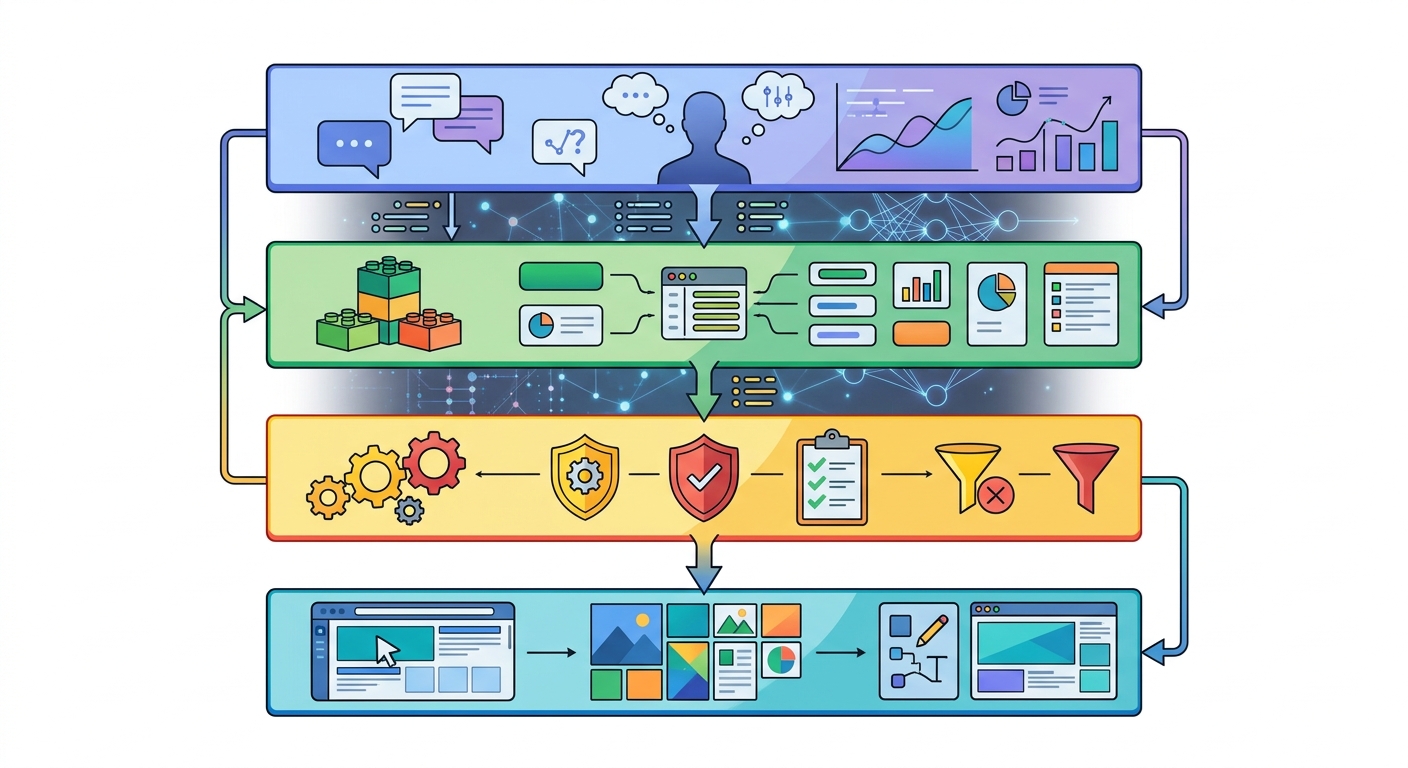
A production generative UI system has five cooperating layers, each with a clear job and a clear audit boundary.
-
Intent layer. Interprets the user's request into a structured intent object — entities, filters, timeframe, action type — rather than passing raw text downstream. The structured object is what gets logged and replayed.
-
Policy and entitlement layer. Applies the viewer's roles, data entitlements, and workflow state to determine which components and data bindings are even permissible. This runs before composition, so the composer never sees options the viewer cannot use.
-
Component registry. A versioned catalog of approved primitives, each carrying its data contract, accessibility metadata, and declared composition rules. The registry is the allowlist; nothing renders that is not in it.
-
Composition engine. Selects and orders components from the registry against the structured intent, within the rules and the policy bounds. Its output is a component tree with explicit data bindings — a structured artifact, not free-form markup.
-
Render and audit layer. Renders the composed tree, records the full decision log (intent, registry version, policy version, selected components, rejected candidates), and feeds the replay harness.
The separation matters: authorization lives in layer 2 and the data-binding layer, not in the model; the registry in layer 3 bounds what is possible; and the audit layer in layer 5 makes the whole thing defensible. A vendor that cannot describe these boundaries — or that collapses them into "the model decides" — has not built an enterprise system.
Evaluating Generative UI: A Buyer's Checklist
Adjectives are cheap. These questions are testable:
- What is the allowlist? Ask for the component registry and its composition rules. If composition can produce components not in the registry, walk away.
- Where is authorization enforced? The correct answer is the data-binding layer, keyed to entitlements — not the prompt or the model's judgment.
- How is a session replayed? Ask to see a snapshot of intent, registry version, policy version, and component tree, and a replay that diffs against it. Confirm the system archives the artifact rather than trusting re-generation.
- What happens on a bad composition? Look for fail-closed behavior, visible fallbacks, and logged rejections — not silent downgrades.
- How are surfaces tiered? Ask for the document that assigns each surface to fully generative, assisted, or static, and who owns that decision.
- What are the operating metrics? Composition validity rate, policy-violation rate, fallback rate, and human-override rate. A demo has none of these; a production system tracks all four.
- Can you show a policy dead-end? A system that has never hit one has not been tested against real entitlements.
The Reorientation
Generative UI does not remove design review, compliance, or audit — it relocates them. The page becomes the composition, the mockup becomes the constraint set, and the screenshot becomes the decision log. Teams that internalize that shift build systems that are both more adaptive and more defensible than the fixed screens they replace. Teams that treat generative UI as a model demo will ship something impressive that cannot survive an audit — which, in the enterprise, is the same as shipping nothing at all.