Kubernetes for ML Workloads in 2026: Resource Management, GPU Scheduling, and Cost Optimization Strategies
A comprehensive guide to the 2026 Kubernetes GPU stack — GPU Operator, Kueue, Volcano, KAI Scheduler, FinOps strategies, and a phased implementation roadmap.
Published: August 7, 2026 | Category: MLOps & Infrastructure | Reading time: ~18 min
Running ML workloads on Kubernetes in 2026 is table stakes for any team doing serious AI. But here's the uncomfortable reality most organizations don't talk about publicly: the average GPU utilization in unoptimized Kubernetes clusters sits at 15–30%, with some workloads dipping as low as 5%. At $2–4 per GPU-hour on cloud providers, a cluster running 8× A100s at 20% utilization pays for 100% of the GPU capacity but uses only 20% of it — burning through $17,000+ per month in effectively wasted spend on idle compute.
The good news: the tools have matured dramatically. What once required bespoke scripting and deep NVIDIA expertise is now a composable, open-source stack. This guide maps the complete 2026 landscape: from GPU operator installation to intelligent schedulers that push GPU utilization to 60–85%, to FinOps strategies that cut costs 40–60% without degrading training throughput or inference latency.
In this guide you'll learn:
- How to deploy and manage the NVIDIA GPU Operator in 2026
- Which scheduler (Kueue, Volcano, or KAI) fits your Kubernetes ML workload type
- GPU sharing strategies: MIG, MPS, and HAMi — and when to use each
- FinOps tactics that cut Kubernetes ML costs by 40–60% (for greenfield deployments; 15–25% for already-optimized clusters)
- A phased implementation roadmap from foundation to production
- Critical tradeoffs most guides skip: DRA migration complexity, KEDA cold-start penalties, spot instance availability limits
The 2026 Kubernetes GPU Stack: Foundation
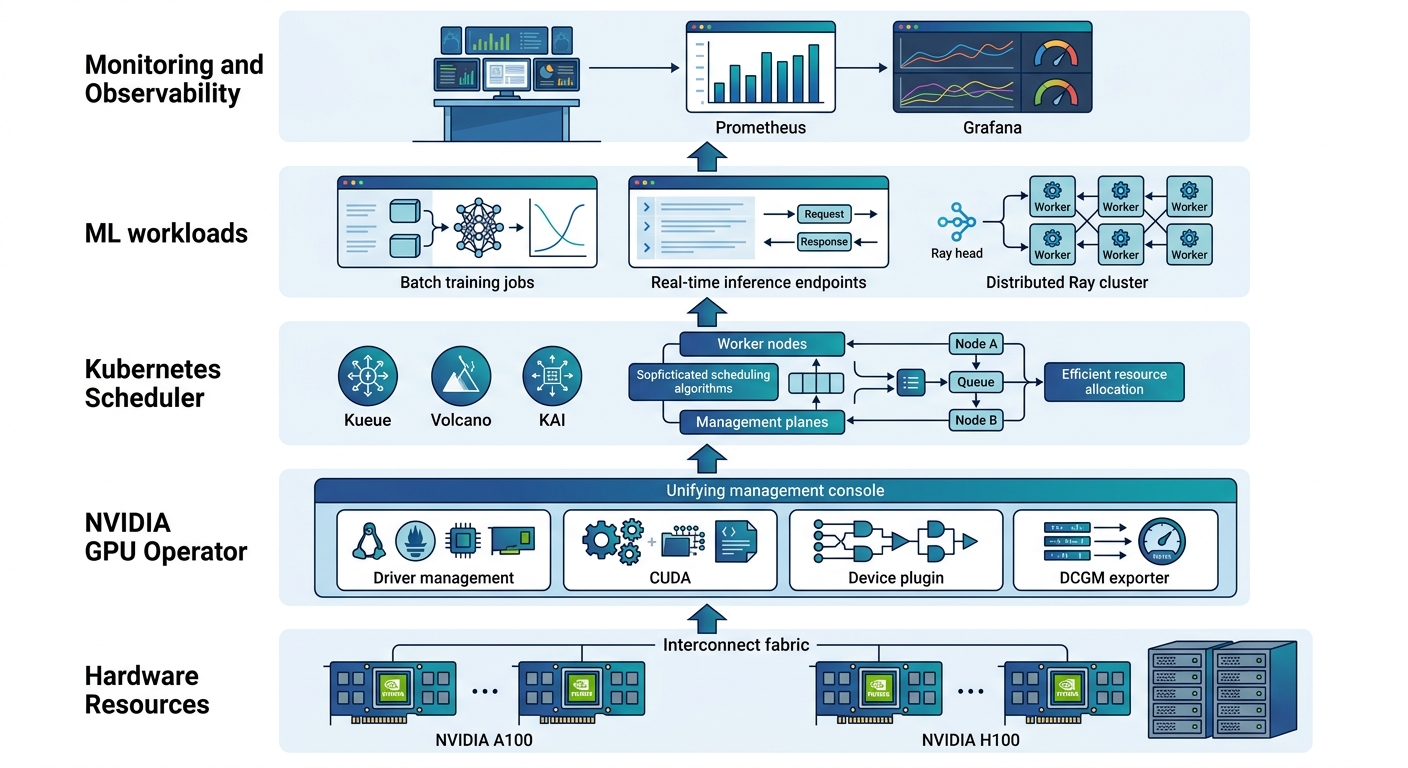
Installing the NVIDIA GPU Operator
# Add the NVIDIA Helm repository
helm repo add nvdp https://nvidia.github.io/gpu-operator
helm repo update

# Install with Helm
helm install gpu-operator nvdp/gpu-operator \
  --namespace gpu-operator --create-namespace \
  --set driver.version="570.133.07" \
  --set toolkit.version="1.16.2"
The operator automatically deploys the nvidia.com/gpu resource class, making GPUs discoverable by the Kubernetes scheduler. After installation, verify with:
kubectl get nodes -l nvidia.com/gpu.product=NVIDIA-A100-SXM4-80GB
# Expected: lists nodes with A100s
kubectl describe node <node-name> | grep nvidia.com/gpu
# Shows allocatable GPU count
Dynamic Resource Allocation (DRA): The Post-Device-Plugin Era
For years, the NVIDIA device plugin was the standard way to advertise GPU resources to Kubernetes. In 2026, Dynamic Resource Allocation (DRA) — now a CNCF project — is replacing it. DRA allows the Kubernetes scheduler to reason about structured GPU parameters (memory, MIG strided, MIG sliced configurations) rather than simple integer counts.
Migration complexity to be aware of: DRA requires Kubernetes 1.31+ and has meaningfully different semantics than the device plugin model. Pod specs using nvidia.com/gpu: 1 work, but leveraging DRA's structured parameters requires updating container resource requests with specific GPU memory and partition configurations. The full migration involves installing the NVIDIA DRA driver (separate from the GPU Operator in early releases), updating pod specs, and testing scheduling behavior. Plan 3–6 months for a careful migration if you're on older Kubernetes versions. Most tools support both paths during the transition period.
GPU Scheduling for ML Workloads: Beyond the Default Scheduler
Kubernetes' default scheduler treats GPUs as undifferentiated integers — nvidia.com/gpu: 1. For ML workloads, that's inadequate. You need gang scheduling for distributed training, quota enforcement across teams, priority-based preemption for production inference, and topology-aware placement to minimize GPU-to-GPU communication overhead.
Three schedulers have emerged as the 2026 standard for Kubernetes ML workloads.
Kueue: Batch Kubernetes ML Workload Management That Pays for Itself
Kueue is the standout story of 2026. Originally developed by Google and now a CNCF sandbox project, it treats batch ML jobs as first-class citizens with queueing, fair-share scheduling, and resource quoting. The GPU utilization gains are real: organizations moving from the vanilla scheduler to Kueue report GPU utilization climbing from a baseline of 25–35% to 60–85%.
Kueue works by intercepting Job and PodGroup resources and managing their admission based on cluster capacity and quota. It integrates with Volcano and the default Kubernetes scheduler.
Key Kueue concepts:
- ClusterQueue (CQ): Represents cluster-wide GPU capacity
- LocalQueue: Team or project-specific queues that reference a ClusterQueue
- ResourceFlavor: Maps to node types (e.g.,
a100-80g,h100-80g)
apiVersion: kueue.x-k8s.io/v1beta1
kind: ClusterQueue
metadata:
  name: "training-cq"
spec:
  resourceGroups:
  - flavors:
    - name: "a100-80g"
      resources:
      - name: "nvidia.com/gpu"
        nominalQuota: 32  # 4 nodes × 8 GPUs
    - name: "h100-80g"
      resources:
      - name: "nvidia.com/gpu"
        nominalQuota: 16
  admissionChecks:
  - name: "drain-before-eviction"
Kueue's preemption model is its killer feature: when high-priority ML training work arrives, Kueue evicts lower-priority jobs fairly, ensuring critical training runs don't wait behind queued experiments.
Volcano: Gang Scheduling for Distributed ML Training
Volcano is purpose-built for distributed ML training on Kubernetes. Its core capability is gang scheduling — the requirement that all pods in a job start together or none start at all. For Ray Distributed Training or DeepSpeed jobs with 64+ GPUs across multiple nodes, this is non-negotiable. Without gang scheduling, a job requesting 64 GPUs where 63 are available will hang indefinitely rather than making partial progress.
Volcano integrates with Kueue as a scheduler plugin, giving you both quota management and gang scheduling for Kubernetes ML workloads. If you're running any form of multi-node distributed training, Volcano is effectively required.
KAI Scheduler: Topology-Aware Multi-Tenant GPU Scheduling
KAI Scheduler fills the gap for organizations running multiple teams on shared GPU infrastructure. It provides:
- Topology-aware Kubernetes GPU scheduling (GPU-to-GPU affinity, NVLink-aware placement)
- Per-team quotas with burst capacity
- Spot-aware scheduling with preemption handling
- Priority-based preemption that protects production inference workloads
For organizations with separate data science, ML engineering, and research teams sharing GPU clusters, KAI's multi-tenancy model is the most complete solution available in 2026.
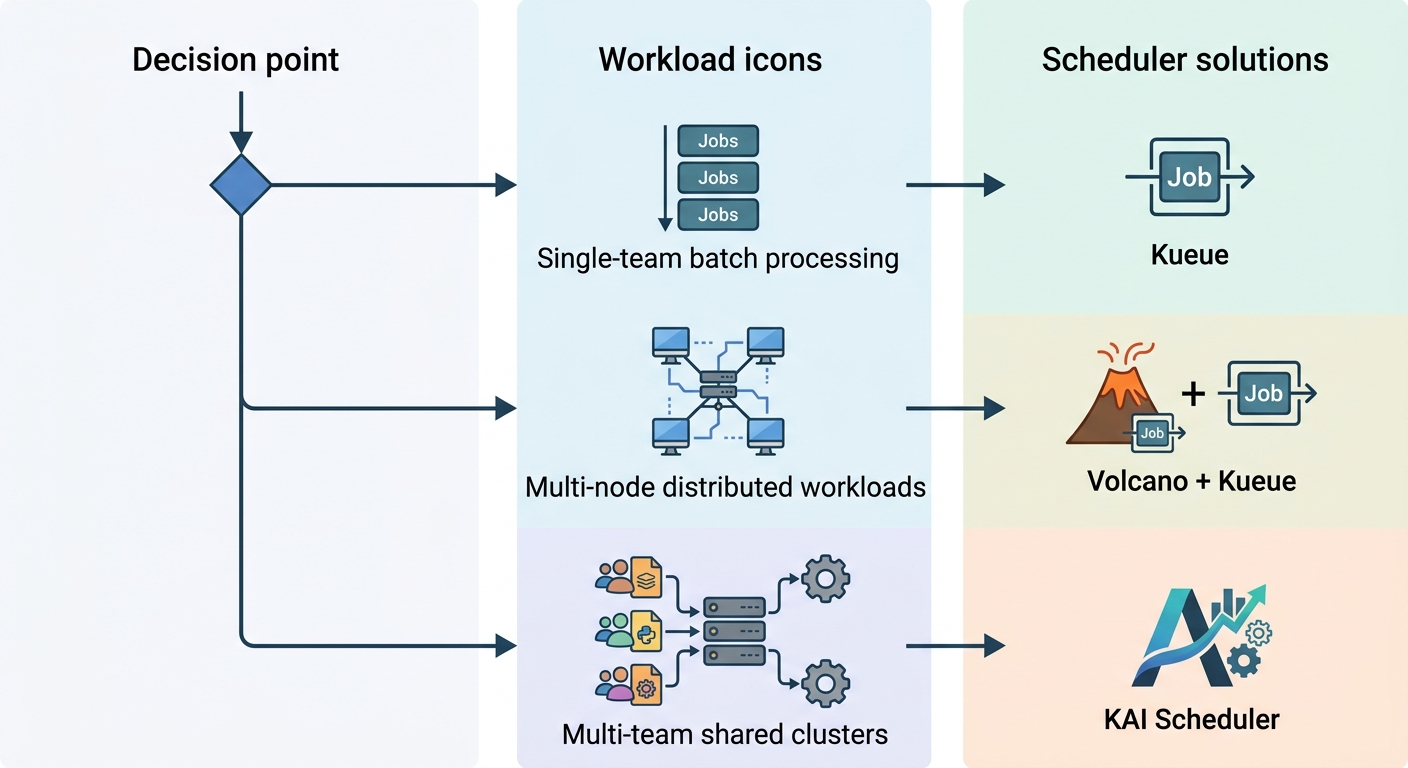
Which Scheduler for Kubernetes ML Workloads?
| Workload Type | Recommended Scheduler | Key Reason |
|---|---|---|
| Batch ML training (single team) | Kueue | Quota management, GPU utilization gains |
| Distributed ML training (multi-node) | Volcano + Kueue | Gang scheduling + quota management |
| Multi-tenant shared GPU cluster | KAI Scheduler | Topology awareness, team isolation |
| Production inference serving | KEDA + Kueue | Event-driven scale-to-zero |
GPU Sharing Technologies: MIG, MPS, and HAMi Compared
GPU hardware is expensive. A single H100 costs $25,000–$40,000, and leaving it idle during off-peak hours is pure financial waste. Three technologies enable GPU sharing on Kubernetes in 2026.
Multi-Instance GPU (MIG) for A100 and H100
MIG allows a single physical NVIDIA GPU to be partitioned into multiple instances, each with dedicated compute, memory, and bandwidth. On an 80GB A100, you can create 7 MIG instances of ~10GB each, or 2 instances of 40GB. Each instance is schedulable as an independent nvidia.com/gpu resource by the Kubernetes scheduler.
# Configure MIG using the GPU Operator
apiVersion: v1
kind: ConfigMap
metadata:
  name: migstrategy-config
data:
  config.yaml: |
    version: v1
    mig-strategy: mixed  # or "single" for uniform sizing
MIG shines for inference Kubernetes ML workloads where you have many small models that can't individually utilize a full GPU. It also provides hardware-level fault isolation — one workload's crash doesn't affect others on the same physical GPU.
MIG limitations: MIG partitions are static (configured at boot) and not all GPU models support it (A100, H100, H200; not consumer RTX cards).
NVIDIA MPS (Multi-Process Service) for Concurrent CUDA Workloads
MPS allows multiple CUDA processes to execute concurrently on a single GPU by time-slicing the hardware. Unlike MIG (spatial partitioning), MPS is temporal — all Kubernetes pod workloads share the same CUDA context but get scheduled time slices.
MPS is lower-overhead than MIG and works on any NVIDIA GPU, but doesn't provide hardware-level fault isolation. It's best for batch inference workloads that benefit from occasional GPU access but don't need guaranteed resources.
HAMi: The Open-Source GPU Virtualization Alternative
HAMi (Hardware-Aware Middleware for Intelligent workloads) is an open-source CNCF project providing GPU sharing and virtualization without the hardware constraints of MIG. It works across NVIDIA and AMD GPUs, supports dynamic resource adjustment, and integrates with Kubernetes' existing scheduling primitives.
HAMi is gaining traction in organizations running heterogeneous GPU fleets or wanting vendor-agnostic GPU sharing for Kubernetes ML workloads. The tradeoffs: less polished than MIG for NVIDIA-only shops, but no licensing concerns and broader hardware support.
GPU Sharing Technology Comparison
| Technology | Isolation | Hardware Support | Dynamic Adjustment | Best For |
|---|---|---|---|---|
| MIG | Hardware-level | A100, H100, H200 | No (static) | Inference, mixed workloads |
| MPS | Temporal | All NVIDIA | No | Batch inference, low-latency |
| HAMi | Software-level | NVIDIA + AMD | Yes | Heterogeneous clusters |
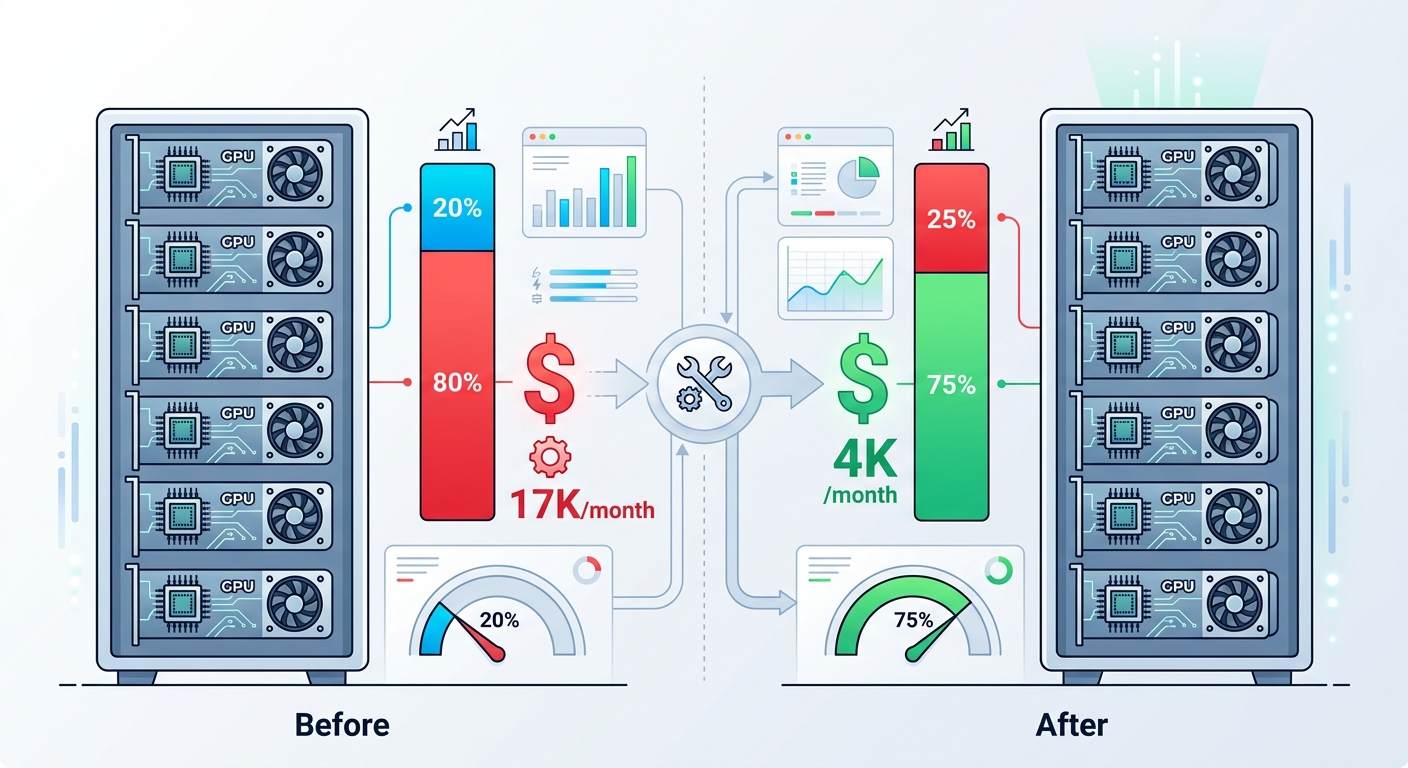
Cost Optimization for Kubernetes ML: The FinOps Playbook
GPU costs are the dominant line item for most ML infrastructure budgets. The good news: 40–60% cost reduction is achievable without sacrificing training throughput or inference quality. Here's the 2026 FinOps playbook for Kubernetes ML workloads.
Strategy 1: Spot and Preemptible Instances for ML Training Jobs
ML training Kubernetes workloads are inherently fault-tolerant — they checkpoint regularly, can resume from saved state, and don't have strict SLAs on completion time. This makes them ideal candidates for spot/preemptible GPU instances, which cost 60–90% less than on-demand.
On AWS, Spot GPU instances for A100s run ~$1.50–$2.00/hour versus $3.67/hour on-demand. On GCP, spot A100s are approximately $1.22/hour.
Karpenter implementation for spot GPU training (note: spot availability fluctuates by region and availability zone — during high-demand periods, spot A100 capacity may be limited. Maintain on-demand fallback for time-sensitive Kubernetes ML training jobs; use spot for deferrable batch workloads):
apiVersion: karpenter.sh/v1
kind: NodePool
metadata:
  name: training-spot
spec:
  disruption:
    consolidationPolicy: WhenUnderUtilized
    expireAfter: 720h  # Replace nodes every 30 days
  template:
    spec:
      requirements:
        - key: node.kubernetes.io/lifecycle
          operator: In
          values: ["spot"]
        - key: nvidia.com/gpu
          operator: Exists
      nodeClassRef:
        name: default
Karpenter handles spot instance interruptions gracefully — it watches for termination notices and proactively provisions replacement GPU nodes, migrating Kubernetes ML workloads before the interruption occurs.
Strategy 2: Karpenter vs. Cluster Autoscaler for GPU Node Provisioning
If you're still using the Cluster Autoscaler for Kubernetes GPU workloads, you're leaving money on the table. Karpenter provisions GPU nodes in under 60 seconds (versus 2–4 minutes for Cluster Autoscaler) and has superior spot instance handling. For bursty ML training workloads, this difference is substantial — faster provisioning means less idle GPU time and more GPU-hours devoted to actual training.
Karpenter also performs node consolidation: it periodically checks if running GPU pods can fit on fewer nodes and evicts them from underutilized instances, terminating the empty nodes. This is especially valuable during off-peak hours for Kubernetes ML infrastructure.
Strategy 3: KEDA for Scale-to-Zero Inference on Kubernetes
Production inference Kubernetes ML workloads often sit idle — overnight, on weekends, during low-traffic periods. KEDA (Kubernetes Event-Driven Autoscaling) connects inference endpoints to real demand signals (HTTP request rate, queue depth, custom Prometheus metrics) and scales replicas including to zero.
For a model serving 10 requests/hour versus 10,000 requests/minute, the difference between 1 replica always-on and scale-to-zero is dramatic. A single A100 idle on Kubernetes costs approximately $150/month in cloud costs. KEDA eliminates that waste during idle Kubernetes ML workload periods.
Critical tradeoff: cold-start latency. When KEDA scales a vLLM inference endpoint from zero, the model must be reloaded into GPU memory — a process taking 30–120 seconds for large models (7B+ parameters). This cold-start penalty makes scale-to-zero unsuitable for user-facing APIs with strict latency SLAs (sub-500ms). Best practice: use KEDA scale-to-zero for async inference, batch processing endpoints, and development/staging environments. Keep a minimum of 1 replica for production inference endpoints where latency matters.
apiVersion: keda.sh/v1alpha1
kind: ScaledObject
metadata:
  name: inference-scaler
spec:
  scaleTargetRef:
    name: vllm-inference
  minReplicaCount: 0
  maxReplicaCount: 10
  triggers:
  - type: prometheus
    metricType: AverageValue
    metadata:
      serverAddress: http://prometheus:9090
      metricName: http_requests_per_second
      threshold: "10"
Strategy 4: Automated Pod Rightsizing with ScaleOps or StormForge
Most ML pods running on Kubernetes are over-provisioned by design — teams request 64GB RAM and 4 GPUs "just to be safe," and those Kubernetes resources sit idle. ScaleOps and StormForge use machine learning to analyze actual GPU utilization patterns and continuously adjust Kubernetes pod resource requests and limits.
Organizations report 30–50% reduction in Kubernetes ML compute spend with zero performance degradation, because the tools learn actual requirements rather than relying on developer estimates that err on the side of over-provisioning. Organizations already running Kueue and spot instances typically see 15–25% incremental reduction from rightsizing alone.
Strategy 5: FinOps Labels and Kubernetes Cost Allocation
You can't optimize Kubernetes ML infrastructure costs you can't measure. Implement FinOps Foundation labels from day one for your Kubernetes workloads:
metadata:
  labels:
    finops.cloudprovider.com/cost-center: "ml-platform"
    finops.project.com/owner: "recommendations-team"
    finops.environment.com/stage: "production"
Use these FinOps labels with cloud provider cost allocation APIs or tools like Kubecost to generate per-team, per-project Kubernetes resource chargeback reports. GPU utilization visibility drives accountability, and accountability drives cost optimization.
Production ML Platform Architecture: The 2026 Stack
The chaos of custom ML platforms has consolidated into a recognizable stack. In 2026, the consensus production architecture for Kubernetes ML workloads looks like this:
| Layer | Tool | Role in ML Platform |
|---|---|---|
| GPU Scheduling | Kueue + Volcano | Batch job queueing, gang scheduling |
| Model Serving | KServe + vLLM | Inference serving, auto-scaling, canary |
| Distributed Training | Ray | Multi-node training coordination |
| Autoscaling | KEDA | Event-driven scale-to-zero |
| Node Provisioning | Karpenter | Fast GPU node provisioning |
| GPU Observability | DCGM Exporter + Prometheus | Utilization metrics tracking |
| GitOps | Flux or ArgoCD | Config and model artifact management |
GPU Observability with DCGM Exporter
DCGM Exporter is critical for GPU observability in Kubernetes ML workloads. It exposes NVIDIA GPU metrics (utilization, memory, temperature, power draw) via a Prometheus endpoint:
kubectl apply -f https://raw.githubusercontent.com/NVIDIA/dcgm-exporter/main/k8s/dcgm-exporter.yaml

# Key Kubernetes GPU metrics to monitor:
# - DCGM_FI_DEV_GPU_UTIL (GPU utilization %)
# - DCGM_FI_DEV_FB_USED (frame buffer memory used in MB)
# - DCGM_FI_DEV_POWER_USAGE (GPU power draw in watts)
Monitor DCGM_FI_DEV_GPU_UTIL across your Kubernetes cluster — if it's consistently below 40%, you're wasting money on idle GPU capacity. Anything below 20% indicates serious optimization opportunity for your Kubernetes ML workloads.
Multi-Tenancy with vCluster and KAI Scheduler
For organizations with multiple teams needing isolated Kubernetes environments for ML workloads, vCluster provides lightweight virtual clusters that share the underlying GPU node pool but have complete API server isolation. Combined with KAI Scheduler's per-team quotas, you get the security of dedicated Kubernetes infrastructure with the cost efficiency of shared GPU hardware.
Implementation Roadmap for Kubernetes ML Optimization
Don't try to implement everything at once. Here's a proven phased approach that delivers quick wins and builds organizational momentum for Kubernetes ML workloads.
Phase 1: Foundation (Weeks 1–2)
- Deploy NVIDIA GPU Operator across all Kubernetes clusters
- Install DCGM Exporter and establish GPU utilization baselines
- Tag all Kubernetes ML workloads with FinOps Foundation labels
- Success metric: You can answer "what is our average GPU utilization?"
Phase 2: Scheduling Intelligence (Weeks 3–4)
- Deploy Kueue for batch Kubernetes ML workload management
- Configure ClusterQueues and LocalQueues for each team
- Migrate existing Kubernetes batch training jobs to Kueue-managed Job resources
- Success metric: GPU utilization climbs from baseline to 50%+
Phase 3: Cost Optimization (Month 2)
- Migrate Kubernetes ML training workloads to spot GPU instances using Karpenter
- Deploy KEDA for inference Kubernetes endpoints with scale-to-zero
- Implement automated pod rightsizing with ScaleOps or StormForge
- Success metric: Cloud bill drops 30–40%
Phase 4: Advanced Patterns (Month 3)
- Add Volcano for gang scheduling of multi-node distributed Kubernetes ML training
- Implement multi-tenancy with vCluster + KAI Scheduler for shared GPU clusters
- Set up Kubernetes ML infrastructure chargeback reporting with FinOps labels
- Success metric: 50%+ total cost reduction, SLAs improved
Conclusion: The GPU Utilization Gap Is Your Opportunity
The difference between "running ML on Kubernetes" and "running it efficiently" is enormous — but the gap has never been easier to close. The NVIDIA GPU Operator, Kueue, Volcano, KEDA, Karpenter, and the FinOps toolkit have all matured into reliable, production-ready tools with solid documentation and active CNCF community support.
Start with foundations: install the NVIDIA GPU Operator, deploy DCGM Exporter, and establish Kubernetes GPU utilization baselines. Within two weeks, you'll have the data to make the business case for further investment.
Then layer in wins: Kueue for batch Kubernetes ML scheduling gives you 2–3x GPU utilization improvement. Spot instances for training workloads cut costs 60–90%. KEDA for inference scale-to-zero eliminates idle GPU waste. Each step delivers measurable ROI — faster training turnaround, lower cloud bills, better GPU utilization.
The cumulative effect of these Kubernetes ML optimizations is typically 50%+ cost reduction for organizations starting from a low optimization baseline (15–25% GPU utilization, no spot usage, no KEDA, no rightsizing). For organizations already running Kueue, spot instances, and Karpenter, incremental gains from the remaining levers are more modest — 15–25% additional reduction. Start from where you are; the gains are real either way. The GPUs are expensive. Make them work harder.
Related Guides:
- Kueue Deep Dive: GPU Utilization from 35% to 85% — Quota configuration, benchmarking, and real-world utilization numbers
- FinOps for Kubernetes ML: 10 Cost-Saving Strategies for 2026 — Specific implementation steps for each cost lever
- Karpenter vs. Cluster Autoscaler: GPU Node Provisioning — Benchmark data and migration guide