Fine-Tuning Open Source LLMs: LoRA and QLoRA Methods Explained
LoRA and QLoRA have fundamentally changed the economics of domain-specific LLM customization. This guide covers everything enterprise teams need to know.
In 2025, the global market for LLM fine-tuning services was valued at $4.2 billion. By 2034, analysts project that figure will reach $22.8 billion — a compound annual growth rate exceeding 23% per year. Enterprises are not waiting for that future to arrive. Over 60% of businesses are expected to adopt open-source LLMs for at least one application in 2026, driven by a need for domain-specific behavior, data sovereignty, and inference cost reduction.
The bottleneck has always been the same: full fine-tuning requires updating every parameter in a model that may contain 7 billion, 13 billion, or 70 billion weights. A 7B-parameter model in float16 demands roughly 56 gigabytes of VRAM just to train — before any optimizer states, gradients, or activations. That infrastructure is within reach for large enterprises, but it is out of reach for the teams that need to iterate quickly, test across use cases, or fine-tune models for specific customers.
LoRA (Low-Rank Adaptation) and QLoRA (Quantized LoRA) solve this problem. They are parameter-efficient fine-tuning (PEFT) techniques that reduce trainable parameters by up to 10,000x compared to full fine-tuning, while delivering performance that matches or approaches full fine-tune quality. The result is a paradigm shift: domain-specific LLMs are now accessible to any team with a single consumer-grade GPU.
This guide covers the mechanics of both methods, how they differ, when to use each, and how to implement them in a production enterprise workflow.
What Is LoRA? How Low-Rank Adaptation Works
When a large language model is pre-trained, it learns to represent knowledge across all of its weights. Full fine-tuning updates every one of those weights for a specific task. The problem is obvious: a model with 7 billion parameters requires updating 7 billion values. The GPU memory needed to store the model, its optimizer states, and its gradients during training is prohibitively expensive for most teams.
LoRA takes a different approach, grounded in a mathematical insight. Researchers discovered that the weight updates during fine-tuning tend to be low-rank — meaning they can be approximated by the product of two smaller matrices rather than a single large matrix. In practical terms, instead of updating a weight matrix of size d × d (where d is the model's hidden dimension), LoRA injects two small trainable matrices: A of size d × r and B of size r × d. The rank r is typically 8, 16, 32, or 64.
The base model's weights are frozen — they never change during training. Only the LoRA adapter matrices are trained. When inference runs, the adapter outputs are added to the frozen base weights in a forward pass that is mathematically equivalent to full fine-tuning, but dramatically cheaper.
How LoRA Integrates Into a Transformer
LoRA adapters are injected into the attention and feed-forward (MLP) layers of a transformer. For most modern architectures — Llama, Mistral, Qwen — this means targeting these modules:
q_projandk_proj: Query and key projections in the attention mechanismv_projando_proj: Value and output projectionsgate_proj,up_proj,down_proj: MLP gate and intermediate layers
Targeting all six modules is the standard configuration for Llama 3 and Mistral 7B. The result is a set of trainable parameters that is roughly 0.1% to 1% of the base model's total parameter count.
Memory Requirements in Practice
A concrete example: fine-tuning Meta's Llama 3 8B Instruct with LoRA requires approximately 18 gigabytes of VRAM on a single GPU. The full fine-tune requirement of that same model is roughly 56 gigabytes. LoRA achieves a 3x reduction in memory usage by only storing gradient and optimizer states for the adapter matrices — not the 8 billion base weights.
Memory comparison — A 7B-parameter model in float16 requires ~56GB VRAM for full fine-tuning. With LoRA, the same model trains in ~18GB. QLoRA (see below) brings that down to ~10GB.
The rank parameter r controls the expressiveness of the adapter. A higher rank allows the model to represent more complex adaptations but increases trainable parameters and memory usage. For most enterprise use cases — style adaptation, format enforcement, domain behavior — r=16 is the practical sweet spot.
What Is QLoRA? Adding 4-Bit Quantization to LoRA
QLoRA extends LoRA with one critical innovation: the frozen base model is stored in 4-bit NormalFloat (NF4) format instead of 16-bit or 32-bit float. This compression reduces the memory footprint of the base model itself by a factor of four, enabling teams to fine-tune models that would otherwise require multiple GPUs.
NF4 is not simple rounding. NF4 is a quantization scheme designed specifically for normally distributed weights — which is exactly how pre-trained LLM weights behave. NF4 uses 16 distinct values to represent a range of weight values, where each value is a quantile of the normal distribution. This preserves much more precision than uniform 4-bit integer quantization, which would waste bits on outlier values.
The Technical Innovations in QLoRA
QLoRA introduces two additional memory optimizations on top of 4-bit base model storage:
Double quantization reduces the memory cost of the quantization process itself. When a model is quantized to 4-bit, the quantization constants (scale factors for each parameter group) must be stored. Double quantization quantizes these constants as well, squeezing out additional memory savings at negligible quality cost.
Paged optimizers handle memory spikes that occur during training when the optimizer updates model weights. Paging these states to CPU RAM prevents out-of-memory crashes without losing training progress.
What This Means for Hardware Requirements
With QLoRA, a 70B-parameter model — one that would normally require a multi-GPU cluster for full fine-tuning — can be fine-tuned on a single NVIDIA A100 with 80GB of VRAM. More remarkably, 33B-parameter models can be fine-tuned on consumer GPUs with 24GB of VRAM, such as the RTX 4090.
Hardware democratization — QLoRA enables fine-tuning of 70B-parameter models on a single A100 (80GB VRAM). The same model requires an 8-GPU cluster for full fine-tuning.
The trade-off is a small quality reduction from quantization noise. In practice, QLoRA fine-tuned models consistently score within 1–2% of their full-precision counterparts on standard benchmarks.
LoRA vs QLoRA: A Direct Comparison
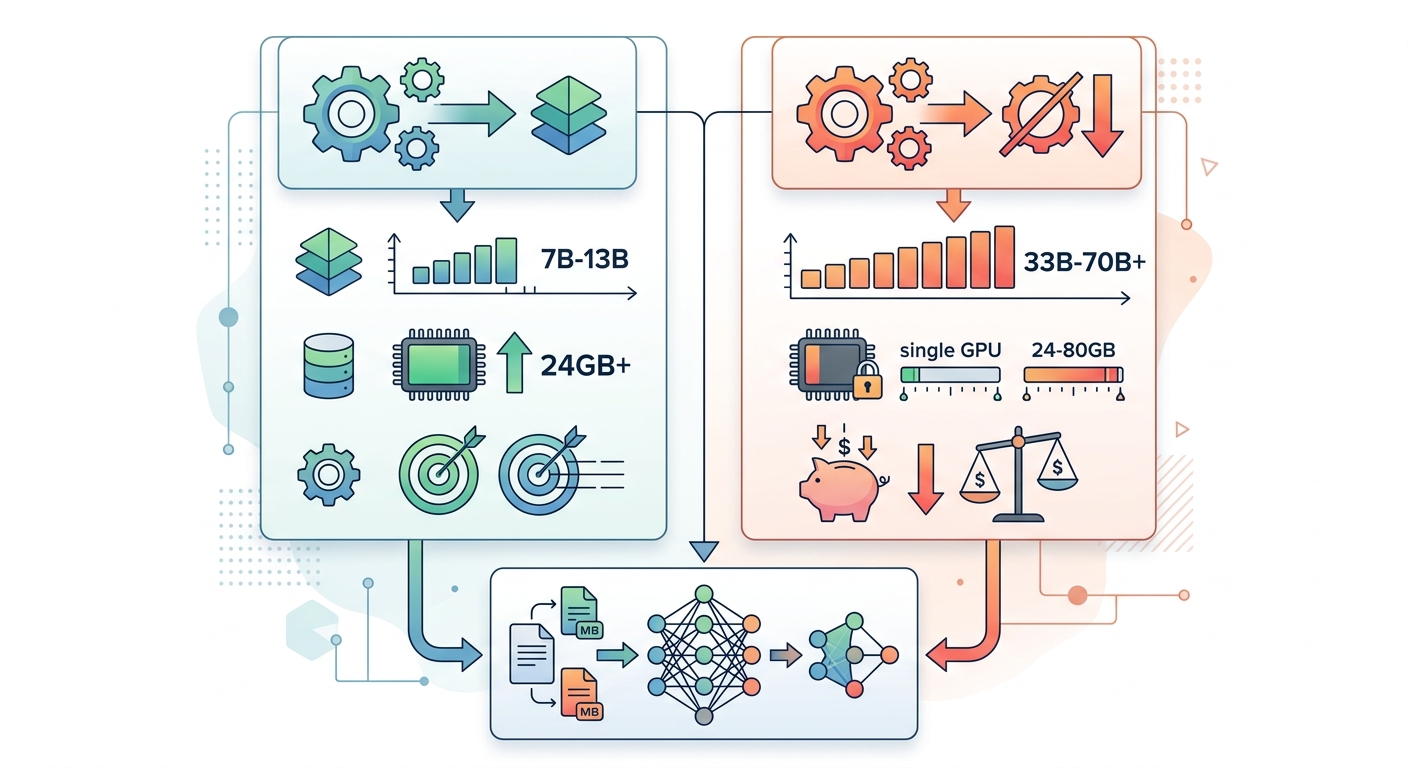
The choice between LoRA and QLoRA is primarily driven by model size and available hardware. Both methods share the same architectural pattern — frozen base model plus trainable adapters — and both use the same Hugging Face PEFT library interfaces. The difference is how the base model is stored.
When to Choose LoRA
LoRA is the right choice when you are fine-tuning 7B or 13B parameter models and have a GPU with at least 24GB of VRAM. The quality advantage of full-precision base model storage is real, and the memory requirements are manageable on modern hardware. LoRA also has slightly faster training throughput because there is no dequantization step during forward and backward passes.
Prefer LoRA when: your model is in the 7B–13B range, you have 24GB+ VRAM available, and quality is the top priority over cost.
When to Choose QLoRA
QLoRA is the right choice for 33B, 70B, or larger models — or when your hardware is constrained to a single GPU with limited VRAM. The 4-bit base model storage makes these large models tractable for fine-tuning that would otherwise require expensive multi-GPU infrastructure.
Prefer QLoRA when: you are fine-tuning 33B+ parameter models, you have only one GPU, or you want to maximize the number of concurrent fine-tuning experiments within a budget.
Shared Benefits
Both methods produce adapter files that are small — typically tens to hundreds of megabytes, versus the full model which may be tens of gigabytes. This makes it practical to maintain multiple task-specific adapters for a single base model, enabling:
- Per-customer adapter variants in SaaS products
- A/B testing between fine-tuning approaches
- Rapid iteration without retraining the full model
The Enterprise Fine-Tuning Stack: Tools and Frameworks in 2026
The tooling ecosystem for LoRA and QLoRA fine-tuning has matured significantly. These are the tools that enterprise teams are standardizing on in 2026.
Hugging Face PEFT and TRL form the de facto standard foundation. PEFT (Parameter-Efficient Fine-Tuning) provides the LoRA and QLoRA model wrapper classes, configuration, and adapter management. TRL (Transformer Reinforcement Learning) adds the SFTTrainer for supervised fine-tuning, as well as support for DPO (Direct Preference Optimization), ORPO, and KTO — increasingly important for aligning models to enterprise behavior requirements.
Unsloth is the performance leader for single-GPU training. It implements custom Triton kernels for the attention mechanism and LoRA backward passes, delivering 2–5x faster training speeds and up to 80% less VRAM usage compared to vanilla Hugging Face implementations. For teams working on a single RTX 4090 or A100, Unsloth is the fastest path from dataset to fine-tuned model.
Axolotl targets teams that need multi-GPU and multi-node training with complex pipeline configurations. It uses YAML-based config files to define training runs, making it easier to reproduce and version training experiments across large clusters.
Bitsandbytes is the library that powers 4-bit quantization in QLoRA. It provides the BitsAndBytesConfig that Hugging Face's from_pretrained method uses to load models in 4-bit NF4 format.
For serving fine-tuned models, vLLM and Text Generation Inference (TGI) are the leading frameworks. Both support paged attention, continuous batching, and tensor parallelism for high-throughput inference.
Step-by-Step: Fine-Tuning with LoRA and QLoRA
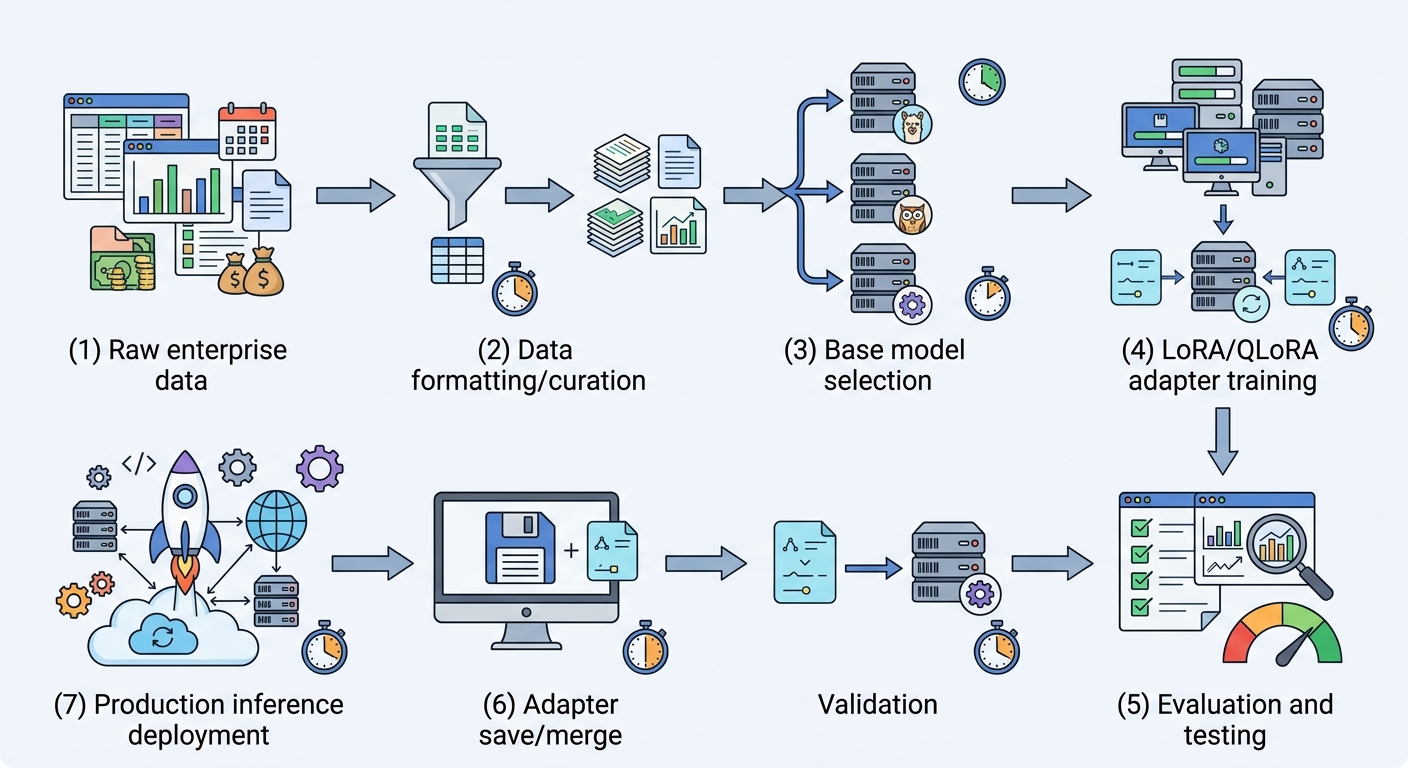
This section walks through a complete fine-tuning workflow using Unsloth, Hugging Face PEFT, and the TRL SFTTrainer. The example fine-tunes a Llama 3 8B Instruct model for a customer support use case.
Step 1: Environment Setup
Install the required Python packages. Unsloth provides an optimized fork of the Hugging Face ecosystem:
pip install torch>=2.4.1
pip install transformers datasets accelerate bitsandbytes peft trl
pip install "unsloth[colab-new] @ git+https://github.com/unslothai/unsloth.git"
pip install flash-attn
Step 2: Load the Base Model
For QLoRA, load the model with 4-bit quantization enabled. Unsloth handles the quantization configuration automatically:
from unsloth import FastLanguageModel

model, tokenizer = FastLanguageModel.from_pretrained(
    model_name="unsloth/llama-3-8b-Instruct-bnb-4bit",
    max_seq_length=2048,
    dtype=None,          # Auto-detects bfloat16 on Ampere+ GPUs
    load_in_4bit=True,   # Enable 4-bit NF4 quantization
)
For standard LoRA without quantization, use the non-quantized variant:
model, tokenizer = FastLanguageModel.from_pretrained(
    model_name="unsloth/llama-3-8b-Instruct",
    max_seq_length=2048,
    dtype=None,
    load_in_4bit=False,
)
Step 3: Apply LoRA Adapters
Configure the LoRA adapter. These settings are a reliable starting point for most enterprise use cases:
model = FastLanguageModel.get_peft_model(
    model,
    r=16,                          # Rank — 16 is a practical default
    target_modules=["q_proj", "k_proj", "v_proj", "o_proj",
                    "gate_proj", "up_proj", "down_proj"],
    lora_alpha=16,                 # Scaling factor — typically 2x r
    lora_dropout=0.05,             # Light dropout for regularization
    bias="none",                   # Do not train bias terms
    use_gradient_checkpointing="current_paged_adamw",
    random_state=3407,
)
Step 4: Prepare the Training Dataset
Format your data as instruction-response pairs. The Alpaca format is widely supported:
alpaca_prompt = """Below is an instruction that describes a task, paired with an input that provides further context. Write a response that appropriately completes the request.

### Instruction:
{}

### Input:
{}

### Response:
{}"""

def formatting_prompts_func(examples):
    instructions = examples["instruction"]
    inputs = examples["input"]
    outputs = examples["response"]
    texts = []
    for instruction, input_text, output in zip(instructions, inputs, outputs):
        text = alpaca_prompt.format(instruction, input_text, output)
        texts.append(text)
    return {"text": texts}

dataset = dataset.map(formatting_prompts_func, batched=True)
For enterprise customer support data, aim for 500–2,000 curated examples covering your most common query types, edge cases, and escalation scenarios. Quality of examples is more important than volume.
Step 5: Configure and Run Training
Use SFTTrainer from the TRL library for a robust training loop with built-in logging and evaluation:
from trl import SFTTrainer
from transformers import TrainingArguments

trainer = SFTTrainer(
    model=model,
    tokenizer=tokenizer,
    train_dataset=dataset,
    dataset_text_field="text",
    max_seq_length=2048,
    args=TrainingArguments(
        per_device_train_batch_size=2,
        gradient_accumulation_steps=4,     # Effective batch size of 8
        warmup_steps=10,
        num_train_epochs=3,                # Start with 3, monitor for overfitting
        learning_rate=1e-4,                # 1e-4 for Unsloth; 2e-4 for standard
        fp16=not torch.cuda.is_bf16_supported(),
        bf16=torch.cuda.is_bf16_supported(),
        logging_steps=1,
        optim="adamw_8bit",
        weight_decay=0.01,
        lr_scheduler_type="linear",
        seed=3407,
        output_dir="outputs",
    ),
)

trainer.train()
Step 6: Save the Fine-Tuned Model
Save only the adapter weights (small file) or merge them into the base model for standard inference:
# Save adapters only (recommended for multi-adapter serving)
model.save_pretrained("llama3-8b-support-adapters")
tokenizer.save_pretrained("llama3-8b-support-adapters")

# Or merge and save a standalone model
model.save_pretrained_merged(
    "llama3-8b-support-merged",
    tokenizer,
    save_method="merged_4bit_fine_tuned",
)
When to Fine-Tune vs When to Use RAG
This is the question enterprise AI teams ask most often, and it is also the most commonly misapplied decision.
Fine-tuning changes how a model behaves. It adjusts the model's internal representations to produce consistent tone, follow specific formats, refuse certain requests in a predictable way, or reason through domain-specific problems. Fine-tuning is appropriate when you need the model to behave differently — not when you need it to know more.
RAG (Retrieval-Augmented Generation) adds knowledge. RAG retrieves relevant documents from a knowledge base at inference time and includes them in the prompt context. This is the right approach when your use case requires up-to-date information, source citations, or access to knowledge that changes frequently.
Decision heuristic — If more than 60% of your use case is "the model needs to behave like X," fine-tune. If more than 20% is "the model needs to know Y (and Y changes)," use RAG.
The strongest enterprise architectures combine both. A fine-tuned base model provides consistent behavior, domain reasoning, and format enforcement. A RAG layer provides grounding in current documentation, policies, and product catalogs. The fine-tuned model processes the retrieved context more effectively because it already understands your domain's language and priorities.
Dataset Best Practices for Enterprise Fine-Tuning
Fine-tuning success is 80% data quality. Even the best model architecture cannot overcome a poorly curated dataset. Here are the practices that separate production-grade fine-tunes from failed experiments.
Volume guidelines by use case:
- Style and behavior adaptation (tone, format, refusals): 500–2,000 curated examples
- Domain expertise injection: 5,000–20,000 examples
- Task-specific fine-tuning (classification, extraction): 1,000–10,000 examples with balanced label distribution
Quality requirements:
- Deduplicate your dataset. Repeated or near-duplicate examples bias the model toward those patterns
- Maintain annotation consistency. If multiple labelers annotate your data, measure inter-annotator agreement
- Cover edge cases explicitly. The model will reflect the distribution of your training data, including its gaps
- Avoid data contamination. Ensure your training data does not include test set examples or production queries
Format consistency matters. Use a single prompt template across all examples. Inconsistent formatting — varying system prompts, different instruction phrasings — makes the model learn formatting as a secondary task and degrades its primary objective.
Split your data. Use an 80/10/10 train/validation/test split. The validation set tells you when to stop training. The test set tells you whether you actually succeeded.
Evaluating Fine-Tuned Models: Enterprise-Grade Assessment
A fine-tuned model that has not been rigorously evaluated is an unknown liability. Enterprise evaluation requires more than a gut check against a few examples.
Automated metrics for structured tasks:
- Exact match accuracy for classification and extraction tasks
- BLEU and ROUGE scores when comparing to reference outputs
- Perplexity as a general model quality proxy
LLM-as-a-judge uses a stronger model — GPT-4o or Claude 3.5 — to evaluate your fine-tuned model's outputs on dimensions like helpfulness, coherence, factual accuracy, and safety. This scales evaluation beyond human panel review while correlating well with human preference.
Human evaluation remains indispensable for behavioral nuances — tone, empathy, brand voice, and judgment calls — that automated metrics cannot capture. Set up a panel of 3–5 domain experts to review outputs before production deployment.
A/B testing in production compares your fine-tuned model against the base model or a previous fine-tune version using real traffic. Route 5–10% of requests to the new model and measure task completion rate, user satisfaction, and error rates.
Watch for these failure modes:
- Overfitting: the model repeats training data verbatim or fails on anything outside the training distribution
- Mode collapse: the model produces the same response regardless of input
- Excessive refusals: the fine-tuning has taught the model to refuse too broadly
- Hallucination regression: the model fabricates information it previously handled correctly
Deployment: From Adapters to Production
Saving a fine-tuned model is not deployment. Here is what the path to production looks like for LoRA/QLoRA fine-tuned models.
Merge before serving. Most inference frameworks (vLLM, TGI, llama.cpp) expect a standalone model file, not a base model plus adapter. Merge the adapter weights into the base model before deploying:
model.save_pretrained_merged("llama3-8b-support-production", tokenizer,
                             save_method="merged_4bit_fine_tuned")
For CPU or edge inference, export to GGUF format for quantized inference with llama.cpp:
model.save_pretrained_gguf("llama3-8b-support-gguf", tokenizer)
Adapter management in production. Adapter files are small — typically 50–200 megabytes. This enables a powerful SaaS pattern: host a single base model, and load different adapters per customer or use case. You can serve hundreds of specialized models without duplicating the base model. Route incoming requests to the appropriate adapter based on customer ID, product context, or request type.
Serving infrastructure. For GPU inference, vLLM provides the highest throughput via paged attention and continuous batching. Text Generation Inference (TGI) from Hugging Face offers easier deployment and strong latency characteristics. Both support tensor parallelism for multi-GPU serving of larger models.
Monitor post-deployment. Track latency per token, request throughput, error rates, and — most importantly — behavioral drift. Set up automated evaluations that run periodically against a golden dataset to detect degradation before users report it.
Conclusion
LoRA and QLoRA have fundamentally changed the economics of domain-specific LLM customization. In 2026, any enterprise team with a single GPU and a well-curated dataset can fine-tune a model that outperforms general-purpose APIs on their specific task — at a fraction of the inference cost.
The practical path forward is straightforward: start with a 7B or 8B model (Llama 3 8B or Mistral 7B), use Unsloth + Hugging Face PEFT for the fastest time to value, and invest heavily in your training data quality. That investment pays dividends across every fine-tune you run afterward.
For larger models or constrained hardware, QLoRA unlocks 33B and 70B parameter fine-tuning on infrastructure that most teams already have access to. The quality trade-off is small; the capability gain is enormous.
Evaluate rigorously before deployment, and design your serving architecture to take advantage of the adapter model pattern — multiple specialized models from a single base, managed and versioned independently.
The tools are mature. The costs are accessible. The question is no longer whether fine-tuning is feasible — it is which problem you will solve first.