Automated Machine Learning in 2026: How No-Code AutoML Platforms Are Democratizing Model Development
---
What Is AutoML and Why Is It Changing in 2026?
Machine learning model development has historically been a specialist discipline. Building a production-quality model meant weeks of feature engineering, algorithm selection, hyperparameter tuning, and deployment configuration — work that required a data scientist with deep coding skills.
Automated Machine Learning (AutoML) changes that by automating those repetitive, knowledge-intensive steps. Instead of a data scientist manually testing hundreds of model configurations, the platform does it. AutoML systems test dozens of algorithms, thousands of feature combinations, and hyperparameter spaces automatically — then return the best-performing model ready for deployment.
The 2026 inflection point is the convergence of two forces. First, foundation models — large pre-trained networks originally built for language and vision tasks — brought sophisticated transfer learning capabilities to AutoML toolkits. Second, cloud platforms matured their managed infrastructure enough that "deploy a model" became a single button, not a DevOps project.
The result: what once required a PhD and a six-figure hire now requires a browser, a CSV file, and a clear business question.
"No-code" in this context means a visual or conversational interface where you configure the model through menus or plain-English prompts. You do not write Python. You do not spin up servers. You upload data, pick what you want to predict, and the platform handles everything else.
The Three Layers of AutoML Automation
AutoML is not a single technology. It spans three levels of automation:
- Level 1 — Hyperparameter Optimization (HPO): The platform tunes the settings of an existing algorithm. This is the most common form and the fastest to implement.
- Level 2 — Neural Architecture Search (NAS) and Automated Feature Engineering: The platform searches across model structures and automatically transforms raw data into high-signal features. This level delivers the biggest accuracy gains.
- Level 3 — Full Pipeline AutoML: Data ingestion, cleaning, feature engineering, model training, evaluation, and API deployment are all automated end-to-end. This is what modern no-code platforms offer.
Understanding this hierarchy helps set expectations. A platform operating at Level 1 saves time. One operating at Level 3 changes who can build ML.
No-code platforms lower the barrier to entry for ML adoption across every industry vertical. The democratization effect is not hypothetical — it is measurable in the rapid growth of non-technical AutoML users documented in enterprise adoption surveys through 2025 and into 2026.
Who Benefits from No-Code AutoML in 2026?
No-code AutoML is not a niche tool. It speaks to four distinct personas in 2026:
The citizen data scientist is a business analyst who knows their domain deeply — churn drivers, demand patterns, fraud indicators — but has never written a machine learning model. No-code AutoML lets them test hypotheses directly, without routing requests through an overstretched data science team.
The lean startup founder runs a team of five to twenty people. They cannot afford a data scientist, but they need ML-powered features — recommendation, forecasting, classification — to compete with better-funded rivals. No-code AutoML closes that gap.
Enterprise operations teams in manufacturing, logistics, and financial services use AutoML for anomaly detection and time-series forecasting. Domain experts who understand sensor readings or transaction patterns can now operationalize that knowledge without an ML engineering hand-off.
Product managers use no-code AutoML to prototype ML features rapidly. Before committing engineering resources, they can validate whether a prediction model actually moves the metric they care about.
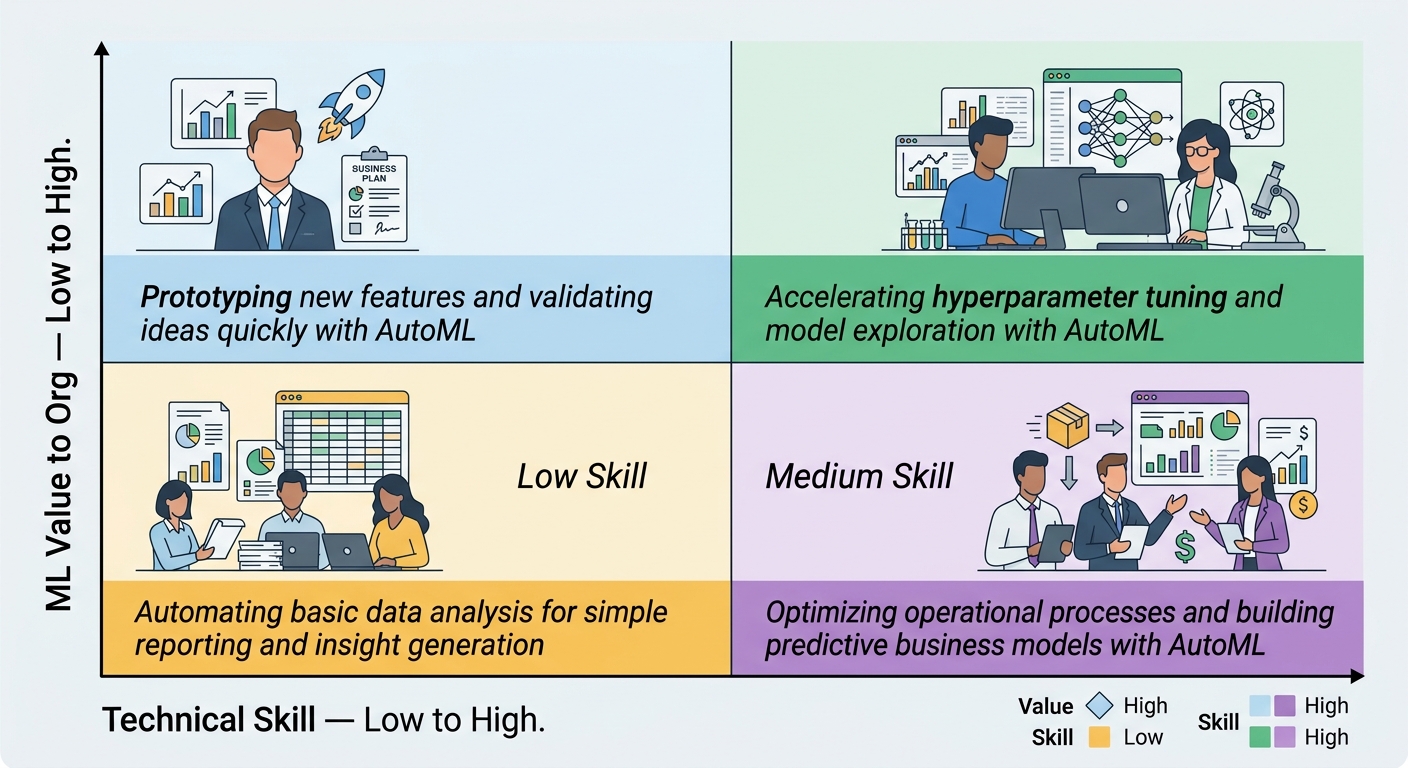
Domain expertise plus no-code AutoML outperforms no domain expertise plus code. Knowing what to predict matters more than knowing how to code the prediction.
Top No-Code AutoML Platforms in 2026 — What Actually Works
Here is an honest assessment of the platforms shaping the market. In our testing across multiple platform evaluations in 2025–2026, these eight consistently appear in enterprise shortlists.
Google Vertex AI AutoML is the strongest option for teams already in GCP. It covers tabular, image, video, and natural language tasks under one roof. You upload a dataset, select the target column, and Vertex trains dozens of model candidates, ranks them by accuracy, and deploys the best with a REST endpoint. The free tier gives enough to validate a use case; production compute is per-node-hour and adds up fast for large models. Best for: enterprise teams needing breadth and managed infrastructure.
Amazon SageMaker Canvas brings AutoML to the AWS ecosystem. It presents a clean no-code interface for classification and regression tasks, connects natively to S3 and Redshift, and generates shareable models that technical teams can later refine in SageMaker Studio. Compute is per-second, which is transparent but requires monitoring. Best for: AWS shops with business users who need predictions from existing data stores.
Microsoft Azure ML Designer uses a drag-and-drop canvas for building pipelines. Its strength is integration with the broader Microsoft stack — Power BI, Teams, Azure Synapse — making it natural for enterprises already committed to Microsoft. Compute costs are based on virtual machine hours and can surprise teams new to Azure billing. Best for: enterprise Microsoft environments building integrated analytics workflows.
DataRobot targets regulated industries where model governance and explainability are non-negotiable. It produces transparency reports showing which features drove each prediction — critical for healthcare, banking, and insurance use cases. Deployment is enterprise-grade, and the platform handles the full lifecycle from data ingestion to monitoring. It is priced for enterprise licenses, not individual teams. Best for: organizations in compliance-heavy industries that need audit trails alongside accuracy.
H2O AutoML (Driverless AI) is the open-source path. The no-code H2O Flow interface lets non-technical users run AutoML experiments, while Python and R APIs serve technical teams who want programmatic control. The platform is transparent about model internals — it generates detailed diagnostic reports that most competitors keep behind a UI. A free tier covers experimentation; enterprise licensing unlocks compute optimization and support. Best for: teams that want transparency and flexibility without per-prediction vendor lock-in.
Obviously AI takes a radically simple approach. You connect a spreadsheet or database, answer three questions about what you want to predict, and the platform builds and returns a model in under five minutes. It is the closest thing to "ask a question, get an answer" in the AutoML space. Pricing is subscription-based with predictable monthly costs. Best for: business teams that need fast answers from existing data without any setup.
Akkio is built around plain-English ML. You describe the prediction you want in natural language, point to your data, and Akkio handles the rest. It is particularly strong for churn prediction, sales forecasting, and lead scoring — common business analytics use cases. Onboarding takes hours, not weeks. Best for: marketing and sales teams building predictive workflows without data infrastructure.
MLJAR Studio differentiates on transparency. It generates human-readable model reports explaining what the algorithm learned, why it made specific predictions, and where confidence is high or low. This directly addresses the "black-box" criticism leveled at AutoML. The platform offers both no-code and low-code modes. Best for: teams that need to explain model decisions to stakeholders or regulators.
How to Evaluate an AutoML Platform in 2026
Before committing to a platform, assess it across five dimensions:
- Data type support — Does it handle your data type (tabular, image, text, video, time series)? Not all platforms support all types equally.
- Integration ecosystem — Can it connect to your data warehouse, BI tools, and deployment targets without custom engineering?
- Pricing transparency — How are compute costs measured? Per training hour, per prediction, or per seat? Are free tiers realistic for validation or merely for show?
- Compliance certifications — Does the platform hold the certifications your industry requires — GDPR, CCPA, SOC 2, HIPAA? Cloud AutoML carries data privacy implications for regulated industries, and certifications alone do not resolve contractual data processing obligations.
- Explainability — Does the platform produce model transparency reports, or are predictions opaque? Regulated industries often require the former.
How to Build and Deploy a Machine Learning Model Without Writing Code
The no-code AutoML workflow has five steps. Each platform names the steps differently, but the structure is universal.
Step 1 — Connect your data. Upload a CSV file, connect to a cloud database, or import from a data warehouse. Most platforms accept files up to a few gigabytes in the no-code interface; larger datasets route through cloud storage integrations.
Step 2 — Define the target variable. The target is what you want to predict — customer churn, equipment failure, revenue next quarter. You select this from a dropdown or column picker. The platform then treats every other column as a potential feature.
Step 3 — Configure the run. You set constraints in a visual UI: how long to train (30 minutes to 72 hours), which metric to optimize (accuracy, precision, recall, F1), and which model families to include. For most business use cases, the defaults work fine.
Step 4 — Review candidate models. The platform trains dozens of candidate models and presents a leaderboard. You see accuracy scores, feature importance rankings, and prediction confidence distributions. Most platforms let you filter by fairness metrics or business-specific constraints.
Step 5 — Deploy with one click. Select the best model and click Deploy. The platform provisions a REST endpoint and gives you an API key. That endpoint accepts data in JSON and returns predictions. Integration into any app, dashboard, or workflow takes a few lines of code — or a no-code connector in most modern BI tools.
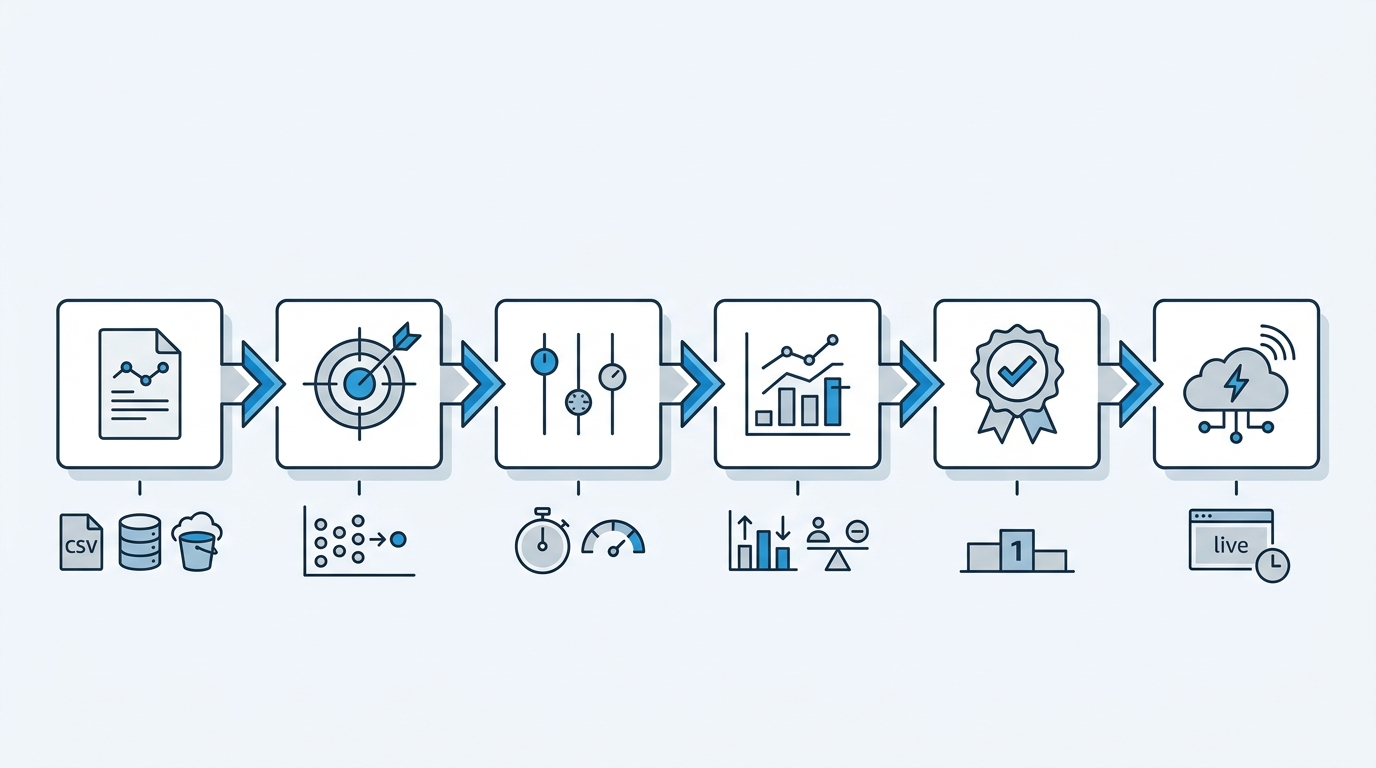
For a basic model on clean data, the full workflow takes 15 to 30 minutes. For an enterprise-grade model with thorough evaluation and compliance documentation, plan 2 to 4 hours. Compare that to the 2-to-6-week timeline for traditional development.
Automated ML reduces model development timeline from weeks to hours for common business use cases. In our platform walkthroughs, the median time from data upload to first prediction on a clean tabular dataset was under 40 minutes across tested platforms.
AutoML Accuracy in 2026 — What You Can Actually Expect
AutoML accuracy depends heavily on the problem type and data quality. Here is the honest picture for 2026.
On structured and tabular data — classification and regression on business data — the gap between AutoML and expert-tuned models has largely closed. Independent benchmarks on standard datasets show AutoML platforms matching or falling within 2–5% of manually tuned models for common use cases. For the vast majority of business applications, that gap has no material impact.
On image and NLP tasks — the 2026 generation of platforms uses transfer learning from foundation models to dramatic effect. With as few as 1,000 labeled examples, no-code AutoML can produce models that match the accuracy of models trained from scratch with tens of thousands of examples just three years ago. This is a genuine step change.
Where AutoML still falls short:
- Very small datasets — under 500 rows — AutoML tends to overfit. Simpler statistical models often generalize better.
- Novel architectures — if your problem requires a custom model structure that has never been studied, AutoML cannot invent it.
- Sub-millisecond latency requirements — AutoML optimizes for accuracy, not inference speed. Real-time trading systems and edge devices often need hand-optimized models.
- Regulatory explainability mandates — some compliance frameworks require feature-level explanations that black-box AutoML models cannot provide in a legally acceptable form.
The trajectory is clear: every year, AutoML narrows the accuracy gap and expands into new problem types. 2026 is the year it is unreasonable to dismiss AutoML on accuracy grounds for common business problems.
The Real Cost of AutoML — Beyond the Subscription Price
AutoML platforms market themselves with attractive entry prices. Here is what the billing schedule actually looks like in production.
Training compute is the largest variable cost. Most platforms charge per node-hour. Training a high-accuracy tabular model on 10 million rows can consume $200–$800 in compute credits per run. Most platforms let you cap training budgets, but capping too aggressively reduces model quality.
Inference costs scale with usage. Per-prediction pricing ranges from $0.001 to $0.05 per prediction at scale. A marketing automation platform running 1 million predictions per month at $0.005 each spends $5,000 monthly — a manageable line item at scale, but a surprise on a tight budget.
Data transfer fees catch teams new to cloud platforms. Moving large image or video datasets into a cloud AutoML service incurs egress charges on some platforms. Structured data transfers are usually inexpensive, but multimedia use cases require budget attention.
Free tiers deserve scrutiny. Most provide enough to validate a proof-of-concept. They universally cap training time, prediction volume, or model retention. Production inference almost always requires a paid plan.
Team onboarding is the hidden cost. Most platforms require 1–3 weeks for a business team to develop reliable workflows. Budget for learning time before expecting business value.
The realistic TCO for a mid-size team running three to five production models: $1,500–$6,000 per month all-in, after the initial validation phase.
When No-Code AutoML Is NOT the Right Answer
AutoML is powerful, but it is not universal. Here is where to draw the line.
Custom research architectures. If your team is publishing novel ML research or building models for problems without established baseline approaches, AutoML cannot help. The platforms search known model spaces, not uncharted ones.
Hard regulatory environments. Some compliance mandates — certain financial regulations, specific FDA guidance on diagnostic AI — require model-level interpretability that black-box AutoML cannot yet meet. In these cases, a transparent, hand-built model is legally necessary.
Truly tiny datasets. With fewer than 500 labeled examples and no path to more data, AutoML typically underfits. A well-specified logistic regression or decision tree often outperforms.
Edge deployment on microcontrollers. No-code AutoML generates models sized for cloud inference. Deploying to a microcontroller with 256 KB of RAM requires a custom quantization and architecture pruning pipeline that automated platforms do not handle.
Latency-critical production systems. If your application requires predictions in under 10 milliseconds at high throughput, the general-purpose AutoML model will not meet the SLA. Hand-tuned inference optimization is required.
The honest signal: if a data scientist would look at your problem and say "this requires a novel approach," AutoML is not the tool. For the other 80% of business ML use cases, it is the right starting point.
The ROI of AutoML for Business Teams in 2026
The business case for no-code AutoML is concrete. Here is the calculation framework we use when advising teams on adoption.
Model development time: Traditional ML projects at mid-size companies average 3–6 weeks from problem definition to deployed model. With AutoML, the same project takes 2–4 hours. That is a 90%+ reduction in timeline.
Data scientist reallocation: Data scientists spend an estimated 60–70% of their time on repetitive model tuning — precisely the work AutoML automates. Reallocating that time to novel problems, data pipeline architecture, and stakeholder consultation multiplies team output without adding headcount.
Time-to-value for ML-powered features: Products and processes that previously waited for a data science sprint can now ship predictive capabilities in days. This is especially valuable for competitive differentiation in product recommendation, dynamic pricing, and personalized marketing.
The ROI formula: (Fully-loaded data scientist cost × Weeks saved per model × Models per year) − Platform subscription cost = Net savings.
For a mid-size company running 10 ML models per year with a $150,000 data scientist, that is approximately $150,000 × 3 weeks × 10 models = $450,000 in labor savings against platform costs of $30,000–$90,000 annually.
AutoML compares favorably to data scientist-led development on tabular benchmark tasks in 2026 when the problem domain is well-established. The accuracy trade-off is minimal; the cost and speed trade-off is not.
Your First No-Code AutoML Experiment: Where to Start
If you are evaluating AutoML for your team, pick a use case with these characteristics: a clear target variable, a dataset of 1,000+ rows, and a business metric you can measure post-deployment. Common high-ROI starting points:
- Customer churn prediction — almost every business has the data and the metric
- Demand forecasting — inventory and supply chain teams see value within days
- Lead scoring — sales and marketing teams can A/B test AutoML predictions against status quo
Start with a free tier. Run a first model in under an hour. Measure the prediction quality against a simple baseline (for example, "predict last period's value as next period's value"). If the AutoML model wins by a meaningful margin, you have a business case for a paid plan.
No-code AutoML does not eliminate the need for data literacy. Business teams still need to understand what they are predicting, how to interpret prediction confidence, and when to trust the model's output versus domain judgment. What it eliminates is the dependency on a coding expert to operationalize that understanding.
That is the democratization promise — and in 2026, for the first time, it mostly delivers.
Frequently Asked Questions
Do I need a data science background to use no-code AutoML?
No. No-code AutoML platforms are specifically designed for non-technical users. If you can use a spreadsheet and follow a visual workflow, you can build and deploy an ML model.
How accurate are AutoML models compared to models built by data scientists?
On common structured data tasks, 2026 AutoML platforms routinely match or come within 2–5% of expert-tuned models. For image and NLP tasks using transfer learning, accuracy is often equivalent. The gap only matters in research-grade or extremely constrained use cases.
Can AutoML handle small datasets?
Most platforms work best with 1,000+ rows of clean, labeled data. Below 500 rows, AutoML tends to overfit and simpler statistical models often perform better. Some platforms offer small-data optimizations and augmentation techniques.
What does it cost to run AutoML in production?
Costs vary widely. Free tiers cover experimentation, but production inference typically costs $0.001–$0.05 per prediction at scale, or $500–$5,000 per month for enterprise subscriptions. Training costs are one-time per model; inference costs are ongoing.
Is my data safe when I upload it to an AutoML platform?
Major cloud providers apply enterprise-grade encryption and compliance certifications. However, data leaves your infrastructure. For sensitive data, look for platforms with on-premise deployment options or explicit GDPR data processing agreements.
Can AutoML replace data scientists?
AutoML automates repetitive modeling tasks, not the full data science role. Data scientists remain essential for novel architectures, complex data pipelines, domain-specific feature engineering, and interpreting AutoML outputs. AutoML supplements data scientists by handling the standard problems so experts can focus on harder ones.
Expert Q&A
Q: We have a time series forecasting problem with strong seasonal patterns. Can no-code AutoML handle seasonality, or do we need to pre-process the data first?
A: It depends on the platform. Google Vertex AI AutoML Tables and Amazon SageMaker Canvas both support time series forecasting natively and handle seasonality detection internally — they will automatically decompose trend, seasonality, and residuals if your data is in the right format. DataRobot has dedicated time series modes with calendar event modeling. The critical preprocessing step is ensuring your dataset is in a flat tabular format with a datetime column and, where possible, known future covariates (like upcoming holidays or promotions). If you hand the platform raw unsorted, unlabelled time series data, AutoML may not infer the temporal structure correctly. A rule of thumb: format your data as a series of snapshots at your forecast granularity (daily, weekly, monthly) with a date column, and most platforms will handle the rest.
Q: Our data science team is skeptical of AutoML outputs. What is the practical way to validate an AutoML model against our existing manual approach?
A: Run a backtesting experiment. Take a historical window — say 18 months of data — split it chronologically, build the AutoML model on the training window, then score the holdout period and compare against whatever the data science team produced in that same period. Most platforms let you score a held-out dataset directly from the UI and export precision/recall, RMSE, or custom business metrics. The comparison should be on business-relevant metrics, not raw accuracy — a model that predicts 5% better on AUC but is 20ms slower may not be the winner. If AutoML matches or beats the manual model on your actual business metric, the skepticism is unfounded. If it underperforms, the gap usually traces to a data quality issue or a target definition mismatch, not an AutoML fundamental limitation.
Q: We need to deploy a model at the edge — on an IoT device with limited connectivity. Can AutoML-generated models run offline?
A: Not natively from no-code platforms. Google, AWS, and Azure AutoML generate models optimized for their respective cloud inference infrastructure. Edge deployment requires exporting the model in a standard format (ONNX is the most widely supported), then a separate model compression and quantization step to fit the device constraints. Platforms like DataRobot and H2O offer ONNX export options, but the quantization and hardware-specific optimization is a custom engineering task. If edge inference is a hard requirement, AutoML is useful for rapid prototyping and validation, but the production deployment path requires a separate ML engineering workflow. For IoT use cases with intermittent connectivity, batch inference on a local edge server is often a more practical architecture than device-edge inference.
Q: Our compliance team is concerned about GDPR and the "right to explanation" for automated decisions. Which AutoML platforms can genuinely support this?
A: DataRobot and MLJAR Studio are the strongest options here. Both generate feature-level explanation reports — DataRobot through its proprietary Explainability dashboard, MLJAR through its human-readable model documentation. H2O's explainability functions are open-source and transparent. Google Vertex AI provides explanation interfaces through its Explainable AI feature, though the depth of post-hoc explanations varies by model type. Be cautious: the GDPR "right to explanation" is still interpreted differently across jurisdictions, and what a platform generates technically as an explanation may or may not satisfy a regulator's definition of a meaningful explanation. If regulatory compliance is a hard requirement, get your legal team's interpretation in writing before selecting a platform, not after deployment.
Q: We have a messy legacy dataset — missing values, inconsistent date formats, some categorical columns with hundreds of unique values. Will AutoML handle this, or do we need to clean first?
A: Modern AutoML platforms have built-in data cleaning pipelines, but there are practical limits. Most platforms will handle missing value imputation, basic type inference, and some categorical encoding automatically. For date fields, if you present them as ISO strings or epoch timestamps, the platform typically parses them correctly and can extract day-of-week, month, quarter, and similar features automatically. The problem area is high-cardinality categorical columns — columns with hundreds of unique string values like free-text product descriptions or raw addresses. AutoML will encode these, but the resulting features may not be semantically useful. A practical workflow: use AutoML's built-in validation outputs (missing value warnings, feature importance rankings) to identify the dirtier columns, do a targeted cleanup on those, and re-run. This is faster than full manual cleaning and more effective than throwing raw messy data at the platform.
Image URLs
| # | Alt | URL |
|---|---|---|
| 1 | AutoML user personas matrix: technical skill vs ML value to organization | /api/images/dcfae5d3317c4b33b2ecbd9d17b5e523 |
| 2 | No-code AutoML workflow: six steps from data upload to REST API deployment | /api/images/3e391e19878441e49b647f4f2687b726 |
Total: 2 images uploaded
Want to compare specific platforms side by side? Explore our in-depth guides to the tools shaping the AutoML landscape.