AI Code Generation Tools Showdown: GitHub Copilot, Cursor, and Amazon CodeWhisperer in 2026 Enterprise
Which AI code generation tool is right for your enterprise in 2026? Our hands-on comparison of GitHu...
AI code generation tools have graduated from "interesting experiment" to production infrastructure decision. Three platforms have consolidated as the primary options for enterprise teams in 2026: GitHub Copilot, Cursor, and Amazon CodeWhisperer. Each has a compelling pitch. Each has genuine trade-offs. And for the first time, the differences between them are significant enough to matter for your organization.
This guide cuts through the marketing noise. We are senior engineers and DevOps architects who have deployed all three tools at scale, and we are going to give you an honest assessment of where each one wins, where it falls short, and how to choose.

The Enterprise AI Coding Landscape in 2026
Two forces have pushed AI coding tools from curiosity to necessity. The first is agentic AI. The 2024-2025 generation of coding assistants could complete individual lines or small blocks. The 2026 generation can reason across thousands of lines of code, autonomously refactor multiple files, and open pull requests from a single high-level instruction. That capability jump changes what "AI coding tool" means for your team.
The second force is code abundance. Modern engineering teams generate more code faster than any human review process can keep pace with. AI coding assistants are no longer just a developer productivity play. They are the mechanism by which organizations maintain velocity without accumulating quality debt.
Three tools dominate the enterprise consideration set. GitHub Copilot is the incumbent — deeply embedded in the Microsoft/GitHub ecosystem, with the broadest IDE support and the only IP indemnification guarantee in the market. Cursor is the disruptor — a purpose-built AI-native IDE that has redefined what "agentic" means in a code editor. Amazon CodeWhisperer is the AWS specialist — a natural fit for teams that live heavily in the Amazon ecosystem and want integrated security scanning.

GitHub Copilot — The Enterprise Default
GitHub Copilot is the tool most enterprise procurement teams reach for first. That is not an accident. Microsoft has invested heavily in making Copilot the "safe choice" — the option that works in virtually any IDE, integrates natively with GitHub's workflow, and carries the legal protections that regulated industries require.
Strengths for Enterprise
Copilot works as a plugin across VS Code, the entire JetBrains lineup, Neovim, Vim, Visual Studio, and the GitHub web editor. For organizations with heterogeneous developer environments, that breadth matters. You can roll out Copilot without asking anyone to change their workflow.
The enterprise security story is where Copilot genuinely separates itself. Business tier includes SOC 2 Type II compliance, privacy mode (your code is not used for training), and policy controls. Enterprise tier adds IP indemnification — Microsoft will defend you in court if a Copilot-generated code snippet infringes third-party intellectual property. This is the feature that keeps legal teams awake at night, and it is the feature no competitor currently matches.
The agent modes have expanded significantly. Copilot's agents can now read multiple files, open issues, generate pull requests, and execute autonomous coding tasks. The experience is not as fluid as Cursor's, but it is functional and improving rapidly.
Security, Compliance & Governance
Copilot Business and Enterprise both offer privacy mode. Your code snippets are not retained by Microsoft for model training. Audit logs give security teams visibility into which developers are using Copilot and how. SCIM provisioning means Copilot slots cleanly into your existing identity management.
The IP indemnification on Enterprise is the genuine differentiator. If your developers use Copilot to generate code that turns out to infringe a patent or copyright, Microsoft's legal team will step in. No other tool in this comparison makes that promise. For financial services, healthcare, and defense contractors, that indemnity is not optional.
Pricing & Scale Considerations
Copilot Business runs $19 per user per month. Enterprise is $39 per user per month. At 100 engineers, that is $45,600 per year on the Business tier — meaningful money, though the productivity case is generally strong enough to justify it.
The pricing gets complicated at scale. Organizations with thousands of developers often negotiate enterprise agreements. The per-seat model creates pressure to exclude contractors, junior developers, or part-time contributors — exactly the populations who might benefit most from AI assistance.
Where It Falls Short in 2026
Copilot's context window is 64,000 tokens. That sounds large until you are working with a complex monorepo and need the model to reason across hundreds of related files simultaneously. Cursor's semantic repository indexing handles this differently and, in our experience, more effectively.
The agent experience, while improved, still feels like an AI plugin acting within an IDE rather than an AI-native environment. Multi-file refactoring in Copilot requires more manual coordination than in Cursor, and the reasoning traces are less transparent.
Cursor — The AI-First Disruptor
Cursor arrived in 2023 as a VS Code fork rebuilt from the ground up for AI-native development. In 2026, it has become the tool that Copilot is racing to catch up to. If Copilot is the safe enterprise choice, Cursor is the choice for teams that want maximum capability and are willing to accept some friction.
Why Cursor Is Different
The architectural distinction matters more than it sounds. Copilot is a plugin. Cursor is an IDE. That difference means Cursor's AI integrations have access to the full editor context — every open file, every terminal output, every debugger state — without requiring explicit user action. The model does not need to be "told" what files are relevant; it knows because it is running inside the development environment.
Cursor supports OpenAI's models, Anthropic's Claude (including Opus and Sonnet 4.6), and Google Gemini. You can also point it at custom API endpoints. This flexibility means you can pick the model that best fits your workload — a capability that neither Copilot nor CodeWhisperer offers.
Enterprise Features: SSO, SCIM, RBAC, Privacy Mode
Cursor has closed its enterprise feature gap significantly. The Teams tier includes SAML/OIDC SSO, SCIM provisioning, role-based access controls, and enforced privacy mode. Privacy mode means zero data retention — Cursor does not store your code or conversations, and does not use them for training. SOC 2 Type II compliance covers the AWS infrastructure Cursor runs on.
The one enterprise feature Cursor cannot offer is IP indemnification. That remains a meaningful gap for regulated industries.
Agentic Workflows & Multi-File Editing
Cursor is where the 2026 coding assistant story gets exciting. The Composer lets you make coordinated changes across dozens of files simultaneously, reasoning about your entire codebase as a connected system rather than a collection of individual files. Background Agents can run longer research and implementation tasks while you continue working. BugBot reviews pull requests autonomously and flags potential issues.
.cursorrules is a file you add to your repository that encodes project-specific conventions, architectural decisions, and coding standards. When a developer opens a Cursor session in that repo, the AI immediately understands the project context. Teams report up to 70% fewer pull request review comments after establishing solid .cursorrules files.
We have seen teams save 8–12 hours per week on complex refactors in Cursor. The productivity delta is real. The caveat is that it requires discipline to use Cursor's capabilities well — the tool will happily generate large amounts of code quickly, and not all of it will be right.
Pricing & IDE Lock-in Trade-offs
Cursor Teams runs approximately $40 per user per month — higher than Copilot Business. That premium buys meaningfully better AI capability, but it requires your team to adopt Cursor as their IDE. For organizations that are already standardized on VS Code, that migration is relatively smooth. For teams on JetBrains or Vim/Neovim, the lock-in is more painful.
Amazon CodeWhisperer — The AWS-Native Choice
Amazon CodeWhisperer occupies a different niche than Copilot or Cursor. It is not trying to be the best general-purpose AI coding assistant. It is trying to be the best AI coding assistant for AWS-centric development. Depending on your infrastructure, that focus can be either its greatest strength or its most significant limitation.
Deep AWS Integration Benefits
CodeWhisperer integrates natively with Lambda, S3, Cloud9, and the broader AWS API surface. When you are writing a Lambda function handler, CodeWhisperer generates code that follows AWS best practices by default — IAM permission least-privilege patterns, retry logic for API calls, proper error handling for transient failures. That is not something the other tools match out of the box.
The integration with AWS Toolchain and Cloud9 makes it natural for teams already living in the AWS ecosystem. Security scanning runs automatically as you code, flagging vulnerabilities in generated Python, Java, and JavaScript against the OWASP Top Ten.
Security Scanning & Customization
CodeWhisperer Professional includes built-in security scanning. It identifies potential security issues in generated code in real time — not as a post-commit check, but as an inline coding assistant signal. For teams without dedicated security tooling integrated into their pipeline, this is valuable.
Customization is CodeWhisperer's most underappreciated feature. You can fine-tune the model on your internal codebases, internal APIs, and architectural patterns. A financial services firm can connect CodeWhisperer to their proprietary trading libraries. A healthcare organization can connect it to their HIPAA-compliant data access patterns. The model learns your codebase the way a senior developer on your team would.
Open-Source Reference Tracking
CodeWhisperer flags suggestions that are derived from open-source training data, showing you the source URL and license type. If you are operating under strict open-source compliance requirements, this is a genuine help. Copilot and Cursor do not offer this.
Limitations Outside the AWS Ecosystem
Here is the honest assessment: if your infrastructure is not primarily AWS, CodeWhisperer's core value proposition collapses. The Lambda and S3 integrations that make it powerful for AWS shops are irrelevant if you are running on GCP, Azure, or on-premises infrastructure.
The agentic capabilities lag behind both Copilot and Cursor. CodeWhisperer is strongest as a code completion and security scanning tool. Its autonomous multi-file editing capabilities are more limited.
Pricing
CodeWhisperer Professional runs approximately $19 per user per month — competitive with Copilot Business. There is a capable free tier for individual developers. The economics are favorable, especially for organizations already paying for AWS infrastructure that includes CodeWhisperer seats.
Head-to-Head Comparison
| Feature | GitHub Copilot | Cursor | Amazon CodeWhisperer |
|---|---|---|---|
| IDE Architecture | Plugin (VS Code, JetBrains, Neovim, Vim, VS, GitHub web) | AI-native IDE (VS Code fork) | Plugin (VS Code, JetBrains, Cloud9, etc.) |
| Multi-model support | OpenAI GPT family (proprietary) | OpenAI + Anthropic Claude + Google Gemini + custom endpoints | Amazon Titan + custom fine-tuned models |
| Context window | 64K tokens | Near-unlimited with semantic indexing | ~100K tokens (CodeWhisperer Pro) |
| Agentic workflows | Agent modes, cloud agents, custom agents | Composer, Background Agents, BugBot, .cursorrules | Limited; code completion focus |
| SSO / SAML / OIDC | ✅ Business+ | ✅ Enterprise (SAML/OIDC) | ✅ Professional tier |
| SCIM provisioning | ✅ Enterprise | ✅ Enterprise | ✅ Professional tier |
| RBAC | ✅ Enterprise | ✅ Enterprise | ✅ Professional tier |
| SOC 2 Type II | ✅ Enterprise | ✅ Enterprise (AWS infra) | ✅ |
| IP indemnification | ✅ Enterprise only | ❌ | ❌ |
| Privacy mode / No training | ✅ Business+ | ✅ Enforced privacy mode | ✅ |
| Open-source reference tracker | ❌ | ❌ | ✅ |
| Custom model training | ✅ On private codebases (Enterprise) | Via custom API endpoints | ✅ On internal codebases |
| Pricing (per user/mo) | Business $19; Enterprise $39 | Teams ~$40 | Professional ~$19; Free tier |
| AWS-native integration | ❌ | ❌ | ✅✅ (core differentiator) |
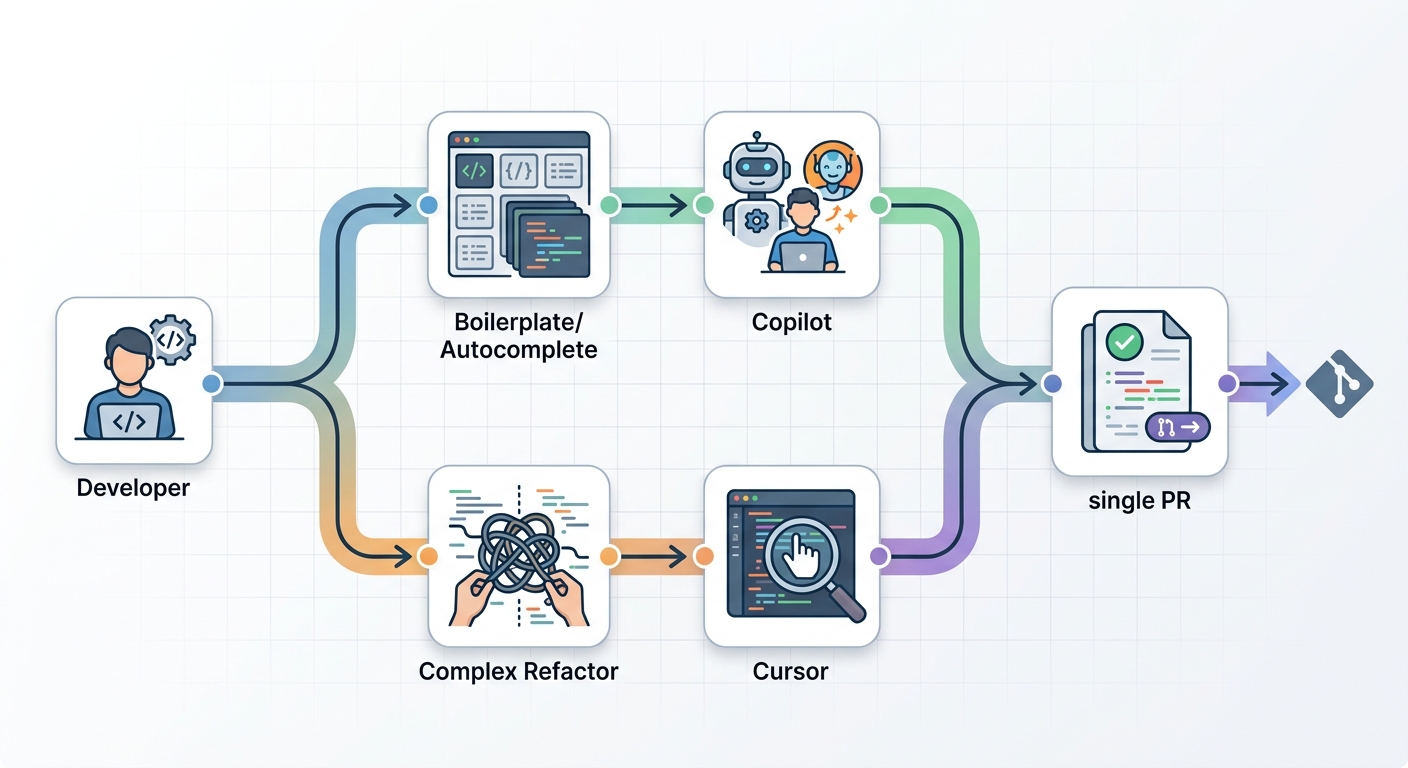
The Emerging Hybrid Workflow
The most sophisticated teams we work with are not choosing one tool. They are running multiple tools simultaneously for different tasks.
The dominant pattern we see is Copilot for boilerplate + Cursor for complex refactoring. Copilot is faster and less intrusive for day-to-day autocomplete and small, repetitive tasks. When a developer needs to tackle a significant architectural change — splitting a service, renaming across hundreds of files, implementing a new pattern throughout a codebase — they open it in Cursor and let the agent work.
A second common hybrid: CodeWhisperer for AWS infrastructure code + Copilot or Cursor for application logic. Teams writing Terraform and Lambda functions appreciate CodeWhisperer's AWS best-practice generation. Application developers prefer Copilot or Cursor for everything else.
The governance implication of multi-tool environments is often overlooked. When you run three AI coding tools, you have three separate audit log streams, three separate admin consoles, and three separate policies to manage. Centralized AI usage analytics become a real operational need, not a nice-to-have.
The risk of tool overlap is code style fragmentation. If your team is using both Copilot and Cursor, you need alignment on standards. .cursorrules files, shared linter configurations, and explicit style guides become more important, not less.
Enterprise Best Practices for AI Code Tools in 2026
Governance-as-Code: Policy as Executable Rules
Treat your AI tool policies as first-class engineering artifacts. Represent them as code in your version control system. Run tests against them in CI/CD. Block releases when governance controls fail.
What does this look like in practice? Instead of an informal policy document that says "developers should review all AI-generated code," you implement a pre-commit hook that requires a PR reviewer acknowledgment for any file touched by an AI assistant. You write automated tests that verify audit logs capture AI tool usage. You encode your policy as infrastructure.
Treat AI Output as Untrusted: Human Review Workflows
Every line of AI-generated code should pass through human review before reaching production. This is not about distrusting the model — it is about maintaining accountability. When a production incident occurs, your team needs to be able to explain every decision in the codebase, including decisions made with AI assistance.
Audit logs should capture which files were modified with AI assistance, which model was used, and who approved the change. This data matters for compliance, for incident investigation, and for measuring the actual quality of your AI-assisted development process.
Compliance Alignment: EU AI Act, NIST AI RMF, ISO/IEC 42001
The EU AI Act's high-risk AI classification implications for autonomous coding agents take full effect August 2, 2026. If you are deploying AI coding tools in a regulated industry, your legal and compliance teams should already be assessing exposure.
NIST's AI Risk Management Framework provides a useful assessment structure: categorize your AI tool usage, identify risks, measure your controls, and monitor continuously. ISO/IEC 42001, the AI management system standard, offers a more prescriptive path for organizations that want a formal certification.
CI/CD Security Integration for AI-Generated Code
Your existing security scanning pipeline should extend to AI-generated code. Dependency vulnerability checks, SAST tooling, and secret scanning should run on every pull request regardless of whether a human or an AI generated the changes.
The specific risk with AI-generated code is that it tends to look reasonable even when it contains subtle security flaws. A developer reviewing their own code tends to catch obvious mistakes. A developer reviewing AI-generated code often assumes the AI "knows what it is doing" and approves changes that would be flagged if written by a human. Treat AI output with the same skepticism you would apply to a contractor's first commit.
FinOps: Cloud Cost Guardrails in the Pipeline
AI tool subscription costs are real, and they grow with headcount. Integrate cost monitoring into your CI/CD dashboard. Track AI tool usage per team and per project. Set thresholds that trigger alerts when spend exceeds expected ranges.
The mistake many organizations make is treating AI tool costs as a purely individual developer concern. In practice, the ROI calculation — developer hours saved versus subscription cost — needs to be visible at the engineering leadership level. Otherwise you end up with a budget surprise at renewal time.
Decision Framework — Which Tool Should Your Enterprise Choose?
Quick Rubric
| Your priority | Recommended tool |
|---|---|
| Existing GitHub ecosystem, broad IDE support, IP indemnification | GitHub Copilot Enterprise |
| Maximum AI capability, multi-file agentic workflows, deep codebase reasoning | Cursor |
| AWS-native development, Lambda/S3 best-practice generation | Amazon CodeWhisperer Professional |
| Hybrid teams with complex multi-tool needs | Copilot + Cursor (document rationale per team) |
| Regulated industry requiring IP indemnification | Copilot Enterprise (only option with IP indemnity) |
Questions to Ask Before Choosing
Before committing to any platform, answer these six questions honestly:
Which IDEs does our team already use? Copilot works in virtually everything. Cursor requires migrating to its VS Code fork. If your team runs JetBrains exclusively, the Cursor migration is a real friction point.
What percentage of our codebase lives in GitHub versus other VCS? Copilot's deepest integrations are GitHub-only. If you use GitLab, Bitbucket, or Azure DevOps, some features are diminished.
Do we need IP indemnification for generated code? If your legal team requires it — and in financial services, healthcare, and defense, many do — Copilot Enterprise is your only option.
Is our infrastructure primarily AWS, multi-cloud, or on-prem? AWS shops get genuine value from CodeWhisperer's integration depth. Multi-cloud and on-prem teams will find CodeWhisperer underpowered for their core use cases.
How sophisticated are our CI/CD pipelines for integrating AI governance? If you have mature security scanning and audit logging already in place, adding AI tool governance is incremental. If you are starting from scratch, factor that investment into your tool selection.
What is our tolerance for IDE migration? Cursor's capability advantage is real. But switching IDEs across a 200-person engineering team is not a trivial undertaking. Budget the migration cost honestly.
Conclusion
There is no universal winner in the 2026 AI code generation tool landscape. The right choice depends on your stack, your security requirements, your IDE strategy, and your appetite for capability versus compliance risk.
GitHub Copilot Enterprise remains the lowest-risk choice for organizations that are GitHub-native, need IP indemnification, or have heterogeneous IDE environments. Cursor is the right choice for teams that want maximum AI capability and are willing to invest in the IDE migration. Amazon CodeWhisperer is the natural choice for AWS-centric teams that want integrated security scanning and customization at a competitive price.
The emerging hybrid pattern — Copilot for daily autocomplete, Cursor for complex agentic tasks — deserves serious consideration if you have teams with diverse workflows. The governance complexity is real, but so is the productivity delta.
Whatever you choose, treat AI coding tools as production infrastructure, not developer perks. Bake governance into your pipeline. Maintain human accountability. Measure outcomes. The teams that get the most value from AI coding assistants are the ones that treat them as engineering systems to be designed and operated, not as products to be purchased.
Start with your stack context. Answer the six questions above. Match your priority to the tool that serves it. That is how you choose in 2026.
Frequently Asked Questions
Is GitHub Copilot worth it for enterprise in 2026? For organizations already using GitHub and needing IP indemnification, Copilot Enterprise at $39/user/month delivers clear value. The productivity gains for teams writing significant amounts of code typically far exceed the per-seat cost. The question to answer honestly is whether your team will actually use the agentic features or primarily use autocomplete — if it is the latter, the value case is weaker.
Cursor vs Copilot — which is better for large teams? Cursor offers better AI capability, especially for complex refactoring and multi-file agentic tasks. Copilot offers better IDE compatibility and IP indemnification. For large teams with mixed IDE environments and legal compliance requirements, Copilot is often the practical choice. For teams standardized on VS Code and prioritizing AI capability, Cursor's $40/user/month premium is frequently justified.
Does Amazon CodeWhisperer work outside AWS? Yes — CodeWhisperer works as a general-purpose code completion tool regardless of your cloud infrastructure. However, its core value proposition (AWS best-practice generation, Lambda integration, Cloud9 tooling) only applies when you are building on AWS. Outside that ecosystem, it competes with Copilot and Cursor primarily on price and the open-source reference tracker.
What is the EU AI Act impact on AI coding tools? The EU AI Act's high-risk AI provisions take full effect August 2, 2026. AI coding assistants used in regulated industries (financial services, healthcare, defense) may fall under high-risk classification if they are used in automated decision-making workflows. Organizations should conduct a compliance assessment before rolling out AI coding tools to regulated teams.
How do I govern multiple AI coding tools simultaneously? Centralize audit logging across all AI tool platforms. Treat governance policies as code — version-controlled, tested in CI/CD, with deployment gates. Establish clear team-level guidelines for when to use each tool. Monitor adoption and quality metrics per tool to identify which platforms are delivering actual value.
Can AI-generated code introduce security vulnerabilities? Yes — and this is one of the most underappreciated risks of AI coding assistants. AI-generated code often looks structurally reasonable even when it contains subtle security flaws. Organizations should extend their existing security scanning pipeline (SAST, dependency checks, secret scanning) to all AI-assisted code changes, and train developers to apply the same scrutiny to AI output as they would to a contractor's first commit.
Expert Q&A — Practitioner Insights on AI Code Generation in the Enterprise
The following Q&A draws on direct enterprise deployment experience with GitHub Copilot, Cursor, and Amazon CodeWhisperer across organizations ranging from 50 to 5,000+ engineers.
You have deployed all three tools in production enterprise environments. What is the single most important lesson that shows up反复ly that organizations consistently underestimate?
The gap between "AI-assisted coding" and "AI-driven development" is wider than most organizations plan for. AI-assisted coding means the developer is still in the loop — AI generates suggestions, human approves. AI-driven development means the AI is making architectural decisions, generating large volumes of code autonomously, and the human is reviewing after the fact.
Most organizations start with the first mode and assume they are ready for the second. They are not. The quality bar for AI-assisted code review is high — you need strong .cursorrules or equivalent, you need mature linter integration, and you need developers who know how to evaluate AI output critically. When organizations jump to AI-driven development without that foundation, the code quality problems show up in production, not in review.
On the IP indemnification question — is it real, or is it marketing?
It is real, but narrower than the marketing suggests. Microsoft's IP indemnification covers situations where Copilot-generated code is alleged to infringe third-party patents or copyrights. It does not cover situations where your company generates harmful code, or where AI-generated code causes a security breach, or where generated code violates a regulatory requirement.
In practice, for the vast majority of enterprise use cases, IP indemnification from Copilot Enterprise is meaningful protection against a real risk. The situations where it would actually be invoked are probably rare. But "probably rare" is different from "never," and for organizations in financial services or healthcare where IP litigation is a known risk, that protection matters. Treat it as real insurance, not marketing copy.
You mentioned teams saving 8–12 hours per week with Cursor. That number feels high. What is the actual profile of that productivity gain?
The 8–12 hour figure is real but cherry-picked from teams doing active architectural refactoring — splitting microservices, implementing new patterns across large codebases, migrating between frameworks. In those contexts, Cursor's multi-file agentic capability is genuinely transformative. A task that would take a senior engineer two days of mechanical, repetitive file edits gets done in an afternoon.
For teams doing primarily feature development — writing new business logic, integrating APIs — the productivity gain is smaller, probably 2–4 hours per week. The AI is most powerful for large-scale mechanical transformation, not for novel design work. Organizations that expect Copilot or Cursor to dramatically accelerate greenfield development will be disappointed. Organizations that use it to offload large-scale refactoring see the large numbers.
What is your honest assessment of CodeWhisperer's customization feature — the ability to fine-tune on internal codebases?
CodeWhisperer's customization is genuinely powerful and genuinely underused. The reason it does not get more attention is that the setup cost is real. You need to curate a high-quality training dataset from your internal codebases. You need to validate that the fine-tuned model is producing better outputs than the base model. You need to maintain that fine-tuned model as your internal APIs and patterns evolve.
Organizations that do that investment well report significant quality improvements. A healthcare company I worked with fine-tuned CodeWhisperer on their internal data access patterns and HIPAA-compliant code conventions. The resulting model generated code that was meaningfully more aligned with their compliance requirements than the base model. That is not a small thing — that is the difference between code that passes security review on first submission and code that requires multiple rounds of correction.
The gotcha is that the investment is ongoing, not one-time. If your internal codebases change frequently, your fine-tuned model drifts. Budget for continuous validation and retraining.
The EU AI Act enforcement date of August 2, 2026 is coming up fast. What should organizations actually be doing right now?
Three things, in order of urgency.
First, if you are in a regulated industry — financial services, healthcare, defense, critical infrastructure — your legal and compliance team should already have a documented assessment of how AI coding tools map to EU AI Act risk categories. If that assessment does not exist, you are behind. Get it started this month.
Second, audit your current AI tool usage. Do you know which teams are using AI coding tools, which platforms, and what workflows? Most organizations do not have good visibility here. You cannot govern what you cannot see. Map your current usage before the enforcement date.
Third, establish your baseline governance controls. Even if the AI coding tool classification is not fully resolved, the controls that matter — human review of AI-generated code, security scanning in CI/CD, audit logging — are good practices regardless of regulatory obligation. Implement them now and you will be ready for whatever the final classification looks like.
For organizations choosing between Copilot and Cursor, what is the single biggest mistake you see?
Choosing Cursor because the demos are impressive without accounting for the IDE migration cost. Cursor's AI capability is genuinely better for complex agentic tasks. But "better AI" does not automatically translate to "better outcomes" if your team spends three months fighting with a new IDE, or if your JetBrains-only developers refuse to switch.
The organizations that get the most out of Cursor are ones that made the IDE decision deliberately — not "we heard Cursor is better" but "we evaluated our IDE landscape and decided the migration investment is worth the capability gain." That decision looks different for a 20-person VS Code shop than it does for a 500-person JetBrains organization.
The flip side of that mistake is organizations choosing Copilot because "it's what everyone uses" without evaluating whether Cursor might serve their specific teams better. The incumbent advantage is real but not always right.
What does enterprise AI coding tool governance look like when it is actually working well?
The organizations I have seen do this well share a few characteristics. Governance is owned by engineering leadership, not delegated to a separate "AI ethics" team that developers route around. Policies are specific and actionable — not "review all AI output" but "AI-assisted changes require a PR approval that explicitly acknowledges the AI assistance in the review comment."
Audit logging is automated and centralized. Every AI tool platform generates usage logs. The mature organizations aggregate those logs into a single observability platform where engineering leads can see aggregate usage, flag anomalies, and correlate AI tool usage with code quality metrics.
The last piece — and this is the hardest — is that they measure outcomes. They track whether AI coding tools are actually delivering productivity improvements, and they are willing to make platform changes if the data does not support continued investment. Most organizations measure adoption (are people using it?) but not impact (is it making our code better or faster?). The second measurement is what separates high-performing AI engineering programs from expensive subscriptions.