Building Your First RAG Pipeline in 2026: A Practical Step-by-Step Guide
A hands-on guide to building a RAG pipeline from scratch. Covers document chunking, embeddings, vector search, LangChain integration, and RAG evaluation metrics.
What Is a RAG Pipeline?
A RAG pipeline — short for Retrieval-Augmented Generation — connects a large language model to an external knowledge base. When a user asks a question, the system first retrieves relevant documents, then passes them as context to the LLM. The result: answers grounded in your actual data, not hallucinations.
RAG pipeline has three core phases:
- Ingestion — documents go in, get chunked, embedded, and stored in a vector database
- Retrieval — a user query comes in, gets embedded, and similar documents are pulled out
- Generation — the LLM receives the query plus retrieved context and generates a grounded answer
This architecture matters in 2026 more than ever. LLMs trained on static data struggle with proprietary knowledge, recent events, or domain-specific content. Fine-tuning solves this expensively and opaquely. RAG solves it cheaply and transparently — you can inspect exactly which documents informed each answer.
If you want a production-grade AI system that knows your data, you start with RAG.
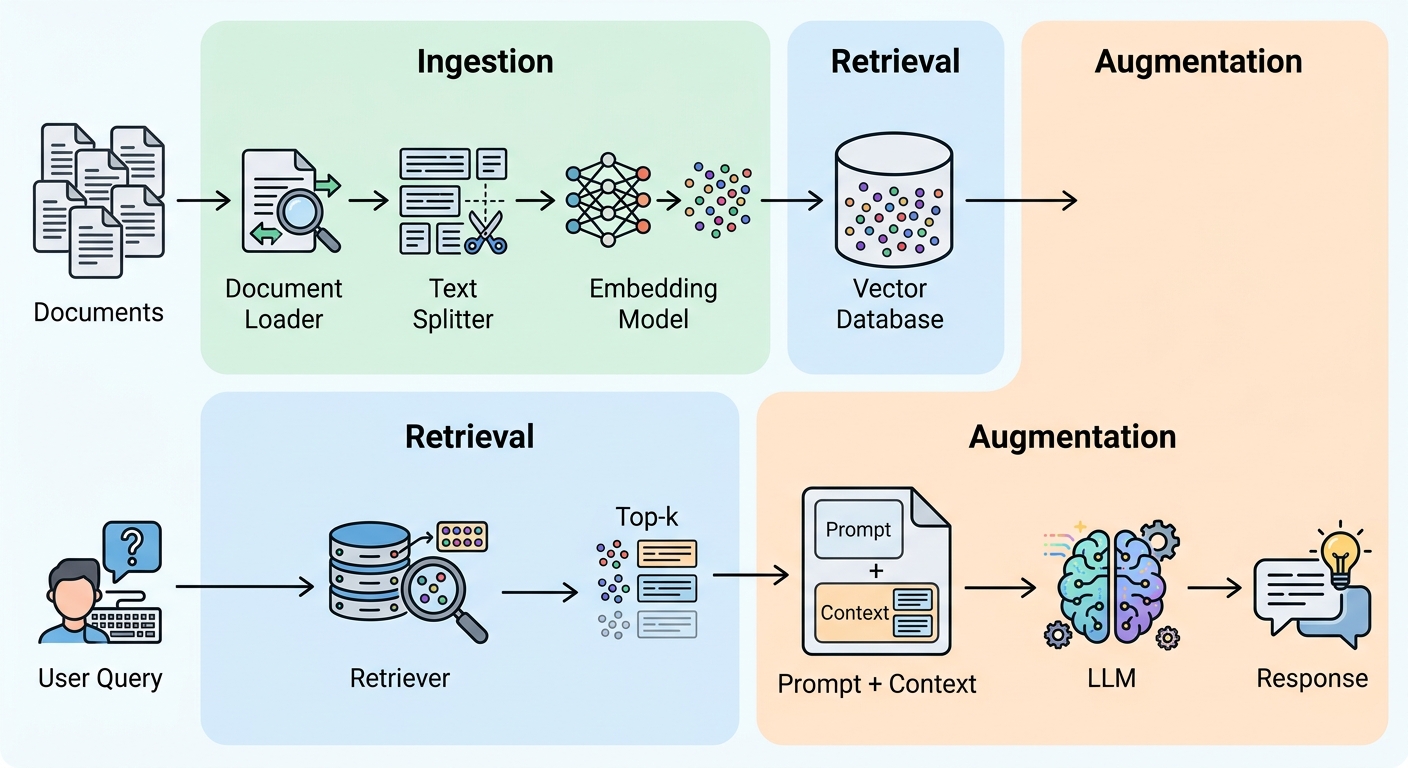
The RAG Architecture: Three Phases at a Glance
Before touching code, build a mental model. RAG operates in two distinct modes.
Ingestion (offline): You load raw documents, split them into chunks, generate vector embeddings for each chunk, and store everything in a vector database. This happens once or on a schedule.
Inference (real-time): A user submits a query. The system embeds the query, searches the vector store for similar chunks, retrieves the top-k most relevant pieces, and injects them into an LLM prompt. The LLM generates a response grounded in that context.
The bridge between ingestion and inference is the embedding model — the same model must encode both documents and queries. If you change your embedding model, you rebuild the index.
Prerequisites and Environment Setup
You need Python 3.10 or higher and a virtual environment. Install everything with one command:
pip install langchain langchain-openai langchain-community chromadb \
  sentence-transformers tiktoken pypdf
You also need an OpenAI API key (or swap for any compatible LLM). Set it as an environment variable:
export OPENAI_API_KEY="sk-..."
CPU-only hardware is fine for this tutorial. Embedding generation with sentence-transformers runs locally. LLM inference calls go to the OpenAI API.
Step 1 — Load and Prepare Your Documents
The ingestion pipeline starts with raw files. LangChain provides document loaders for PDFs, text files, web pages, and more.
from langchain_community.document_loaders import PyPDFLoader

loader = PyPDFLoader("annual-report-2025.pdf")
documents = loader.load()
Loaded documents contain page content plus metadata. Raw text is rarely clean enough for embedding. You split documents into smaller, semantically coherent pieces.
LangChain's RecursiveCharacterTextSplitter is the default choice. It breaks text by character count, then tries to keep natural boundaries together:
from langchain.text_splitter import RecursiveCharacterTextSplitter

splitter = RecursiveCharacterTextSplitter(
    chunk_size=800,      # tokens per chunk
    chunk_overlap=150,   # overlap to preserve cross-chunk context
    length_function=tiktoken.encoding().encode
)

chunks = splitter.split_documents(documents)
print(f"Created {len(chunks)} chunks")
Chunk size is the most impactful tuning knob. Start at 500-1000 tokens. Smaller chunks (200-400) give precise retrieval but may lose paragraph-level context. Larger chunks (1000+) preserve more context but introduce noise. The right size depends on your data — experiment with your specific documents.
Overlap matters less than chunk size but helps when a concept spans two chunks. 100-200 tokens is usually enough. Too much overlap dilutes precision.
For complex documents with mixed content (text, tables, code), consider document-aware chunking that keeps tables intact rather than splitting rows across chunks.
Step 2 — Generate Embeddings and Store in a Vector Database
An embedding model converts text into a numerical vector — a list of floats that captures semantic meaning. Semantically similar texts have vectors that are close together in high-dimensional space.
Embedding model options:
| Model | Type | Cost | Quality | Notes |
|---|---|---|---|---|
| text-embedding-3-small | OpenAI | Paid API | High | 1536 dims, best general quality |
| text-embedding-3-large | OpenAI | Paid API | Highest | 3072 dims, slower |
| all-MiniLM-L6-v2 | Sentence Transformers | Free/local | Good | 384 dims, fast, CPU-friendly |
For this tutorial, use the free local model:
from langchain_community.embeddings import SentenceTransformerEmbeddings

embeddings = SentenceTransformerEmbeddings(
    model_name="all-MiniLM-L6-v2"
)
Now store the chunks in ChromaDB — an open-source vector database that runs locally:
import chromadb
from langchain_community.vectorstores import Chroma

vectorstore = Chroma.from_documents(
    documents=chunks,
    embedding=embeddings,
    persist_directory="./chroma_db"
)
vectorstore.persist()
from_documents does three things at once: embeds every chunk, creates the vector index, and stores everything on disk. The persist_directory lets you reload the database later without re-indexing:
# Reload existing index
vectorstore = Chroma(
    persist_directory="./chroma_db",
    embedding_function=embeddings
)
ChromaDB supports cosine similarity, Euclidean distance, and dot product — cosine similarity is the default and works well for most RAG use cases.
Step 3 — Build the Retrieval Layer
The retriever is the bridge between user queries and your vector store. ChromaDB's as_retriever() method exposes the index:
retriever = vectorstore.as_retriever(
    search_kwargs={"k": 5}  # retrieve top-5 chunks
)
Tuning k: Retrieve too few chunks and you miss relevant context. Retrieve too many and you overwhelm the context window or dilute signal with noise. Start at k=5 — this balances coverage and precision for typical 500-800 token chunks. Adjust based on your chunk size and context window.
Maximum Marginal Relevance (MMR) is a retrieval diversity technique. Standard similarity search can return multiple very similar chunks. MMR re-ranks to maximize diversity among the top results:
retriever = vectorstore.as_retriever(
    search_type="mmr",
    search_kwargs={"k": 5, "fetch_k": 20}
)
fetch_k=20 retrieves 20 candidates, then selects 5 that maximize both relevance and diversity. This is especially useful when documents have repetitive content.
Hybrid search combines keyword-based search (BM25) with semantic similarity. Pure vector search sometimes misses exact keyword matches. Hybrid search captures both semantic meaning and exact term matches:
from langchain_community.retrievers import BM25Retriever

# For production: combine BM25 + vector retriever
# This requires a framework like LangChain's EnsembleRetriever
LangChain's EnsembleRetriever merges results from multiple retrievers with configurable weights.
Step 4 — Create the RAG Chain with an LLM
The RAG chain ties retrieval to generation. LangChain's RetrievalQA chain takes a retriever and an LLM:
from langchain_openai import ChatOpenAI
from langchain.chains import RetrievalQA

llm = ChatOpenAI(model="gpt-4o-mini", temperature=0)

qa_chain = RetrievalQA.from_chain_type(
    llm=llm,
    chain_type="stuff",
    retriever=retriever,
    return_source_documents=True
)
chain_type="stuff" means all retrieved documents get stuffed into one prompt. Other options — map_reduce, refine, map_rerank — handle longer contexts differently.
return_source_documents=True lets you inspect which chunks informed the answer — critical for debugging and trust.
For grounded, factual answers, temperature=0 eliminates creative variation. For more conversational responses, try 0.3-0.5.
Now run a query:
query = "What were the key revenue drivers in 2025?"
result = qa_chain.invoke({"query": query})

print(result["result"])
print("\nSources:")
for doc in result["source_documents"]:
    print(f"  - {doc.metadata.get('source', 'unknown')}")
Custom prompt templates give you more control. Default prompts work, but for domain-specific use cases, write your own:
from langchain.prompts import PromptTemplate

template = """You are a financial analyst assistant.
Use only the provided context to answer the question.
If the context doesn't contain the answer, say "I don't know."
Never invent information.

Context: {context}

Question: {question}

Answer:"""

prompt = PromptTemplate(
    template=template,
    input_variables=["context", "question"]
)

qa_chain = RetrievalQA.from_chain_type(
    llm=llm,
    chain_type="stuff",
    retriever=retriever,
    prompt=prompt,
    return_source_documents=True
)
A good prompt explicitly tells the LLM to use only the provided context and to admit uncertainty. This dramatically reduces hallucination.
Step 5 — Evaluate and Improve Your Pipeline
A working prototype is the start, not the end. RAG evaluation measures two separate things: retrieval quality and generation quality.
RAG evaluation framework (RAGAS) provides standard metrics:
- Context Precision — are the retrieved documents actually relevant to the query?
- Faithfulness — does the generated answer stay true to the retrieved context?
- Answer Relevance — does the answer actually address the user's question?
These three metrics form the RAG triad — together they tell you whether your pipeline retrieves the right information and generates accurate, grounded responses.
Quick setup with RAGAS:
from ragas import evaluate
from ragas.metrics import (
    faithfulness,
    answer_relevancy,
    context_precision
)

# Prepare test dataset with queries, ground truth, and contexts
test_dataset = [...]  # your evaluation set

metrics = [faithfulness, answer_relevancy, context_precision]
results = evaluate(test_dataset, metrics=metrics)
Run this evaluation after every pipeline change — new chunking strategy, different embedding model, adjusted k value.
Retrieval-specific metrics complement generation metrics:
- Recall@k — of all relevant documents, what fraction appears in the top-k?
- MRR (Mean Reciprocal Rank) — how high is the first relevant result ranked?
- NDCG — is the ranking order correct?
Start with a small evaluation set of 20-50 representative queries. Human review of these samples tells you more than any automated metric.
Iterate systematically. Change one variable at a time: chunk size, then embedding model, then k, then prompt. Track metrics in a spreadsheet. The best RAG pipelines are built through deliberate experimentation.
Common RAG Pitfalls and How to Fix Them
Problem: Retrieved documents are irrelevant
Tune k first — too few chunks means missing context, too many means noise. Try MMR to increase diversity. Consider a re-ranker model (cross-encoder) that scores each retrieved chunk against the query for precision re-ranking.
Problem: LLM hallucinates despite retrieved context
Strengthen the prompt with explicit instructions: "Use only the provided context. Say 'I don't know' if uncertain." Lower temperature to 0. Check that your retrieved chunks actually contain the answer — if they don't, retrieval is the problem, not generation. Add a verification step where the LLM cites specific passages from the context that support each claim in its answer. This forces the model to check its grounding.
Problem: Vector store has stale data
Set up a refresh schedule. Incremental updates — add new documents without rebuilding the entire index — are more efficient than full rebuilds for large databases. Track document timestamps and re-index anything updated since the last run.
Problem: Context overflow
If you're hitting context window limits, reduce k. Add a re-ranker to select the most signal-dense chunks. Or switch to a chain type like map_reduce that processes chunks in batches rather than stuffing everything into one prompt.
Problem: Slow retrieval latency
Switch to local embeddings (sentence-transformers on CPU is fast enough for most use cases). Add caching for repeated queries. For large-scale production, consider managed vector databases like Pinecone or pgvector with better indexing.
Extending Your RAG: Next Steps
Once you have a working RAG pipeline, these extensions are worth exploring:
Agentic RAG assigns roles: a planner breaks down complex queries, a retriever fetches documents, a synthesizer generates answers, and a verifier checks groundedness. For multi-hop questions that require chaining multiple sources, agentic patterns dramatically improve accuracy.
Query routing classifies each incoming query and routes it to the right path. Some questions answer directly from the LLM's training data — no retrieval needed. Others need a web search. Others need your vector store. A router classifies and dispatches.
Multi-modal RAG handles images, tables, and code alongside text. Specialized embedding models encode visual and structured data. This matters for technical documentation, research papers, and financial reports where information lives in multiple formats.
Streaming responses make RAG feel faster. Instead of waiting for the full LLM response, stream tokens as they're generated. LangChain supports streaming at the chain level with a callback handler.
Expert Q&A
Q: What's the best chunk size for a RAG pipeline?
A: There is no universal answer, but 500-1000 tokens is a safe starting point for most text-heavy use cases. The right size depends on document structure, embedding model context window, and retrieval vs. context tradeoffs. If your documents have clear paragraph boundaries, split by paragraphs and target 300-600 tokens. If you're working with dense technical content, smaller chunks (200-400 tokens) preserve more precision. Always evaluate with your actual data — run retrieval tests across a range of chunk sizes and measure precision at k=5.
Q: When should I use hybrid search instead of pure semantic retrieval?
A: Pure semantic search excels when queries are conceptually related to content but don't share exact keywords. If your users ask questions using different vocabulary than your documents, semantic search wins. But semantic search can miss exact matches, proper nouns, part numbers, and technical terms that exact keyword matching handles naturally. Use hybrid search (BM25 + semantic) when your documents contain significant named entities, technical terminology, or when query-document vocabulary overlap is high. Hybrid adds complexity — only reach for it when pure semantic search has shown keyword-matching gaps in your evaluation set.
Q: How do I prevent hallucination in a RAG system?
A: Hallucination in RAG has two root causes. First, the LLM ignoring provided context and generating from training data — fix this with prompt instructions ("use only the provided context") and temperature=0. Second, the retrieved context being irrelevant or incomplete — fix this by improving retrieval precision through better chunking, re-ranking, or hybrid search. A third layer: add a verification step where the LLM is asked to cite specific passages from the context that support each claim in its answer. This forces the model to check its grounding. No single fix eliminates hallucination entirely — you need retrieval quality, prompt design, and evaluation working together.
Q: Should I use LangChain or LlamaIndex for building RAG?
A: Both are mature, capable frameworks. LangChain provides more modular components and a broader ecosystem — better if you want flexibility to swap out individual pieces (retrievers, LLMs, prompt templates). LlamaIndex is more query-centric with better default retrieval strategies and a more intuitive data indexing API — better if you want a quicker path to a working pipeline with less boilerplate. For basic RAG, either works. For complex multi-modal or agentic workflows, evaluate which framework's abstractions fit your use case better. The tooling matters less than understanding the underlying concepts — if you understand retrieval and generation well, you can build with either.
Ready to build? Start with the prerequisites, run through Steps 1-4, and you'll have a working RAG pipeline in under an hour. From there, iterate with evaluation and the extensions outlined above.
Image URLs
| # | Alt | URL |
|---|---|---|
| 1 | Architecture diagram showing the three-phase RAG pipeline: documents → ingestion (chunking, embeddings) → vector database | /api/images/830abfbca0c44659b9204521115e0682 |
Total: 1 images uploaded