Multi-Agent RAG: A Step-by-Step Guide to Building a Production Retrieval Pipeline
Build a production multi-agent RAG pipeline step by step: topology, chunking, embeddings, hybrid search, reranking, orchestration, and evaluation.
Reading time: 12 min
Building a Production Multi-Agent RAG Pipeline: 7 Steps That Work
Multi-agent RAG production pipelines are how enterprise teams answer questions across docs, CRM, and support data with one grounded response. A multi-agent RAG system coordinates several specialized agents, each retrieving from its own source, so a single question draws evidence from many corpora at once. This step-by-step guide walks through building one that survives production traffic.
RAG (retrieval-augmented generation) means fetching relevant documents and feeding them to a large language model (LLM) so its answer is grounded in real data. Multi-agent retrieval splits that work across agents, where an agent is a program that plans steps and calls tools. The result: product documentation, customer records, and support tickets all feed one confident answer.
Here is the build order: design the topology, build ingestion, index into a vector store, add reranking, orchestrate the agents, evaluate, and handle production concerns. This is the exact order we use for enterprise RAG deployments.
The running example throughout is lead qualification. A prospect sends an inbound query. The system answers from product documentation, the CRM account database, and past support tickets, then hands a qualified answer to sales. This realistic B2B case exercises every step below.
Related reading: our guide on agent orchestration frameworks and how they compare and the research on production RAG evaluation.
What Multi-Agent RAG Is — and When You Need It
Single-retriever RAG is the simple version. One query hits one index. The system returns the top chunks, and the LLM writes the answer. It works well when you have one homogeneous corpus.
Multi-agent retrieval handles multiple corpora and intents. A router decides which source matters, and specialized agents fetch from each. You still get one answer, but the retrieval is orchestrated, not monolithic.
Single-Retriever RAG vs. Multi-Agent Retrieval
Reach for multi-agent RAG when you hit these signals:
- Multiple distinct corpora. Docs, CRM, and tickets are different worlds. One index mixes them badly.
- Conflicting access control. Sales data must not leak to a public retriever. Different permissions demand separate retrieval paths.
- Heterogeneous query intent. Pricing, an account status, and a bug report each need a different source.
- You need routed, auditable behavior. You want to know which source answered, for compliance.
A generalist agent with many retrieval tools is fine at small scale. A router plus specialized agents scales better and keeps permissions clean.
The Lead-Qualification Use Case
In our example, one inbound query touches three sources. The docs agent searches the knowledge base. The CRM agent reads account history. The support agent scans past tickets. A router maps the query to the right agents. The generator fuses their evidence into one qualified, confident answer. One question, several retriever specialists, one grounded answer.
Step 1 — Design the Retrieval Topology
Do not write code first. Map the topology on paper. You need the sources, the agents, and the routing rules before you build.
One Agent, Many Tools vs. Many Specialized Agents
Two patterns:
- Generalist pattern. One agent holds a tool for each source. Simpler to build, but prompt bloat and permission bleed are risks.
- Router pattern. A lightweight router classifies the query and dispatches to a specialized agent per source. Cleaner permissions, easier to scale, more moving parts.
Start with the router pattern when you have three or more distinct sources or strict access boundaries. It mirrors how a real support team routes tickets.
Map Your Data Sources
For each source answer three questions:
- What is it? Docs, CRM, tickets, contracts, Slack archives.
- Who may see it? Define the access tier per audience.
- How does it change? Static documents re-index rarely; CRM and tickets change constantly.
The topology diagram is your contract with the rest of the pipeline. Every later agent and filter hangs off it.
Step 2 — Build the Ingestion Pipeline (Chunking + Embedding)
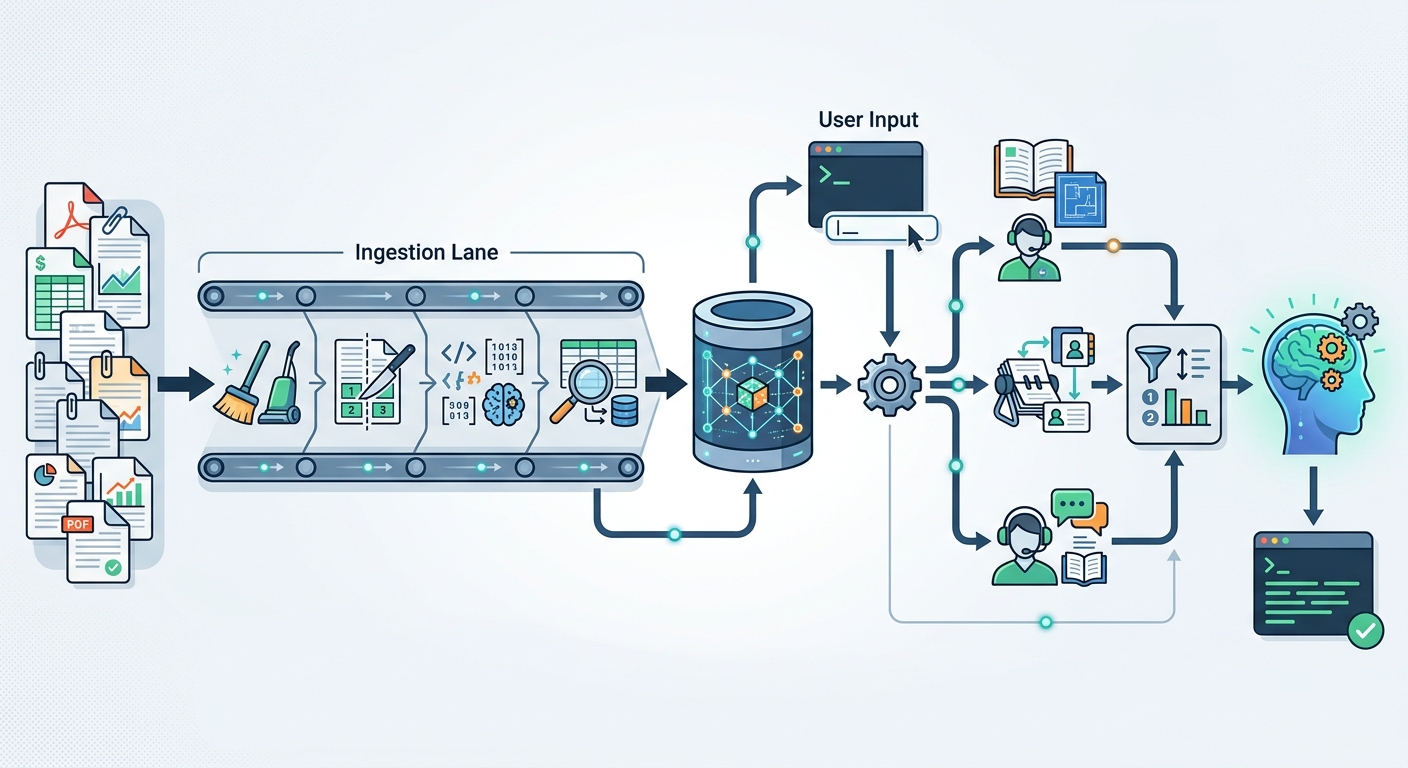
Most RAG failures start at ingestion, not at the LLM. The phrase "garbage in, garbage out" (GIGO) applies directly. Bad chunks cannot be fixed later with retrieval or reranking tricks. Ingestion is a two-step job: chunk the source text, then embed each chunk into a vector.
The illustration below shows the full pipeline we are building, from source documents to the final answer.
Chunking Strategies That Survive Production
Chunking splits documents into retrievable units. The chunk size and boundary decide how well the retriever finds evidence. Three options:
- Fixed-size. Split every N tokens. Simple and fast, but cuts sentences and meaning mid-thought.
- Recursive. Split by structure (paragraphs, then sentences). Better boundaries, still cheap.
- Semantic chunking. Group text by meaning, then embed each unit while keeping a wider context window. Best quality, most work.
For production, use semantic chunking with a small overlap. Overlap of about 10 to 15 percent prevents context loss at boundaries. Keep full context available while embedding small, focused units. Test chunk size with your own data; there is no universal magic number.
Choosing an Embedding Model Pragmatically
An embedding model maps text to a vector, a list of numbers that represents meaning. Similar text lands near similar vectors, which is what makes search work.
Choose pragmatically:
- Match the model to your data. For code, IDs, or a specific language, pick a model strong on those.
- Mind dimensionality. Higher dimension means more storage and slower search for marginal gains.
- Prefer a maintained, current model with strong MTEB results. Test on your own queries, not just leaderboards.
- Plan for upgrades. Embedding changes invalidate your index. Budget for re-embedding.
Write a small eval set now. You will reuse it in Step 6 to compare embedding choices.
Step 3 — Index into a Vector Store
A vector store indexes embeddings so you can search them fast. It uses ANN (approximate nearest neighbor), which finds close vectors without scanning everything.
Hybrid Search: Vectors + Keywords
Dense vectors handle meaning well. They trip on exact names, product IDs, and error codes. Keyword search shines there. Hybrid search combines both: a sparse keyword pass (BM25) and a dense vector pass, then fuses the results.
BM25 is a ranking function for exact term matches. Fusing both avoids the classic failure of dense-only search on an ID like "ALG-42" or a version string. Make hybrid search your baseline, not an optional extra.
Permission-Aware Indexing
Two complementary filters:
- Query-time filtering. Add a metadata filter (for example, "region = EU" or "tier = sales") at every query.
- Index-time separation. Keep higher-permission data in separate collections so no lower-tier query can ever see it.
In the lead-qualification example, the CRM agent reads account data that a public docs retriever must never touch. Index-time separation guarantees that, regardless of any routing bug. Permission is enforced at the index, not just in the prompt.
Step 4 — Add Reranking for Precision
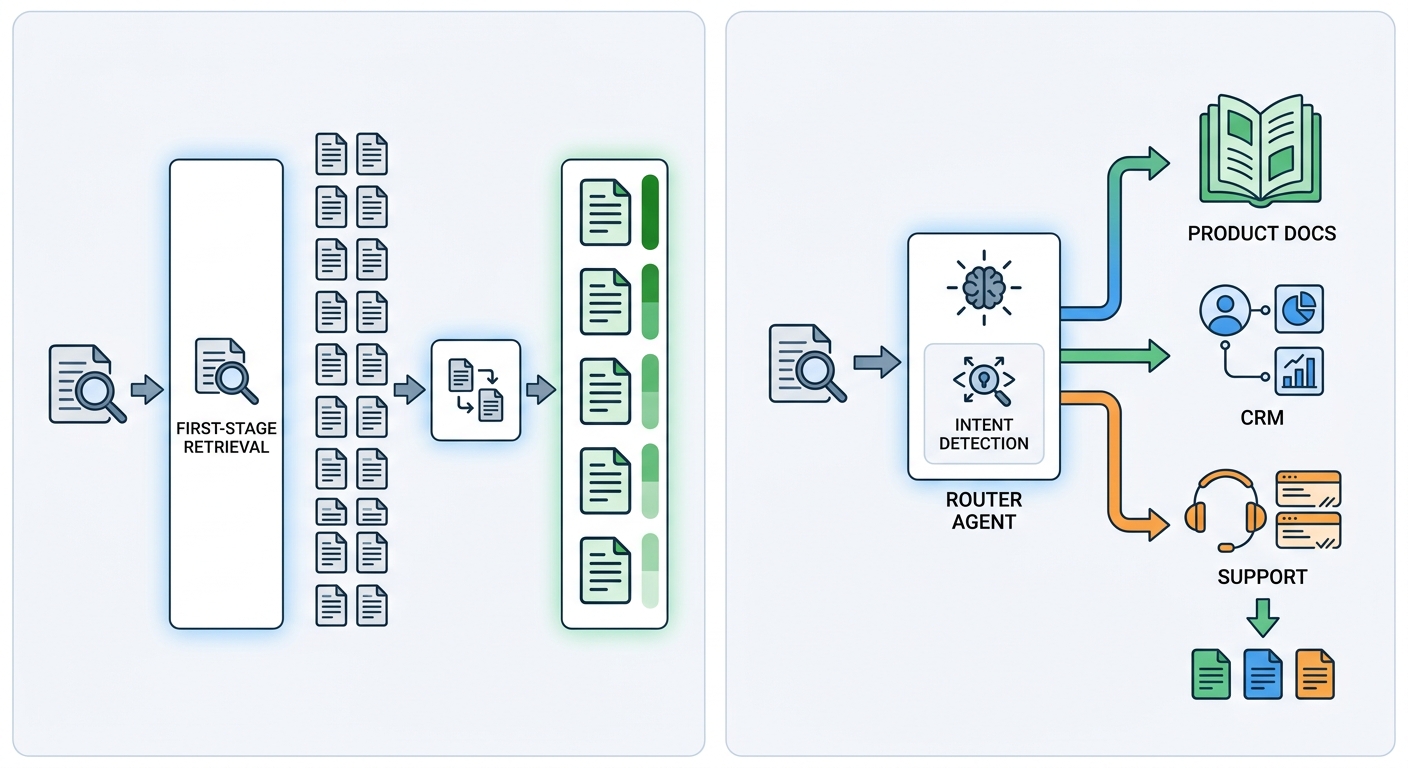
Reranking is the highest-ROI step in the whole pipeline. The first-stage retriever is built for speed and recall, returning many candidates — say, the top 20 or 50. Precision is not its priority. A reranker then scores each candidate against the exact query and returns only the best few, usually the top three to five.
A cross-encoder pairs the query with each candidate and scores them together. It is more accurate than the bi-encoder used during retrieval, but slower per token. That is fine, because it only sees a handful of candidates.
The result is a big precision jump at low cost. This is one of the most reliable wins in RAG.
Step 5 — Orchestrate the Retrieval Agents
Now the agents get involved. Agent orchestration is the coordination of multiple LLM-backed agents and their tool calls. Tool calling means an agent invokes an external function or API — here, a retriever.
The next illustration shows the routing and reranking flow.
The Router Agent Picks the Source
The router agent classifies the query and decides which agents run. For "do you support EU pricing?" it routes to docs. For "what is my account balance?" it routes to CRM. The router is lightweight; its job is dispatch, not deep reasoning.
Keep the router's system prompt short and explicit. Give it a clear routing table and a fallback for ambiguous queries.
The Retrieval Loop: Retrieve, Trace, Re-Ask
A specialized agent often needs more than one pass. It retrieves, then checks whether the evidence actually answers the query. If not, it rephrases and re-asks with a refined query. This is a multi-hop loop: each pass narrows the search.
Ground every claim in retrieved evidence. If the agent cannot cite the source, it should say so instead of guessing. That discipline separates a production answer from a made-up one.
Guardrails on Retrieved Content
Retrieved content is untrusted. Add guardrails:
- Relevance check. Drop chunks that do not match the query.
- Block injection. Treat retrieved text as data, never as instructions.
- Cap tool calls. Limit the loop to a fixed number of iterations to bound latency and cost.
- Enforce permissions. Re-check access on every retrieval path.
Guardrails validate content before it reaches the generator. This is your last line of defense before the final answer.
Step 6 — Evaluate Before You Scale
Measure retrieval quality before you put traffic on it. Evaluation prevents silent regressions when you change an embedding, a chunk size, or a reranker.
Metrics That Measure Retrieval
Three metrics dominate retrieval evaluation:
- Hit rate. Does the correct chunk appear in the top-k results? It measures recall.
- MRR (mean reciprocal rank). How early does the first correct result appear? It rewards finding the answer fast.
- nDCG (normalized discounted cumulative gain). How good is the whole ranking, not just the first hit?
Track all three. Hit rate tells you if the answer exists; MRR tells you if it surfaces quickly; nDCG tells you if the ranking is clean.
A Minimal Evaluation Harness
Build a labeled eval set from real queries. Fifty to one hundred questions with known correct chunks is a fine start. Then:
- Run every query through the retriever.
- Record hit rate, MRR, and nDCG.
- Re-run after every index, embedding, or reranker change.
- Gate deploys on the scores. If a change drops MRR, do not ship it.
This turns retrieval from "feels fine" into a measurable, reviewable system.
Step 7 — Production Concerns: Latency, Caching, Freshness
A working pipeline is not a production pipeline. Three concerns matter: latency, cost, and freshness.
A Latency Budget for Your Pipeline
Break the pipeline into stages and assign each a share of your budget:
| Stage | Typical share |
|---|---|
| Embedding the query | small |
| Hybrid search | small to medium |
| Reranking | medium |
| LLM generation | largest |
| Guardrail validation | small |
Decide the total budget first, for example "under two seconds." Then allocate. If generation eats the budget, consider a smaller model or fewer retrieved chunks. Set the budget before tuning, or you will chase speed forever.
Semantic Caching and Index Refresh
Many real queries repeat. Cache answers for identical or near-identical queries to cut cost and latency. Add a semantic cache — store the answer and its query vector; if a new query lands near a cached one, reuse the answer with a confidence check.
Freshness is the other half. Data changes. Schedule re-indexing for static documents. Use incremental updates for fast-moving sources like CRM and tickets. Detect and remove deleted content. A stale index quietly degrades answers over time.
Add observability from day one. Trace every agent's retrievals so you can see which source answered and whether the guardrails fired. You cannot fix what you cannot see.
FAQ
When is multi-agent RAG overkill? When you have one or two similar corpora with the same permissions. A single retriever is simpler and cheaper. Add agents only when sources, permissions, or intents genuinely diverge.
Do I need a dedicated vector database? Not always. A Postgres extension such as pgvector works when you already run Postgres and your scale is moderate. Dedicated vector stores win at very large scale, low latency, or advanced filtering.
Does reranking always improve results? Not always, but usually, when the first stage returns many candidates. Test it with your eval set. If your first stage already returns tight top-k, the gain shrinks.
How fresh does the index need to be in production? As fresh as your answers. Customer-facing data needs near-real-time updates. Static product docs can re-index on a schedule. Let "how wrong is a stale answer?" set your cadence.
Does long-context LLM support remove the need for RAG? Often, no. Long context helps small corpora but costs more per token and loads slower. RAG wins for large, changing, or permission-sensitive corpora. Use both where it fits.
Conclusion
Multi-agent RAG is the difference between a demo and a system. The build order matters: design the topology, build ingestion with semantic chunking, index with hybrid search, add reranking, orchestrate the agents, evaluate with real metrics, and handle latency, caching, and freshness.
Start small. One router, two agents, one eval set. Measure it, then expand.
If you are shipping agentic retrieval systems, subscribe to the portal. We publish the full engineering series, retrieval agent templates, and evaluation playbooks that take you from prototype to production.
Want the pattern applied to your own pipeline? Subscribe to our portal for the step-by-step build kit and the retriever templates we use in production.