MCP in Practice: A Hands-On Tutorial for Tool-Calling Agents
Hands-on MCP tutorial for US teams: define a tool schema, connect an MCP client, and wire tool calling into your agent loop. Build it step by step.
Why Your Next Agent Integration Shouldn't Be Another Bespoke Connector
Every time you connect an AI agent to a new tool, you pay the integration tax again. A ticketing system, a data warehouse, an internal API—each one needs custom glue code, its own schema mapping, and its own error handling. Multiply that by every agent framework and every model provider in your stack, and the maintenance burden compounds fast.
The Model Context Protocol (MCP) changes that math. It's an open standard, built on JSON-RPC 2.0, for how agents discover and invoke external capabilities. Rather than an N×M grid of point-to-point connectors, MCP gives you an N+M model: write a server once, and any MCP-compatible host can use it.
By the end of this tutorial, you'll have a working tool-calling agent connected to an MCP server—from defining a tool schema to handling failures in production. We assume you're comfortable with LLM APIs and agent loops. No prior MCP experience required.
Why MCP Matters for Tool-Calling Agents
The N×M Integration Problem
Picture your integration matrix. On one axis: every agent framework and runtime you support. On the other: every tool and data source your teams need—CRM, observability, databases, internal services. Each intersection is a bespoke connector with its own auth model, retry logic, and schema translation.
Ten agents and twenty tools means up to 200 custom integrations. Add a framework or a tool and the grid grows again. The engineering cost isn't just the first build; it's the permanent surface area for bugs, drift, and security review.
How MCP Solves It
MCP collapses that grid into a single contract. The same ten agents and twenty tools become ten client integrations plus twenty server implementations—thirty pieces instead of two hundred, and each piece is written once against a stable protocol. Tools expose themselves through an MCP server; agents connect through an MCP client and discover what's available at runtime. Build a server once and any MCP-compatible host can use it.
Think of MCP as the USB-C of agent tooling: one standard port instead of a drawer full of proprietary cables.
The key framing: MCP is an integration layer, not a vendor product. It doesn't compete with your agent framework or your model. It sits between them and the outside world.
Core MCP Concepts in Five Minutes
Hosts, Clients, and Servers
MCP has three moving parts:
- Host — the application running your agent (your runtime, IDE, or chat product). It orchestrates the model and the user experience.
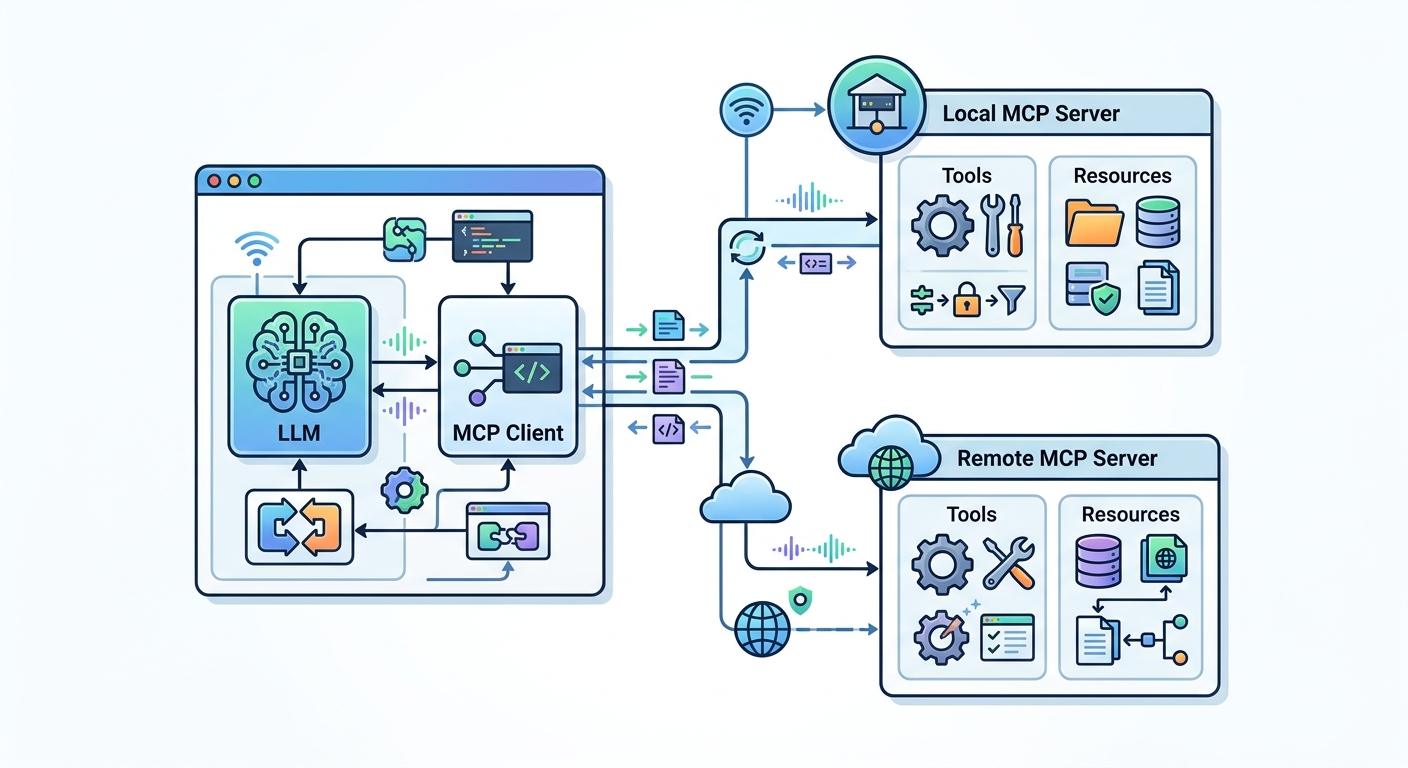
- MCP client — the protocol connection inside the host. It manages sessions, capability negotiation, and message transport to servers.
- MCP server — the process that exposes tools, resources, and prompts. It can run locally or remotely.
Data flows host → client → server for requests, and back for results. A single host can hold multiple clients, each connected to a different server. During initialize, host and server negotiate capabilities—each side declares what it supports, so neither assumes features the other lacks.
Transports: local servers typically run over stdio (the host spawns the server as a subprocess); remote servers use Streamable HTTP. Pick stdio for trusted, same-machine tools and Streamable HTTP (over TLS) when the server is shared across a team or lives behind your network boundary.
Tools, Resources, and Prompts
MCP defines three capability types:
- Tools — callable actions the model can invoke (query a database, create a ticket). These carry input schemas and return structured results.
- Resources — readable context, like files or records, that the host can pull in as grounding data.
- Prompts — reusable, parameterized templates the server offers to standardize common tasks.
This tutorial focuses on tools, since they're the backbone of tool-calling agents.
Tutorial: Build a Tool-Calling Agent with MCP
Prerequisites and Setup
You'll need:
- A language runtime (Python or TypeScript are well supported)
- An LLM API key with tool/function-calling enabled
- The official MCP SDK for your language
We'll use a reference SDK in Python for illustration; the concepts map directly to other SDKs. Install the SDK and set your API key as an environment variable. Keep the tool and model choices swappable so you can adapt the code to your stack.
Step 1 — Define and Expose a Tool via an MCP Server
Start with one practical tool: a ticket lookup. The server declares the tool's name, description, and input schema, then implements the handler. Note that the handler validates arguments and returns an error result (not an exception) when the lookup fails, so the model can see the failure and recover.
from mcp.server import Server
from mcp.types import Tool, TextContent
from pydantic import ValidationError
import json

server = Server("ticketing")

# Declare the tool and its JSON Schema so the model knows how to call it
@server.list_tools()
async def list_tools():
    return [Tool(
        name="get_ticket",
        description="Look up a support ticket by ID. Returns status, owner, and summary.",
        inputSchema={
            "type": "object",
            "properties": {"ticket_id": {"type": "string", "description": "e.g. TCK-1042"}},
            "required": ["ticket_id"],
        },
    )]

# Implement the handler; return a structured error the model can reason about
@server.call_tool()
async def call_tool(name: str, arguments: dict):
    if name != "get_ticket":
        return [TextContent(type="text", text=f"Unknown tool: {name}")]
    ticket_id = arguments.get("ticket_id")
    if not ticket_id:
        return [TextContent(type="text", text="Error: ticket_id is required.")]
    try:
        ticket = db.fetch(ticket_id)  # your data layer
    except LookupError:
        return [TextContent(type="text", text=f"Error: no ticket found for {ticket_id}.")]
    return [TextContent(type="text", text=json.dumps(ticket))]
The description and schema are the contract. The model reads them to decide when and how to call the tool, so write them precisely—vague descriptions produce bad tool calls.
Step 2 — Connect the Client and Discover Tools
Next, connect an MCP client to the server and list its capabilities. This is the discovery step that replaces hardcoded tool definitions.
from mcp import ClientSession, StdioServerParameters
from mcp.client.stdio import stdio_client

params = StdioServerParameters(command="python", args=["server.py"])

async with stdio_client(params) as (read, write):
    async with ClientSession(read, write) as session:
        await session.initialize()
        tools = await session.list_tools()  # discover at runtime
        # tools.tools is a list of Tool objects with name/description/inputSchema
Step 3 — Wire the Agent Loop
Now the payoff: convert discovered MCP tools into the model's tool schema, run the loop, and route tool calls back through the MCP session. The host is the only place that talks to both the model and the server—the model never sees the protocol.
import asyncio

def to_model_tools(mcp_tools):
    # Translate MCP tool defs into the model's function-calling schema
    return [{
        "name": t.name,
        "description": t.description,
        "input_schema": t.inputSchema,
    } for t in mcp_tools]

async def run_agent(session, user_msg, max_turns=8):
    tools = (await session.list_tools()).tools
    model_tools = to_model_tools(tools)
    messages = [{"role": "user", "content": user_msg}]

    for _ in range(max_turns):
        resp = llm.messages.create(
            model="your-model", tools=model_tools, messages=messages
        )
        messages.append({"role": "assistant", "content": resp.content})

        tool_calls = [b for b in resp.content if b.type == "tool_use"]
        if not tool_calls:
            return resp.content  # final answer

        results = []
        for call in tool_calls:
            out = await session.call_tool(call.name, call.input)
            text = "".join(c.text for c in out.content if c.type == "text")
            results.append({
                "type": "tool_result",
                "tool_use_id": call.id,
                "content": text,
                "is_error": getattr(out, "isError", False),
            })
        messages.append({"role": "user", "content": results})

    raise RuntimeError("Agent exceeded max turns without a final answer")
The max_turns guard is not optional. Without it, a model that keeps calling a failing tool will loop until you hit a token or cost ceiling.
Step 4 — Handle Failures in Production
Tool calls fail. The difference between a demo and a production agent is how failures surface and whether they're retried safely.
- Timeouts. Wrap every
session.call_toolin anasyncio.wait_forwith a per-tool budget (e.g., 10s for lookups, longer for batch jobs). A hung server should not hang the whole turn. - Retries with backoff. Retry only transient errors (connection reset, 5xx, timeout)—never validation errors or
isErrorresults. Use exponential backoff with jitter and a hard cap (3 attempts). - Idempotency. For side-effecting tools (create ticket, send email), require an idempotency key in the input schema so retries don't double-execute. Read-only tools are safe to retry freely.
- Error-to-model, not error-to-crash. Return failures as
tool_resultcontent withis_error: True(as above). The model can then apologize, try a different tool, or ask the user—rather than your process throwing and ending the conversation. - Auth for remote servers. Local stdio servers inherit the host's trust. Remote servers over Streamable HTTP should use OAuth with scoped tokens and TLS; never pass long-lived credentials through tool arguments.
Security and Trust Boundaries
Two things are easy to get wrong:
- Tool descriptions are untrusted input. A malicious or compromised server can embed prompt-injection text in a description or tool result. Treat server-returned content as data, not instructions, and log it for review.
- The host is the trust boundary. It decides which servers to connect to, which tools to expose to the model, and which results to trust. Keep an allowlist of servers, scope each connection's credentials to the minimum, and review new servers like you'd review a new dependency.
What You've Built
You now have the full path: a server that declares a tool with a schema, a client that discovers it at runtime, an agent loop that routes model tool calls through the protocol, and failure handling that keeps the agent alive when a tool misbehaves. Swap in your own tool and model, and the same skeleton scales to a fleet of servers—without a new bespoke connector for each one.