Build a Local RAG Pipeline: A Step-by-Step Tutorial with Open-Source LLMs
A hands-on, plain-Python walkthrough for building a private local RAG pipeline with open-source LLMs — embeddings, vector storage, retrieval, and generation.
Retrieval-augmented generation, or RAG, is the most practical way to make an open-source LLM useful for your own data. RAG — grounds — LLM answers in your documents. Instead of relying on whatever the model memorized during training, it pulls facts from a knowledge base at answer time. When you run every piece locally, your data never leaves your machine. There is no per-token API bill, and the system works offline.
This tutorial walks you through a complete local RAG pipeline, step by step. I built the version below on a mid-range laptop, and I have flagged the hard-won lessons about memory and retrieval along the way. To keep the mechanics visible, we write the core loop in plain Python first. Then you can layer on convenience tools with confidence.
Key insight — RAG lets an LLM answer from your documents. The local, open-source version adds privacy, zero marginal cost, and full control over the model. The trade is setup effort and a lower quality ceiling than the biggest hosted models.
What "local RAG" means and why it matters
A RAG pipeline has two phases. In the ingest phase, you split your documents into chunks, convert each chunk into a vector, and store those vectors in a vector database. In the query phase, you turn a user question into a vector, find the most similar stored chunks, and hand them to an LLM as context.
Retrieval-augmented generation means the model generates from what you retrieve, not from memory alone. A vector database stores numbers (embeddings) that represent text meaning, so search happens by similarity rather than exact keywords. An embedding model is a small neural network that turns text into those numbers.
Running everything locally means the stack, from the model to the store, lives on your hardware. That matters for a few reasons.
- Privacy: private documents stay inside your perimeter.
- Cost: you pay for electricity, not per token.
- Offline: the pipeline works without an internet connection.
- Control: you choose models, versions, and configuration.
It is not always the right choice. A hosted model is usually more capable, and somebody else maintains the infrastructure. We will return to that trade-off at the end.
The end-to-end picture
Here is the mental model to keep for the whole tutorial. Documents enter on the left. An ingest step splits and embeds them, then writes vectors to a store. A question enters from the bottom, retrieval pulls the closest chunks, and the LLM — generates — a grounded answer from retrieved context.
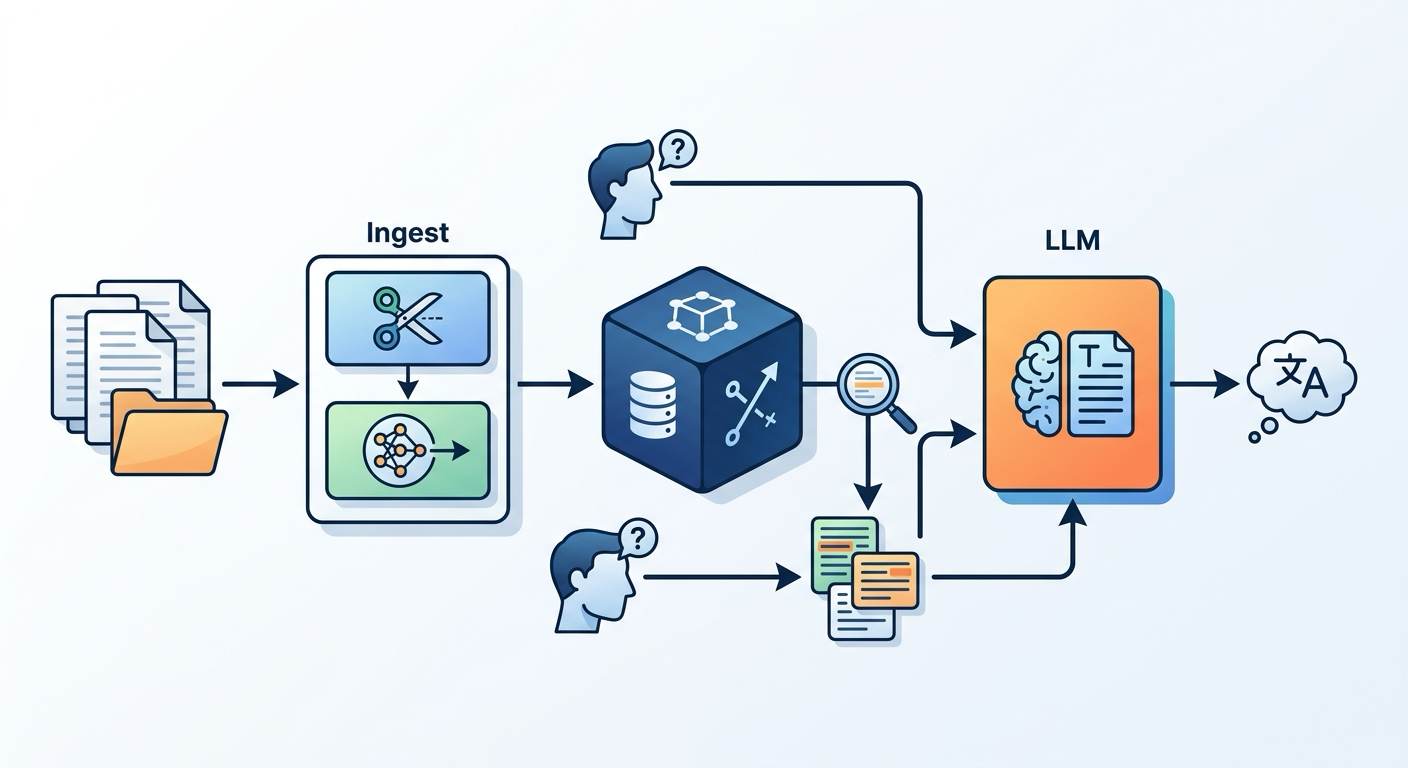
Every part of that flow maps to a step below. When you finish, you will have all of it running on one machine.
Choosing your local toolkit
You need three main pieces: a runtime to run LLMs locally, an embedding model, and a vector database. Here is the reasoning behind a sensible default set.
Runtime — Ollama. Ollama — runs — open-source LLMs locally. It has a simple command-line interface and a local API that mirrors popular formats, so frameworks can talk to it easily. It works on macOS, Linux, and Windows.
Chat model — a 7B-class model. A model with roughly 7 billion parameters, such as llama3, balances coherent answers with modest memory needs. Larger models answer better but demand more RAM and slower hardware. Start with a 7B and move up only if your machine copes.
Embedding model — nomic-embed-text. This small model produces good quality vectors for English retrieval while running quickly on a CPU. The embedding model — converts — text chunks into vectors. Alternatives like all-MiniLM and bge-m3 trade size, speed, and multilingual support differently. For a first local pipeline, nomic-embed-text is a safe, fast default.
Vector database — ChromaDB. ChromaDB is a lightweight, persistent vector store with zero configuration. It fits a single-machine pipeline perfectly. ChromaDB — stores — chunk vectors and metadata. For bigger workloads you can graduate to FAISS, Qdrant, or Weaviate later.
Memory is the real constraint. A small pipeline runs in roughly 8 GB of usable RAM, but 16 GB or more is comfortable. The embedding model batches and the chat model each claim their share. If you are tight on memory, pick a quantized (compressed) model.
Step 1 — Set up Ollama and pull models
Start by installing Ollama. On macOS, the fastest route is Homebrew.
brew install ollama
On Linux, use the official installer script. On Windows, install the preview build from the Ollama site. After installation, pull the two models you will use.
ollama pull llama3
ollama pull nomic-embed-text
The first pull downloads the chat model, which is a few gigabytes. The second pulls the small embedding model. Once both are ready, confirm the chat model answers.
ollama run llama3 "Explain RAG in one sentence."
You should see a short, grounded definition. If you hit an out-of-memory error, use a smaller or heavier-quantized model and retry.
Key insight — pulling a model makes it available locally, but size matters. A 7B model at full precision needs several gigabytes of RAM just for weights. Quantized versions trade a little quality for much lower memory.
Step 2 — The ingest pipeline in plain Python
Now build the path from documents to stored vectors. We will use plain Python and small helper libraries, not a full framework. That makes every step visible.
Create a project folder and a virtual environment first.
mkdir local-rag && cd local-rag
python3 -m venv .venv && source .venv/bin/activate
pip install ollama chromadb
The ollama library talks to your local runtime. chromadb provides the vector store. Now create an ingest script.
# ingest.py
import chromadb
import ollama

DOCS_PATH = "./docs.txt"
EMBED_MODEL = "nomic-embed-text"
CHUNK_SIZE = 500   # characters per chunk
OVERLAP = 50       # characters shared between neighbors

def chunk_text(text, size=CHUNK_SIZE, overlap=OVERLAP):
    chunks = []
    start = 0
    while start < len(text):
        chunks.append(text[start:start + size])
        start += size - overlap
    return chunks

# 1. Read and split
with open(DOCS_PATH) as f:
    raw = f.read()
chunks = chunk_text(raw)

# 2. Embed and store
client = chromadb.PersistentClient(path="./chroma")
col = client.get_or_create_collection("knowledge")
ids = [f"chunk-{i}" for i in range(len(chunks))]
vectors = []
for c in chunks:
    emb = ollama.embeddings(model=EMBED_MODEL, prompt=c)["embedding"]
    vectors.append(emb)

col.add(ids=ids, embeddings=vectors, documents=chunks)
print(f"Ingested {len(chunks)} chunks into ChromaDB.")
Run it.
python ingest.py
The script reads docs.txt, splits it into chunked pieces, embeds each chunk with nomic-embed-text, and stores the vectors in a persistent ChromaDB folder. The id chunk-0, chunk-1, and so on maps each vector back to its source text.
Why chunks matter. Chunk size — affects — retrieval quality. Long chunks carry more content but are less precise. Short chunks are focused but may cut a thought in half. The overlap avoids dropping a key sentence that straddles a boundary. You will tune both after your first evaluation.
Step 3 — Retrieval and the query loop
With data ingested, build the query side. This is where a user question becomes a grounded answer.
# query.py
import chromadb
import ollama

EMBED_MODEL = "nomic-embed-text"
CHAT_MODEL = "llama3"
client = chromadb.PersistentClient(path="./chroma")
col = client.get_or_create_collection("knowledge")

def ask(question, top_k=4):
    # 1. Embed the question
    q_vec = ollama.embeddings(model=EMBED_MODEL, prompt=question)["embedding"]
    # 2. Retrieve the closest chunks
    res = col.query(query_embeddings=[q_vec], n_results=top_k)
    context = "\n\n".join(res["documents"][0])
    # 3. Assemble a grounded prompt
    prompt = (
        "You are a helpful assistant. Answer using only the context below.\n\n"
        f"Context:\n{context}\n\n"
        f"Question: {question}\nAnswer:"
    )
    # 4. Generate with the local LLM
    out = ollama.chat(model=CHAT_MODEL, messages=[{"role": "user", "content": prompt}])
    return out["message"]["content"]

print(ask("What does the ingest step do?"))
Run it.
python query.py
The query engine — retrieves — top-k relevant chunks. The ask function embeds the question, searches the store for the top_k closest chunks, packs them into a grounded prompt, and lets the local model answer from that context. That single loop is the heart of RAG.
Dense semantic search matches on meaning, so the query does not need to contain the exact words in the document. The trade is that a rare abbreviation or a precise ID can fail. Hybrid search — adding keyword matching — fixes that, and we touch on it below.
Step 4 — Making it reliable: evaluate and rerank
A working demo and a trustworthy system are different things. Most local RAG failures come from weak retrieval, not a weak model. Start measuring.
Evaluate with RAGAS-style metrics. RAGAS is an open framework for RAG evaluation. It measures faithfulness — whether the answer is supported by the retrieved context — and answer relevance and context precision. RAG evaluation — measures — faithfulness and answer relevance. Score a small set of real questions, then change one thing and re-score.
A quick manual proxy works too. Collect five questions per topic area, run them, and note whether the retrieved chunks actually contained the answer. Repeated misses point at chunking or embedding choices.
pip install ragas
Add a reranker for precision. A cross-encoder reranker re-scores the retrieved candidates against the question, keeping only the strongest. It is slower per item but runs on a small set. Models such as bge-reranker run locally. The pattern: retrieve 20 candidates, rerank, keep the top 4. Reranking — boosts — top-k precision.
Hybrid search. Combine BM25 keyword search with dense embeddings, then fuse ranking with reciprocal rank fusion. Keyword search catches exact terms the embedding misses. This is usually the highest-leverage quality upgrade after evaluation.
Key insight — improve retrieval before blaming the model. Faithfulness failures almost always trace to chunks that did not contain the facts. Measure first, then change chunk size, overlap, retrieval count, or add reranking.
When local RAG is the right call
Here is an honest framework for deciding local versus hosted.
Choose local when:
- The data is sensitive and must stay on-site. A local pipeline — keeps — data on your machine.
- Your connectivity is unreliable or you need offline operation.
- You want zero marginal cost per query and predictable spend.
- You need control over models and versions.
Choose hosted when:
- Quality is the top priority and the best model is a hosted one.
- You cannot afford the engineering time to maintain the stack.
- You need to scale to many concurrent users without managing hardware.
Many teams run both. A local pilot proves value on a few documents, then a hosted route carries production traffic. The architecture you built here transfers either way, because the RAG pattern is identical.
Next steps
You now have a private, open-source RAG pipeline running end to end. From here, natural next topics include hybrid search done deeply, agentic RAG that calls tools, and the decision between RAG and fine-tuning.
The fastest way to keep up with hands-on tutorials like this one is to subscribe to the Algorithmine portal. New practical guides land regularly, covering the tools and patterns you need to ship AI systems that stay under your control.
FAQs
How much RAM do I need for a local RAG pipeline? A small pipeline works in about 8 GB of usable RAM, with 16 GB or more comfortable for a 7B chat model plus an embedding model.
What is the best embedding model for local RAG? For a fast, general English default, nomic-embed-text is a strong choice. For multilingual or specialized domains, consider bge-m3 or all-MiniLM and test them against your data.
Why is my local RAG giving wrong answers? Weak retrieval is the usual cause — the relevant chunks never made it into the context. Evaluate with faithfulness and answer-relevance metrics, then tune chunking, overlap, retrieval count, or add reranking.
Do I need a framework like LangChain or LlamaIndex? No. The plain-Python loop above is the whole mechanism. Frameworks add convenience for large or complex use cases, but start with the core loop so you understand it.
Can I run RAG without a GPU? Yes. A 7B chat model and a small embedding model run on CPU, just more slowly. A GPU speeds up generation and embedding noticeably.